
A new employee starts work and has dozens of questions on the very first day: where to find the report template, how to request materials, who approves purchases and what to study before visiting a site. Managers and experienced colleagues usually have the answers. While they are busy, the new employee waits, searches through old messages or acts on their own judgement.
A company knowledge base keeps those answers in a form the team can access. Internal chat with an AI assistant makes the route to the right instructions shorter: employees describe their task in everyday language and receive an explanation based on company materials. They do not need to know the document title or which folder contains it.
Let us look at how to organise this approach using examples from a construction company. All the situations below are hypothetical implementation scenarios. You can adapt them to your own roles, processes and rules.
Contents:
- Why should company knowledge be accessible to the whole team?
- How does internal chat help employees find the right instructions?
- Example: a new employee completes introductory training independently
- Three more situations where a knowledge base and chat can help
- What should you add to the knowledge base first?
- How can you give every employee access while keeping information boundaries?
- How can you launch a knowledge base without a major implementation project?
Why should company knowledge be accessible to the whole team?
When only a few people know how work should be done, every repeated explanation takes up their time. One site supervisor trains a newcomer based on personal experience, another passes on an old instruction, and a third forgets to mention a required approval. The same company ends up with several versions of one process.
A shared knowledge base gives the team an agreed starting point. It can hold purchasing procedures, photo report requirements, instructions for using tools, document templates and answers to customer questions. Employees consult the current rule, and the manager updates it in one place.
This is especially useful when the team grows, new sites open or responsibilities change hands. An employee’s experience stays with the company even after they move to another role. Colleagues can continue the work more easily when tasks are handed over together with instructions and explanations of earlier decisions.
How does internal chat help employees find the right instructions?
Imagine an employee making their first purchase request. In a folder system, they would have to choose between “Procurement”, “Finance” and “Site work”. In a chat with the assistant, they can write: “I need to order materials for the site. Where should I start, and who needs to approve the request?”
A useful answer in this scenario draws on your own company’s rules: what information to include, who approves the request and where to find the template. When setting up the process, establish a requirement for answers: the explanation should include a link to the original instructions. This helps employees check the wording and read the details.
The employee can ask a follow-up question: “What if the supplier offers a substitute?” or “What should I do if the material is unavailable?” The same knowledge base can then help with a specific situation, even when the person does not know the terminology used in the company.
101 provides assistant search across the company knowledge base, taking the user’s access to pages into account. It is important to distinguish a personal conversation with the assistant from team messages: having a shared chat does not in itself mean that AI responds to every message there. This scenario requires a personal “101 Assistant” chat with company knowledge search available.
Example: a new employee completes introductory training independently
Suppose a new assistant site supervisor joins the company. The manager has prepared a “First days at the company” section with responsibilities, colleague contact details, site rules, document examples and the daily reporting procedure. Each topic includes a short practical assignment.
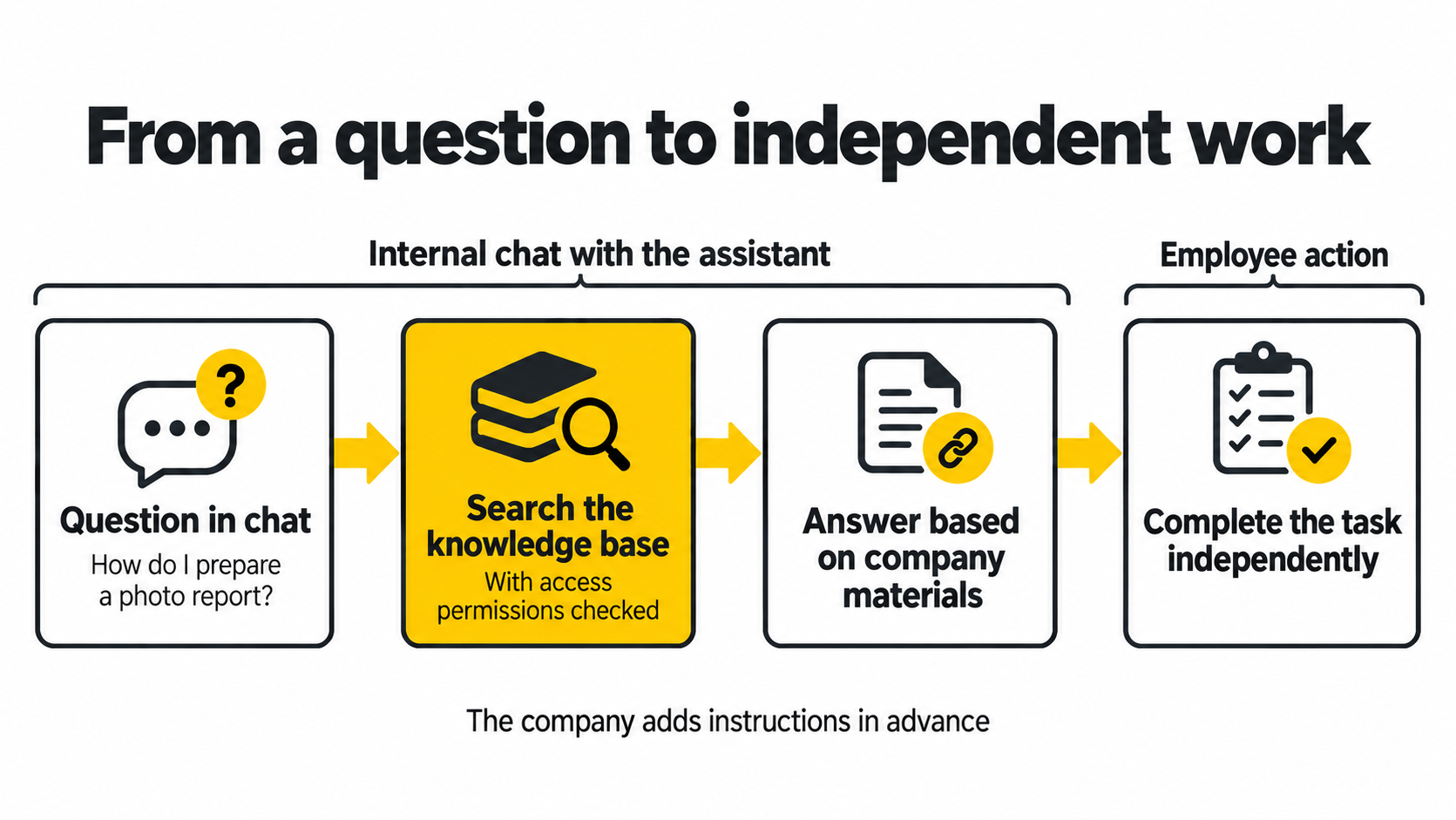
On the first day, the employee opens the learning path and reads the materials at their own pace. When an unfamiliar action comes up, they ask the assistant: “How do we prepare a photo report here? Show me the procedure and an example.” The answer helps them find the right instructions and understand what to prepare.
The newcomer then completes the assignment: they put together a practice photo report, caption the photographs and send it to their mentor themselves, using the company’s usual method. The mentor checks the result and explains specific mistakes. This review is part of how the company organises training. The mentor’s time goes into feedback on the work, while recurring introductory explanations are already available in the knowledge base.
The following day, the employee studies the materials request procedure. They can ask: “What information does the request need, and who approves it?” If the answer is insufficient, the employee contacts the responsible colleague themselves in the usual way. 101 does not automatically transfer questions to a mentor. Once the issue has been clarified, the owner of the instructions can update them manually so the next newcomer can work it out independently.
Independent learning needs a clear path and a check of the result. Reading a page does not yet demonstrate a skill. Set criteria: the employee has found the right instructions, carried out a practice action, explained the sequence and understands when to contact a manager. Organise safety briefings and authorisation to perform work separately, following the procedures established for your company.
Three more situations where a knowledge base and chat can help
Purchasing materials without repeated clarification
A site supervisor writes: “What information should I attach to a purchase request?” The knowledge base contains the company’s agreed procedure: item name, quantity, site, desired delivery date and the person responsible for approval. The employee receives the list of required information and opens the template.
If the purchase falls outside the usual procedure, the instructions should explain whom the employee needs to contact themselves. The assistant helps find the rule; approval itself follows the company’s procedure.
Preparing for work acceptance
A foreman asks: “What should I prepare before handing over this stage of the work?” The knowledge base can contain an agreed checklist, photograph requirements and an example of a completed document. The employee knows in advance what to check and which materials to give the manager.
Different types of work need their own instructions. A question such as “How do I hand over a completed stage?” benefits from clarification: what work has been done, and at which site? The answer can then be linked to the appropriate material, without treating general guidance as the requirements of a particular project.
Handing over before a holiday
A project manager is going on holiday. A colleague takes over their tasks and asks: “Where is the procedure for the weekly customer report described?” The knowledge base holds the instructions, the template and details of the person responsible for checking the report.
Current deadlines, statuses and agreements for a particular site should remain in the project’s working system. The knowledge base explains the procedure. Linking it to tasks and documents helps employees move from the rule to their own work.
What should you add to the knowledge base first?
Start with the questions colleagues already ask regularly. Look at what managers explain to every newcomer, which documents people keep forwarding in messages and which actions most often need clarification.
Three groups of materials make a useful starting point:
- Introductory training: responsibilities, contacts, a plan for the first few days and practical assignments.
- Recurring processes: purchasing, reporting, work acceptance, approvals and handovers.
- Working examples: request templates, sample reports and explanations of common mistakes.
Keep each set of instructions focused on one question. A title such as “How to request materials” helps readers understand the content quickly. Explain when the rule applies, what actions to take, what the result should look like and whom to contact if an exception arises.
Assign an owner to each set of instructions. When the process changes, that person updates the material and records the review date. Remove outdated versions from the active rules so employees and the assistant do not receive conflicting instructions.
How can you give every employee access while keeping information boundaries?
Asking a question should be straightforward for every team member who has been given access to the assistant. The content of the answer depends on their permissions for the materials. A newcomer may need the training section, a site supervisor the site procedures, and a manager additional management documents.
101’s company knowledge search checks the user’s page permissions when returning materials. Decide in advance which sections each role needs, then check several typical questions using accounts with the corresponding permissions.
Also agree on what to do when there is no answer. For example, if a suitable rule is not found, the employee contacts the responsible colleague themselves, and the material’s owner manually updates the knowledge base after clarification. This keeps chat answers connected to the company’s approved rules.
How can you launch a knowledge base without a major implementation project?
Choose one process, such as training a new assistant site supervisor. Collect recurring questions, prepare short instructions and assign someone to keep them current. In 101, the knowledge base sits alongside the application’s other work sections; you can start exploring the system on the 101 App page.
Let the employee follow the learning path and ask questions as they would in an ordinary conversation. Observe which answers they found, which instructions were unclear and where they needed a mentor. Use these observations to improve the materials.
Evaluate the result through work actions: how many repeated questions reached the mentor, which assignments the newcomer completed independently, where revisions were needed and how long it took to find the right rule. Universal promises of time savings are insufficient here; comparing your own process before and after implementation is more useful.
You can start with one recurring question whose answer several people are waiting for today. Save clear instructions, grant the necessary permissions and check whether an employee can find them through internal chat. This is how a knowledge base gradually becomes an everyday tool for the team.