What is MCP? In simple terms, MCP is a common protocol through which an AI agent communicates with external services and data. The agent understands a person’s goal and chooses a tool. MCP sends the request to the working system, receives its response, and returns it to the agent. This allows AI to work with a company’s permitted data, not only with text from a chat.
MCP stands for Model Context Protocol. It defines a common way to describe available tools, input parameters, and results. For a business, the external system may be the 101 App, a CRM, a knowledge base, cloud storage, or another service.
Contents:
What is MCP in simple terms?
Imagine an ordinary work conversation. A manager asks an assistant to find out a project’s status. The assistant needs to understand the task, choose the right system, open the data, and explain the result. In an AI workflow, the agent performs part of this work, while MCP serves as the channel between the agent and the system.
The channel has a set of available tools. Each tool describes a specific action: what can be requested, what data should be passed, and what response to expect. This means the agent does not have to guess how each system is structured.
In OpenAI’s official documentation, MCP servers and connectors are described as a way to give a model access to new capabilities and external services. A developer can allow individual calls automatically or require explicit confirmation.
What is an MCP server?
An MCP server is a program or service that provides an agent with a set of tools according to MCP rules. It reports which actions are available, which parameters are required, and what form the response will take.
One MCP server can be responsible for one working system. For example, a server for the 101 App connects supported agent actions with 101 data and functions. The exact list of capabilities depends on the current integration version and the user’s permissions.
The server itself does not make decisions for a manager. It processes a request to the selected tool, checks the necessary conditions, and returns the result.
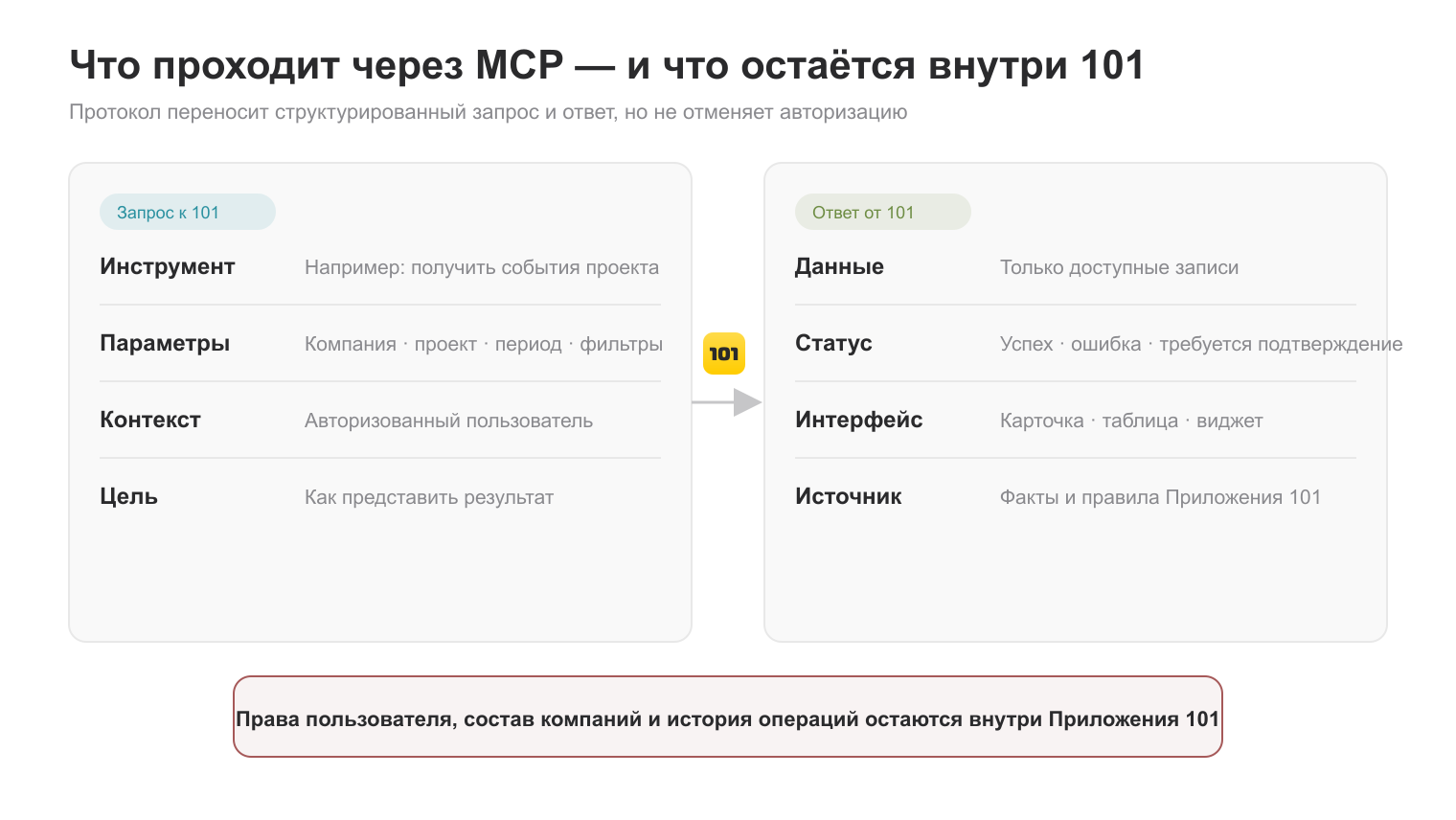
This diagram shows where records are maintained and access permissions are checked. Permitted information about the company, its members, and its operations may be sent to the AI client in tool responses; the original records and access checks remain in 101.
How does MCP work with an AI agent and 101?
Let’s walk through the request step by step:
- A person states a goal in ordinary words. For example: “Show me the tasks for this project.”
- The AI agent understands the request and chooses the right tool.
- MCP sends the request to the 101 App in an agreed format.
- 101 checks the user, their access, and the request parameters. The system then returns only the available data.
- The agent explains the result in plain language or shows an interface if both the selected tool and the AI client support it.
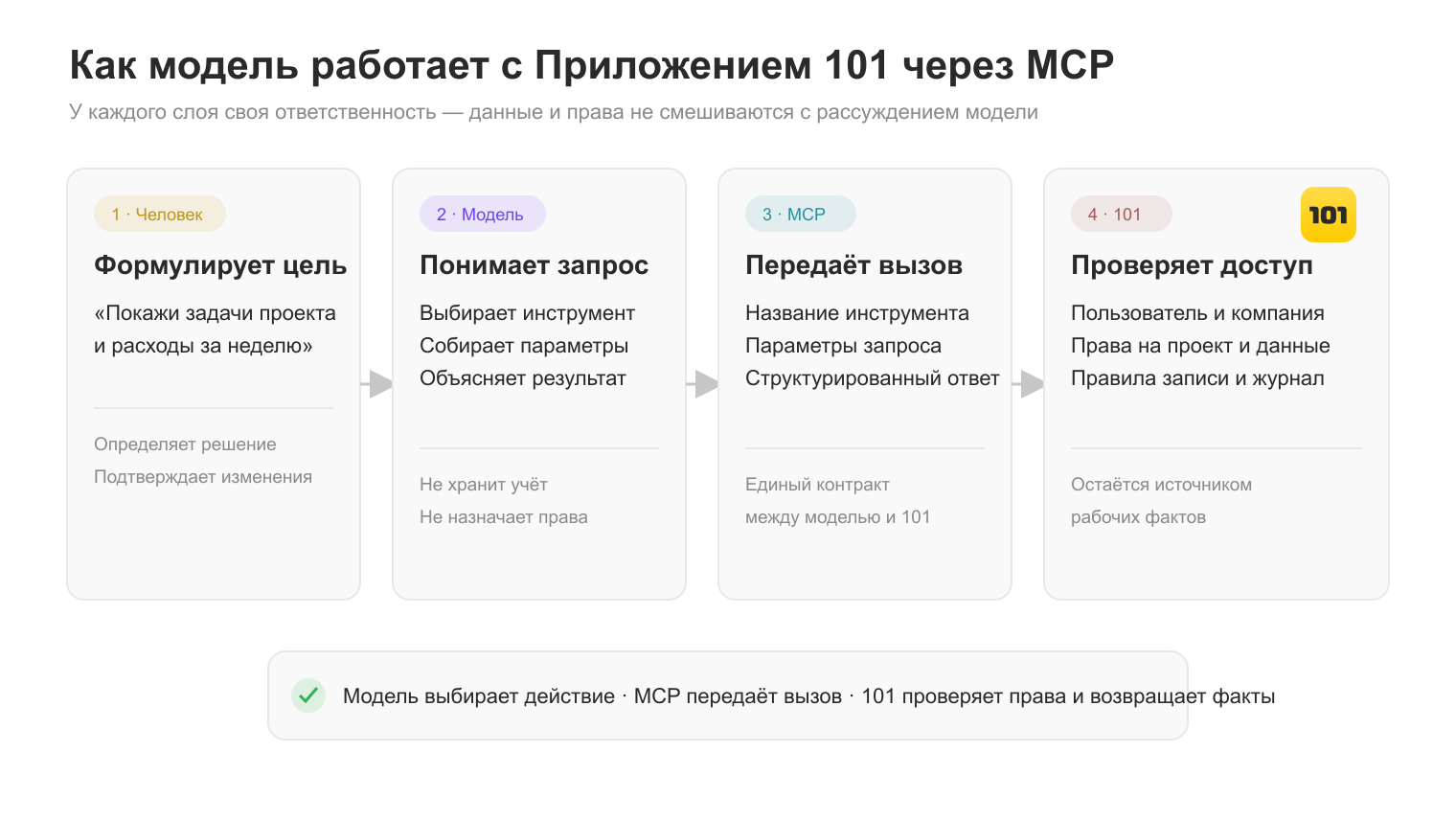
In this scheme, each participant has a specific role. The person sets the goal. The agent manages the workflow. MCP transfers the request and response. The 101 App remains the source of data and applies its own access rules.
The current Help guide “MCP 101” (in Russian) contains detailed connection and usage steps.
Why do businesses need MCP?
The main benefit is fewer manual transitions between the chat, the accounting system, and work screens. A manager asks a question in a familiar form, and the agent obtains data through an approved tool.
MCP is especially useful when employees often perform similar actions:
- find a project, task, or specific record;
- prepare a short summary from work data;
- check a status before a meeting;
- prepare a clear explanation for a manager or team.
Another benefit is a unified way to connect different tools. It is easier for a team to describe and manage available actions than to build separate AI communication logic every time.
It is useful to start by understanding where AI tools already remove routine work. The article about AI tools for small businesses (in Russian) contains practical scenarios. The material about AI in project management helps distinguish useful tasks from situations that require especially strict human control.
The financial use of this approach is shown in the practical scenario for AI-powered financial analysis through MCP and 101: the agent requests permitted data, and the manager receives a clear explanation of the result.
What can MCP do, and what does it not do?
MCP sends requests to available tools. It does not set a business goal, choose the company’s priorities, or take responsibility for a management decision. A person and an agent handle that work together.
A connection also does not mean that the agent has access to the entire system. Actual capabilities depend on the configured MCP server, the list of tools, the account, and the user’s permissions.
The interface does not disappear either. If both the tool and the selected AI client support a card, table, or another screen, the agent can show it. In other cases, it returns a text explanation or structured data. The standard 101 interface remains the workspace for tasks, finances, projects, and checking details.
How do access and security work?
For a business, it is important to start with access permissions. AI should see only the data and actions available to a specific user. The check takes place in the working system itself, so MCP must not bypass its rules.
Before connecting, it is worth answering four questions:
- who will use the connection;
- which tools are actually needed;
- which actions require confirmation;
- where the team checks the result and change history.
It is better to keep sensitive operations under explicit human control. The principle of least privilege also applies to data reading: an employee receives exactly the amount needed for their role and task.
How do you connect MCP?
Connection depends on the AI client and the selected MCP server. First, check whether the client supports MCP. Then add the server according to its instructions, complete authorization, configure permissions, and check the available tools with a safe request.
For the 101 App, use the current MCP 101 guide (in Russian). Start with one short scenario that an employee already knows how to handle manually. This makes it easier to compare the result and notice an error.
- Choose a recurring task with a clear result.
- Check whether the required MCP tool exists for it.
- Configure the account and access permissions.
- Run several real requests without sensitive data.
- Compare the answers with the data in 101 and define a checking rule.
- After checking, expand the scenario to the team.
The practical continuation of this topic is the material “AI Agent for Business: Managing 101”. It shows how to move from the general MCP principle to working scenarios in 101.
Frequently asked questions about MCP
What is an MCP server?
It is a service that publishes available tools through the MCP protocol. The agent sees the tool descriptions, chooses the right one, and passes the required parameters.
What is MCP in AI?
MCP in AI is a way to connect a model or agent to external data and actions. Through it, AI receives access only to the tools that have been configured and permitted.
What is an MCP agent?
This often refers to an AI agent connected to tools through MCP. MCP itself is not an agent. The agent understands the goal and chooses an action, while MCP transfers the request and result.
How do you connect MCP to the 101 App?
Use the MCP 101 Help guide (in Russian). It contains the current setup procedure. After connecting, check permissions and start with a safe request to read available data.