

Changing payment details often looks like a minor task: the bank updated an account, your accountant sent the new information, and all that remains is to send a letter. In practice, this is where delayed payments, “lost” invoices and disputes such as “we paid using the details in the contract” arise.
A notice of changed details helps address two risks: money being sent to the wrong place, and difficulty proving that the counterparty knew about the new information. The document is simple; its value lies in precision: what you wrote, whom you sent it to, and how you confirmed receipt.
This article uses examples for Russian organizations and individual entrepreneurs. INN (taxpayer identification number), KPP (tax registration reason code), OGRN/OGRNIP (state registration numbers for organizations/individual entrepreneurs), BIK (bank identification code), correspondent accounts and EGRUL (the Russian register of legal entities) documents belong to the Russian context. In another country, check the required details and notification procedure against local rules and the contract.
Below we explain when a notice is needed, what to include, how to send it, and how to keep details consistent in documents and the 101 App.
Contents:
When do you need a notice, and whom should you notify?
A notice is needed whenever the payment details a counterparty uses to transfer money change: the settlement account, bank, BIK or correspondent account. In construction, this happens more often than you might expect: businesses change banks because of fees, open a separate account for a project, or move payments from an individual entrepreneur to a legal entity.
Notify everyone who pays you under a contract or against invoices: customers, the general contractor, partners, designers, the property management company, an equipment renter, and anyone else making transfers. If you deal with the customer's accounting department, send the notice both to your contact and to the general accounting address so it reaches the right queue.
A separate case is when your contractor or supplier changes their details. Request a notice and record the date from which the new information applies. This helps keep payments under control and reduces returned transfers.
What should the notice include?
The content depends on what changed. If only the settlement account at the same bank changed, the letter can be shorter. If both the bank and legal information changed, list the changes separately and attach supporting documents, such as an organization details sheet, a bank letter or an EGRUL entry sheet.
The main goal is to let the counterparty's accounting department enter the new details in its accounting system and prepare a payment order with the correct fields without further correspondence. Present the details in a familiar accounting format.
If your work involves individuals, consider personal data. Details, INN, an address and a telephone number may qualify as personal data when connected to an identified or identifiable individual, including an individual entrepreneur. This follows from the definition in Article 3 of Russian Law No. 152-FZ “On Personal Data” of July 27, 2006 (in Russian). Share information only with participants who need it for payments and document work.
Include the following:
- Whom you are notifying: the counterparty's name, contract number and date, and project, if any.
- The date from which the new details apply, preferably a specific calendar date.
- The full new details: beneficiary, INN/KPP for legal entities, OGRN/OGRNIP, settlement account, bank, BIK and correspondent account.
- What to do with payments already in transit: how to handle a payment already sent using the old details.
- Attachments: an organization details sheet, a bank letter and additional evidence if the legal entity changes.
For a bulk notice, create a sending log showing recipient, date, method and who confirmed receipt. It helps when someone says a month later that “nothing arrived.”
How should you format the letter?
It is convenient to write the notice as a formal letter on letterhead, if available. For an individual entrepreneur, a simple signed document with a stamp, if one is used, is suitable. The letter should clearly identify the relationship: contract, site and counterparty.
Avoid ambiguity. “Please use the following details” works when accompanied by an effective date and the full set of details. Explicitly request confirmation of receipt, particularly when sending by email.
The template below is a Russian example that you can adapt to your own information. Its purpose is to give accounting everything it needs and record the effective date.
Subject: Notice of changed bank details
To: [Counterparty name], [Recipient's full name/position]
Contract: No. [number] dated [date]
We hereby inform you of a change in the bank details of [company/individual entrepreneur name]. From [date], please make payments using the following details:
Beneficiary: [full name]
INN/KPP (Russian tax identifiers): [values]
Settlement account: [number]
Bank: [name]
BIK (Russian bank identification code): [value]
Correspondent account: [number]
For payments sent before [date], please use the details valid when the invoice was issued, if this is how your process works, or agree the procedure separately with accounting.
Please confirm receipt of this notice by replying.
Attachments: [organization details sheet / bank letter / EGRUL entry sheet]
Signature: [full name, position, phone, email]
How can you send it and retain evidence?
The letter loses its purpose if you cannot subsequently confirm sending and receipt. This is particularly important in construction: the customer's accounting department may pay several days after approval, and “a message somewhere in a chat” is not a reliable source.
Choose a method that leaves a record: electronic document exchange, registered post, a courier with an acknowledgement, or email with a reply. For difficult relationships and large sums, combine methods: email for speed and registered post for a documented record.
- Prepare the notice and attachments in PDF format.
- Send through the agreed channel: electronic document exchange or email/post, as specified in the contract.
- Request confirmation of receipt. For email, ask for a reply such as “received and being processed,” and save it with the original message. Such a reply alone does not guarantee the outcome of a potential dispute.
- Keep the evidence: outgoing letter, receipt, tracking number, electronic document exchange record and reply.
- Check the first payment using the new details: catching an error in one payment is better than discovering it across a series of invoices.
In the Russian context, email may be used for a legally significant message if the law, contract or established practice does not prescribe another procedure and the sender and recipient can be reliably identified. The sender must prove that the message was sent and delivered. These conditions are explained in paragraphs 65 and 67 of Resolution No. 25 of the Plenum of the Russian Supreme Court, dated June 23, 2015 (in Russian).
If you communicate through a project channel, keep the details as a separate document in the project correspondence and update invoice templates. This prevents the team from sending the customer an old version out of habit.
What should you update in your processes and the 101 App?
After sending the notices, the second task begins: putting your internal processes in order. Otherwise, the letters will go out while documents continue to use the old details.
At a minimum, update the invoice template, contract template for new contracts, organization details sheet, email signatures, CRM details and spreadsheets available to managers. Construction also involves acceptance documents and reports: their details should match what customers receive.
You can store your own details in the 101 App for use in projects and documents. In the web version, open “My profile,” then “About the counterparty” and the “Requisites” tab. The verified Forge Construction owner account has an “Add details” button; available actions may differ for other roles. The screenshots below show the Russian interface.
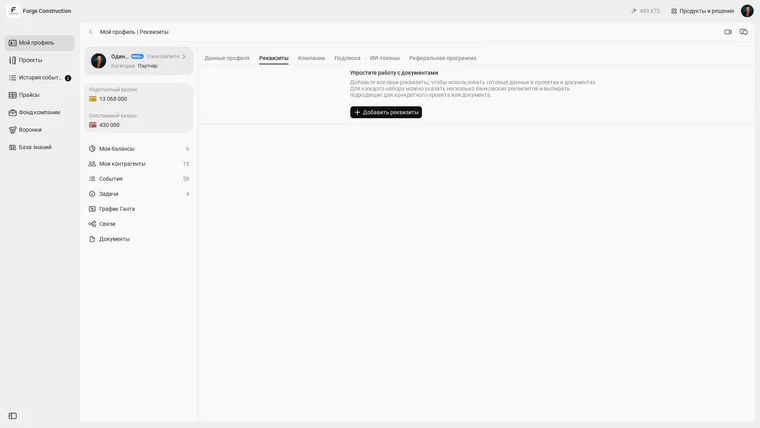
If a project has a customer, ask them to fill in and check their own details before documents are prepared. Share personal and bank information only with participants who need it for their work.
Open your profile information in the 101 web version and select the “Requisites” tab. Each set can contain several bank details, allowing you to choose the appropriate ones for a particular project or document, as explicitly described in the interface.
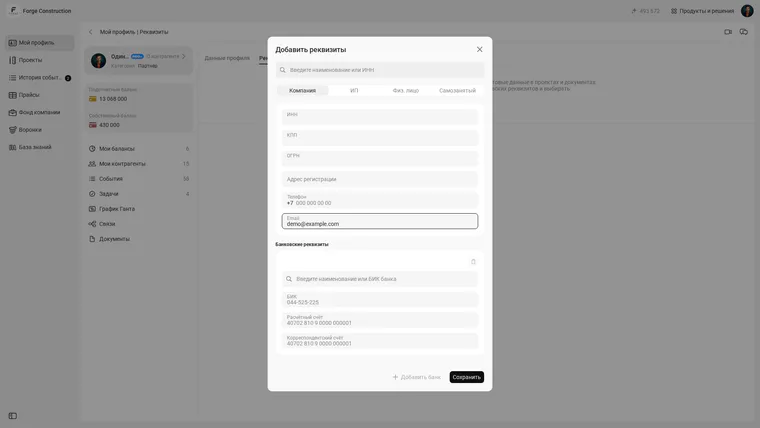
In the “Add details” form, choose a type: “Company,” “Individual entrepreneur,” “Individual” or “Self-employed.” Company and individual entrepreneur entries offer a search by name or INN; banks can be searched by name or BIK. Check the final values before saving.
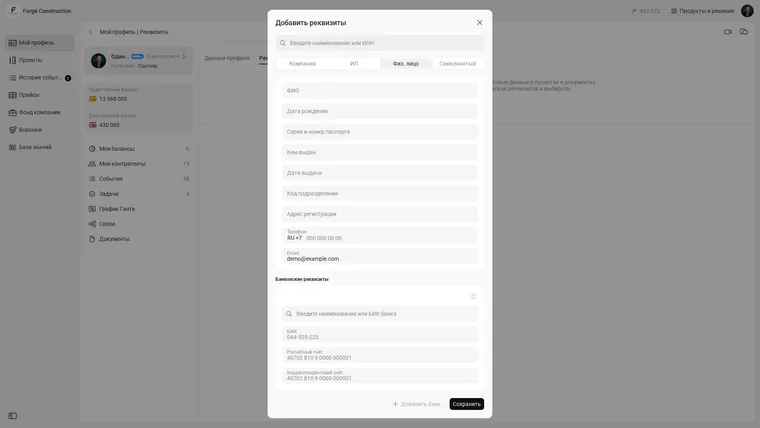
For an individual, the form provides separate personal information and bank detail fields. Fill in only the necessary information and check it before saving. Below is an unfilled demonstration form; the email shown is fictional.
If you want a process that keeps details, invoices and documents consistent, it is useful to see a demo of the 101 App and review how the team manages projects, creates documents and stores contract information in one place.
Common mistakes
Mistake No. 1: notifying your contact and forgetting accounting. Your contact approves the work; the accountant makes the payment. The notice must reach the people who prepare payment orders.
Mistake No. 2: omitting the effective date. Without it, the counterparty chooses how to interpret the letter: some apply it immediately, others from the next month. A date removes these questions.
Mistake No. 3: changing details verbally in a messenger. That may be quick, but it does not provide evidence or orderly records. Follow up with a formal letter and retain a record of sending.
Mistake No. 4: updating details in one place and forgetting documents. The invoice ends up with one set, the acceptance document another, and the project report a third. If documents are generated in the app, check your current details and contract information before exporting PDF files.
Mistake No. 5: entering the customer's details manually “for convenience.” This involves personal data. Asking the customer to complete their own details is more reliable than later investigating who entered someone else's data and on what basis.
If payment arrangements and discipline matter to you, read “Working with advance payments” (in Russian): it explains how to arrange payments so cash flow gaps do not bring construction to a halt.