
On Monday, the site supervisor is waiting for an electrician, but the equipment has not arrived. The electrician moves the visit, finishing work is waiting for the wiring, and the client asks whether the completion date will change and how much has been spent. If answers are scattered across calls, chats and files, you need a project management system. Choose it by how well it supports this chain of decisions.
This is a practical comparison method. The example is educational, not a real client story, and no system solves every issue automatically.
Contents:
What problem should the system solve?
Project businesses work through specific projects, people and separate economics. This is especially clear in construction and renovation, where every site has its own life.
Start with three recent situations where a manager had to urgently find out what was happening: a missed delivery, work without an owner, an expense without a receipt or an unapproved scope change. Record who should have decided and which fact was missing.
If assignments disappear, you need tasks, owners and deadlines. If stages slip because of their sequence, you need a schedule. If the site is on plan but there is not enough money to pay contractors, check estimates, reports, incoming payments and the balance. Several layers may be needed; compare their connections, not the number of menu items.
Which criteria should you check?
Set acceptance criteria of your own. “It has Gantt” does not explain which data the chart shows or what happens after a date moves. “It has reports” does not say whether the original estimate and expense can be checked.
| What to check | Question during the demo | Sign that it fits |
|---|---|---|
| Tasks and responsibility | Can you find an assignment by site, deadline and owner? | The owner sees the expected result; the manager sees status and history. |
| Work plan | How do you show stages and move a date? | The plan is readable without a separate spreadsheet and delay effects are visible. |
| Estimate and actuals | Can you compare agreed scope with completed work and amounts? | The plan and actual-result documents are clear. |
| Money | Where are payments, expenses and obligations shown? | The manager can explain a specific amount, not only see a final chart. |
| Access | What can the supervisor, contractor and client see? | Each person can complete their step without shared access. |
| Cost and exit | Which plan limits apply and how can data be exported? | Price and limits are clear before rollout and history can be preserved. |
A renovation crew may need simple tasks and a schedule. A general contractor with several sites may need a network schedule, resource planning, as-built documents and integrations. These are different purchases.
How can you test it on one site?
Imagine a training restaurant renovation: electrical work runs October 5–8, finishing starts October 9, and stage acceptance follows. Delivery is two days late. In five minutes, answer: what moved, who updates the plan, which expense is recorded and what should be told to the client?
A good answer is a traceable chain: work and deadline → owner → agreed scope → actual work → money and documents. If a transition exists only in the supervisor’s memory, make it an explicit manual process or choose another tool.
Important: the dates are fictional. The screenshot below shows a different 101 demonstration project and is not evidence for these dates.
When do you need Kanban or Gantt?
Kanban answers “what state is the assignment in?” Gantt shows work over time: start, duration and parallel stages. The critical path matters when a delay affects the project end date. Timeline bars alone do not prove automatic critical-path or crew-load calculations.
On the training site, Kanban keeps the delivery task visible; Gantt shows the overlap between electrical and finishing work. The team needs both views and clear update rules.
How does the 101 Platform work here?
In 101, a project has tasks with an owner and deadline. The Gantt chart shows estimate plans and report actuals on a timeline. A separate estimate is created for a stage, completed work is checked against reports, and a cost plan-versus-actual view is available for the client and profit.
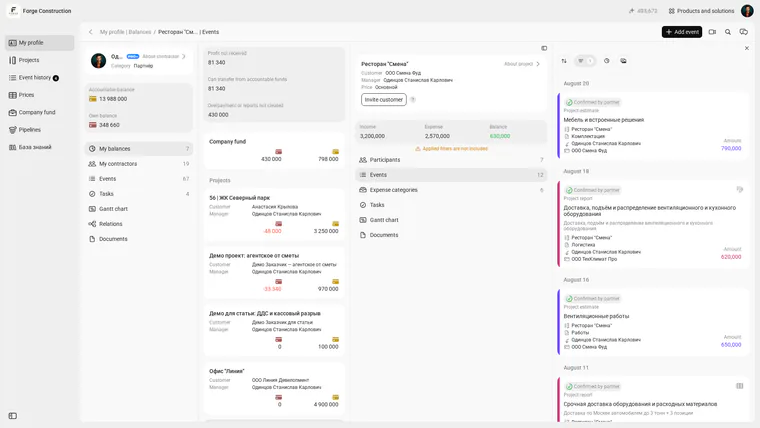
Demonstration project “Smena Restaurant” in the 101 project workspace. The interface is shown in English; the visible project records are demonstration data.
An ordinary task does not appear in Gantt by itself; see the Gantt guide. Current documentation does not promise automatic blocking or moving dependent deadlines. If that is essential, assess a dedicated planner and agree which data stays there and which stays in 101.
If the priority is to connect estimates, reports, deadlines and money for a site, include 101 on the shortlist. See the article about the 101 Gantt chart.
How do you run a seven-day pilot?
Use one real project with active work, purchasing and approvals. Day 1: choose the site and three pain points, and record how many sources you open. Days 2–3: add participants, one stage, three assignments, planned scope and one real expense. Day 4: move the test-stage deadline and check automatic versus manual changes. Days 5–6: record completed work and trace the totals and client report. Day 7: ask the manager and supervisor to answer the four example questions independently, then compare price and plan limits.
Define success beforehand: both people find the same current deadlines and site amount, and every manual transition has an owner. This is your pilot criterion, not a product promise.
How do you make the decision?
Choose a system that the team can keep current every day and that answers expensive questions without guesswork. A simple tracker plus separate auditable financial accounting can be valid. If the work plan should sit beside estimates and reports, test 101 on your site. If you need automatic dependencies, resource workload or large-construction document workflows, include those requirements in acceptance from the start.
Sustainable adoption means the manager stops extracting information and starts deciding from system data.
See our selection of project management software. To test the “estimate → stage → report → money” chain in 101, bring one site and these questions to a product demo.