


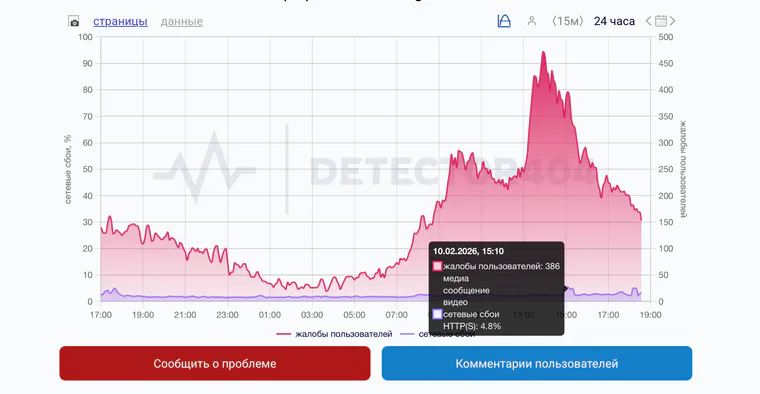
On February 10, 2026, users in Russia reported problems loading media and maintaining a stable Telegram connection. At the same time, media outlets discussed a possible slowdown of the messenger.
Contents:
- What is happening with Telegram?
- Why is Telegram not working?
- How can you identify the problem in 5 minutes?
- How can you clear the cache so Telegram works more reliably?
- Official statements: what was said and when?
- If you need Telegram for work: how can you reduce the risk?
- Where can you follow the news?
- A short plan for the future
What is happening with Telegram?
These are the complaints Telegram users report most often:
- messages are not sent;
- photos and videos do not load, although text goes through;
- channels do not open or the feed does not refresh;
- the web version works while the mobile app does not, or vice versa;
- notifications do not arrive even though the messages are already in the chats;
- calls do not work while messaging does.
Why is Telegram not working?
Causes usually fall into five areas: the device, the app, the connection, Telegram's servers, and restrictions on the network or by the regulator.
1) Connection problems. Mobile internet can fail only in a specific area: an overloaded base station, maintenance by the carrier, or routing problems. A common sign is that Telegram works over Wi-Fi but not over LTE.
2) Telegram-side problems. There may be overload, an infrastructure incident, or attacks. In that case, complaints come from different cities and countries, and outages affect both the app and the web version.
3) Restrictions and slowdowns. When restrictions are in place, media, previews, and file uploads are often affected, and sometimes certain domains are affected as well. Text may go through while video does not. In 2025–2026, Russia publicly discussed and introduced “partial restrictions” on individual messenger functions, including Telegram.
4) App problems. The cache has grown too large, the version is outdated, notification failures appeared after an iOS or Android update, or battery-saving mode is interfering.
5) Device problems. On less powerful phones, Telegram may freeze while loading large chats and media archives. The more data a company or chat contains, the more noticeable this becomes.
How can you identify the problem in 5 minutes?
When Telegram stops working during the workday, you may want to update the app, reinstall it, and restart everything in sight. It is better to run a short diagnostic.
Here is an order that gives an answer in most cases:
- Open any website in a browser and check whether it loads over the same network — Wi-Fi or mobile.
- Switch from Wi-Fi to mobile internet and back. If the problem disappears on another network, look for the cause with the carrier or in the local network.
- Check Telegram on another device: a colleague's phone, a tablet, or a computer. If “Telegram not working” appears there too, the probability of a widespread problem is higher.
- Open the Telegram web version. If the web version works but the app does not, check the app update, cache, and background-work restrictions.
- See exactly what does not work: text, media, notifications, or calls. This will help when you read the news and official comments.
If Telegram comes back after you switch networks, do not rush to conclude that the service has gone down. It is usually a local issue: the carrier, a Wi-Fi router, or a corporate firewall.
There are separate materials on basic Telegram hygiene — cache, chat organization, and settings: how to use Telegram (in Russian) and how to use Telegram for business (in Russian).
How can you clear the cache so Telegram works more reliably?
Clearing Telegram's cache frees up space on your phone. Chats and files in the cloud are not deleted.
Instructions for smartphones (Android and iOS)
- Open Telegram and go to Settings.
- Select Data and Storage.
- Tap Storage Usage.
- Select Clear Entire Cache, or mark individual file types: photos, videos, and documents.
- Confirm the action.
The names of the menu items may vary slightly between app versions.
Official statements: what was said and when?
When Telegram is not working, you want to rely on specifics. Below is a short timeline of public statements by the regulator concerning how messengers operate. Dates and wording refer to the time of publication; check the current status in the official Roskomnadzor channel and on the agency's website.
- June 18, 2020. Roskomnadzor announced that the requirements to restrict access to Telegram had been lifted; the decision was coordinated with the Prosecutor General's Office.
- August 13, 2025. Roskomnadzor announced a “partial restriction” of calls in Telegram and WhatsApp, explaining it as a measure against criminals.
- October 22, 2025. Roskomnadzor reported a partial restriction of Telegram and WhatsApp to counter criminals.
- January 16, 2026. Roskomnadzor reported that no new restriction measures against Telegram were being applied at that time.
- February 10, 2026. Amid outages, Roskomnadzor stated that it would continue applying “successive restrictive measures” to services that fail to comply with Russian law.
Public positions may appear later than the first complaints. In the first hours, there are usually only user reports, complaint graphs, and retellings. That is why the diagnostics in the previous section and a backup communication channel matter in the moment.
If you need Telegram for work: how can you reduce the risk?
Telegram often becomes an “operating system” for a contractor: approvals, photo reports, and estimate changes all happen there. When Telegram is not working, the site comes to a standstill, tension grows, and decisions scatter across calls and voice messages.
Reduce the risk by organizing the process: let the messenger remain a channel for quick messages, while critical information is stored in the project system. We examined this logic in detail using messenger blocks and instability as an example in the article “WhatsApp Web and Max: What Should a Contractor Do?” (in Russian).
If you manage a site as a project with events, documents, and finances, a Telegram outage stops being a single point of failure. The 101 app was created for this model: the client sees the work progress and money inside the project, and the team records decisions next to tasks.
In this setup, “Telegram not working” becomes an inconvenience rather than a shutdown. The conversation can continue later, while key agreements remain in the project.
Where can you follow the news?
If you suspect restrictions or a widespread outage, follow the news along two lines: official statements and trusted media. In Russia, these are usually Roskomnadzor, the Ministry of Digital Development, and telecom operators' press offices. Telegram has official platforms and channels where its team may comment on major incidents.
To avoid gathering news piece by piece, create a shelf of sources and visit it only when there is a real problem. Otherwise, the feed turns into an endless discussion of rumors.
If you need a calm format of “what happened → who is affected → what to check in your work,” the section “Construction News in the 101 Blog” (in Russian) may help. It follows the logic of primary sources and practical conclusions.
A short plan for the future
When Telegram works again, it is tempting to forget the incident. Then history repeats. Here is what you should do once and be done with it.
- Update Telegram and your OS, and check notification settings and battery-saving mode.
- Free up memory: clear the cache and archive chats that are not needed every day.
- Set up a backup communication channel for the team and clients — at least a phone number for emergencies.
- Move key approvals concerning money, deadlines, and the scope of work into the project system. Then a messenger outage will affect the site less.