
An online estimate brings the planned cost of a job into one place: list the work items, enter quantities and prices, and check the total before sending it to a customer. In 101, an estimate belongs to a specific project, so start by choosing the right job.
Contents:
What to prepare before calculating
Have a list of work and materials, units of measurement, quantities and prices ready. Clarify what each line includes: delivery, consumables and subcontracted work may need separate lines. Without these inputs, even a calculator that works correctly will produce an incomplete total.
Your own price list is useful for recurring jobs. Check that it is current before using it: an old price or a wrong unit of measurement can change the total more than an arithmetic error.
Where to open an estimate in 101
- Open “Projects” and choose the job you want to estimate.
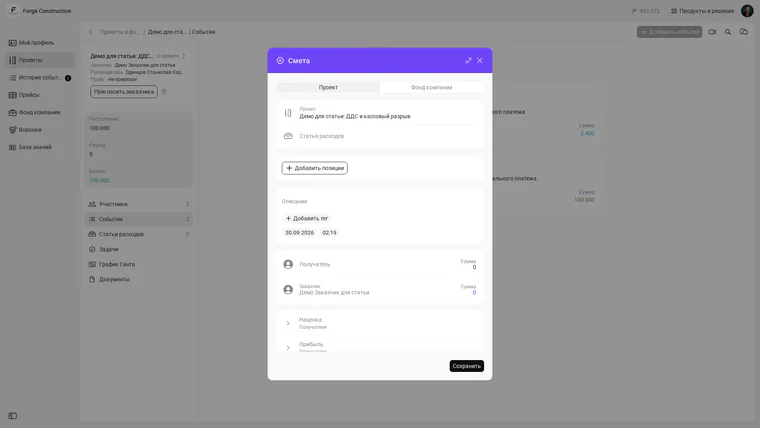
- Go to the project’s “Events” and select “Add event”.
- Choose “Estimate”. In the form, check the project and, if needed, specify an expense category.
The screenshot shows a new estimate form in a Forge Construction demo project. The interface in the image is in Russian; section names may differ when another interface language is selected.
How to enter and check line items
Select “Add items” and enter the work or materials included in the estimate. For each item, check its name, unit, quantity and price. If you use a price list, first make sure the project uses the right list and that its prices are current.
Once the items are entered, compare the total with the original brief: is all the work included, are any items duplicated, and are delivery and other extra costs shown separately? If the estimate is for a customer, check the wording of each item so they can understand what they are paying for.
Common mistakes in an online estimate
- Wrong quantity. Check dimensions and units: square metres, linear metres and pieces cannot be used interchangeably.
- Outdated price. Compare the price list with the supplier’s or contractor’s current terms.
- Missing item. Check delivery, preparation, consumables and waste removal if they are part of the agreement.
- Unagreed extra work. Mark what is included in the original scope and what requires separate approval.
What to do after calculating
Save the estimate only after checking the project, line items and final amount. Then agree on the calculation with the customer through your usual process. When the scope or price changes, update the plan and record why: this makes it easier to compare the estimate with actual costs and protect your margin.
You can learn more about estimates, projects and accounting on the 101 product page. A free online presentation is available if you want to discuss your particular workflow.