
Contents:
- AI for business: what counts as real value?
- Where does AI save businesses time and money?
- How can you choose AI tasks that meet expectations?
- What is a short plan for introducing AI into your processes?
- AI in practice: how does it fit into the 101 app?
- AI risks for businesses and rules that help prevent mistakes
AI for business: what counts as real value?
Think of AI as an extra pair of hands for a manager. It does not make decisions for you; it speeds up the preparation: consolidating information, cleaning it up, finding inconsistencies and drafting text or a document outline.
In a project-based company, this shows up in small everyday tasks. A site supervisor reviews messages and photos from the site in the evening and needs to send the customer a quick status update. You can write it manually or ask AI for a draft, then check and send it.
Where does AI save businesses time and money?
The benefit rarely comes from one major area. More often, it adds up through dozens of small improvements: less retyping, fewer lost receipts, faster approvals and a lower chance of overlooking an important detail.
The first area is communication and documents. AI quickly drafts emails, messages, explanations for an estimate and the structure of a technical brief. This shortens the delay between something happening on site and the customer receiving a response.
The second area is estimates and lists. In a project-based business, estimates keep changing: new work, material substitutions and revised quantities. When some of the data lives in spreadsheets, rows have to be transferred manually and mistakes become more likely.
The third area is finance and reporting. If a tradesperson spends money and brings in the receipt a week later, the manager sees the costs later than needed. When the process ensures that a receipt is scanned straight away and added to the project, the manager sees the updated project balance and can manage the money sooner.
The fourth area is data quality control. As of 21 October 2026, you can ask the 101 assistant to find accessible events for a given period and analyse costs using the underlying records. For example, it can calculate confirmed and unconfirmed reports separately for an expense category and show which events make up the total. Its capabilities and limitations are described in the official 101 assistant guide (in Russian). A person must check any discrepancies found; an AI response does not mean that the data has already been corrected.
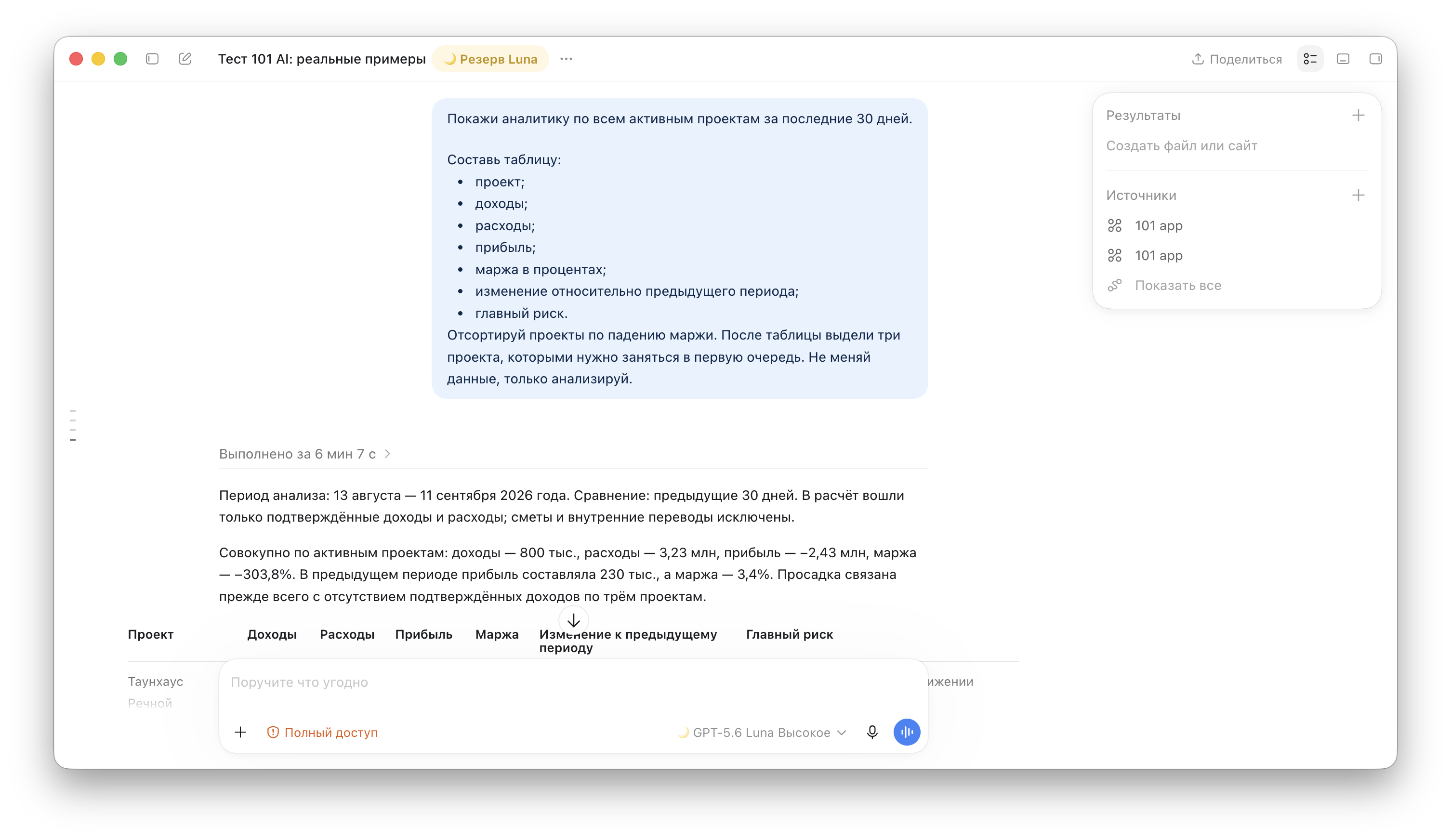
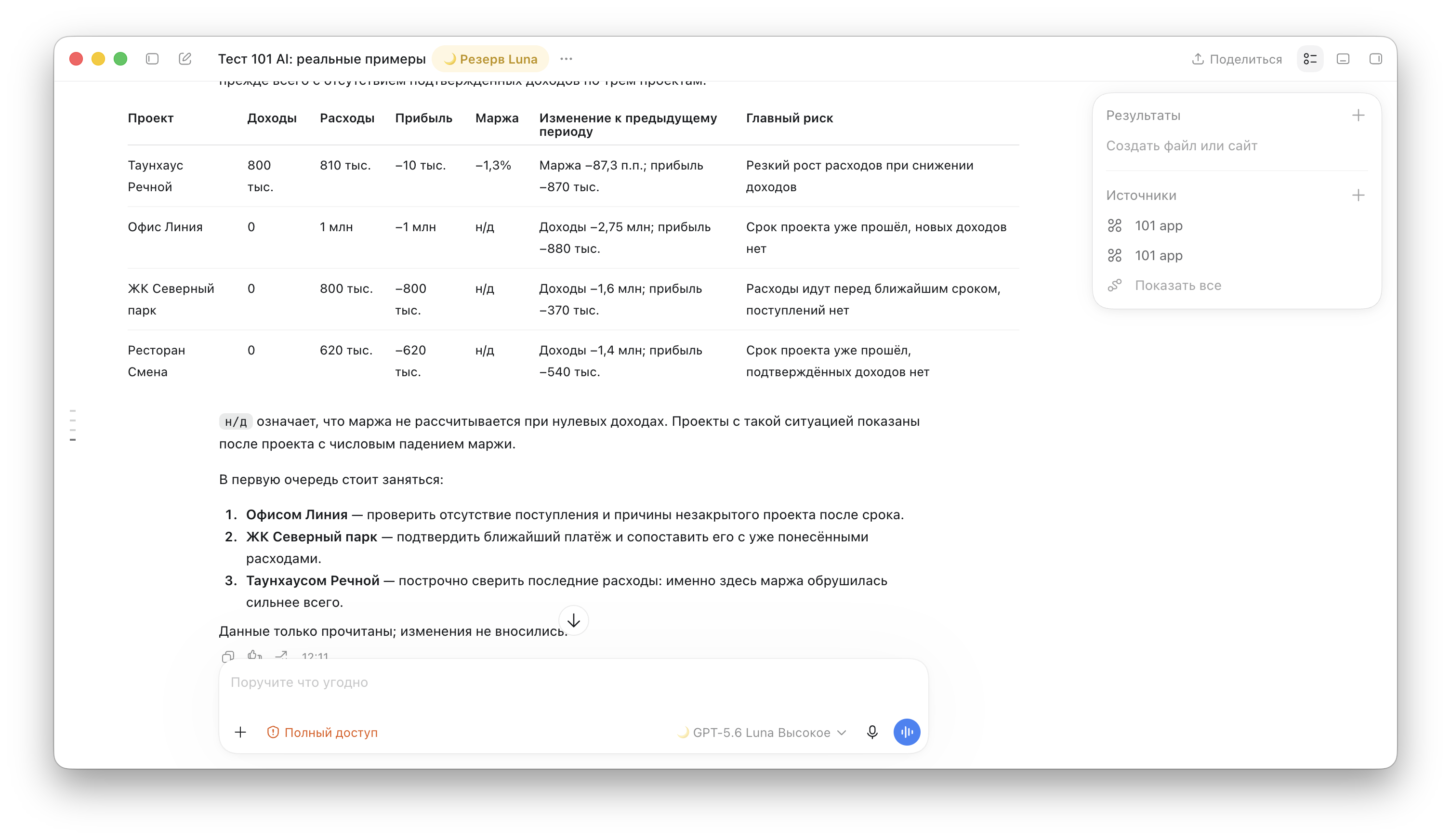
A practical request from a manager is specific: “Show analytics for all active projects over the last 30 days. Create a table of income, expenses, profit, margin, change from the previous period and the main risk. Sort the projects by declining margin and highlight three priorities. Do not change any data; analyse it only.”
How can you choose AI tasks that meet expectations?
The main mistake is trying to “implement AI” across the board. AI has areas where it performs well, and others where disciplined data management and an approval process are essential. Choosing the task therefore matters more than choosing the model.
Here is a quick task check before you start:
- The task comes up at least several times a week and takes up the team's time.
- The input can be standardised: a template, a form, a clear set of fields and consistent naming.
- There is a clear quality criterion: what counts as “done” and what counts as an error.
- The risk of error is manageable: a person still checks the draft, and payments are made only after approval.
In construction, tasks built around “draft, then check” work well: a draft report, a draft purchasing list, an initial cost summary, a quick estimate import or initial categorisation of events by expense category.
What is a short plan for introducing AI into your processes?
Introducing AI into a business is similar to setting up accounting: first put your sources in order, then automate. Otherwise, you automate the chaos.
A practical plan looks like this:
- Step 1. Describe the process in one paragraph: who creates the data, who checks it and where the result is stored, whether that is an estimate, a report, an acceptance document or a customer message.
- Step 2. Define the input format: a spreadsheet template, a list of fields and naming rules for projects and events.
- Step 3. Choose one use case that can deliver a quick benefit: importing an estimate, summarising costs or drafting reports.
- Step 4. Assign someone to take responsibility for quality: a person who approves the result and keeps a list of errors.
- Step 5. Run a test on one project and measure the time taken before and after.
- Step 6. Roll it out to the other projects and add controls: regular checks of figures and data structure.
For step 5, you could prepare a cost summary from one set of documents. Below is a blank template for the measurement: fill in the actual figures after the pilot. Compare manual preparation with AI-assisted preparation using the same amount of input data, the same required output and the same quality criteria.
| Metric | Without AI | With AI |
|---|---|---|
| Volume of input data, number of documents | — | — |
| Preparation time, minutes | — | — |
| Time spent checking by the person responsible, minutes | — | — |
| Number of errors found during review | — | — |
| Time spent correcting errors, minutes | — | — |
| Total time until the result is accepted, minutes | — | — |
The total time includes preparation, checking and corrections. Define what counts as an error in advance and record errors consistently in both approaches. Compare time alongside quality: a quick draft still needs checking, and you can draw conclusions about savings after taking actual measurements.
If you are also setting up management accounting, a quarterly review can help: check that costs are recorded correctly, compare planned and actual figures, and review the structure of expense categories. The checklist approach in the article on a management accounting audit is useful here.
AI in practice: how does it fit into the 101 app?
When AI is built into a product, it can help without a jumble of separate services. The 101 app offers use cases where AI helps turn an external file into a working project structure more quickly.
One example is quickly importing an estimate from Excel into the 101 app with AI-assisted insertion (in Russian). AI helps transfer items from an external source into an “Estimate” or a “Report”. Before saving, check the names, units, quantities, prices and totals against the original. Supported transfer methods are listed in the guide to inserting items (in Russian).
Management accounting comes next. Scanning a receipt's QR code and recognising its item list serve different purposes: the QR code contains receipt details, not a complete list of goods. Check the extracted data, items, project and expense category before saving the report. An assistant's response, an attached photo and a financial event are also different things. See the guide to reporting material purchases (in Russian) for details.
This kind of request helps prepare a list of projects where income, expenses and the reasons for changes in the figures need checking. The next step is to open the underlying events and check the conclusions against the data in 101. Ask the assistant to analyse the data only: a direct request to create or change a record can trigger the action immediately, while deleting an event or changing its status through the AI assistant is not possible.
To understand how this fits together as a system, start by choosing the core: management accounting software with projects, estimates, reports and analytics. The blog explains how to choose management accounting software (in Russian).
Another common question is how to handle estimates and financial accounting once a company has outgrown spreadsheets. The article Excel versus the 101 app (in Russian) shows where spreadsheets work well and where they start to hold back growth.
Managers need a clear view of their money: profit and expenses by project, and the company's cash flow. The plan's features were checked against the current 101 subscription table on 21 October 2026: PRO+ includes advanced analytics, event history export, event change history, documents with the company logo and approval of all event types in the Company Fund. Company Fund accounting is available in PRO+; when choosing a plan, compare the current table in your account using the official subscription guide (in Russian). Keep these features separate from AI-assisted data analysis: the assistant's capabilities also depend on data access rights and the AI tokens available.
If you are also building your sales process, keep CRM focused on its own responsibilities, without trying to put financial accounting and estimates into it. The blog has a detailed guide to choosing a CRM system for a construction or fit-out company (in Russian).
AI risks for businesses and rules that help prevent mistakes
AI speeds up the work, and then you suddenly discover that a draft was sent to the customer without being checked. Or extra rows have appeared in an estimate. Before a message is sent or an estimate is used, the person responsible must compare the result with the source data and approve it.
Three rules help keep the process under control:
- The checking rule: a responsible person approves everything that affects money and commitments.
- The source rule: AI works with what you give it. If project data is named inconsistently, standardise it first.
- The traceability rule: store the result in the accounting system as a document or project event so that you can reconstruct the reasoning later.
In project-based companies, control is easier to organise around project figures and documents: income, expenses, planned versus actual figures, profitability and debts. These are the foundations of management accounting; without them, AI becomes a text generator with little to support its output.
For guidance on which figures to check and where accounting most often breaks down, return to the management accounting audit and carry out a short review before scaling up automation.