Contents:
- Business processes: what exactly are they?
- Core business processes in management: what types are there?
- Principles and methods of business process management
- Business process analysis and modeling
- Who needs business process optimization?
- How can you automate processes with business process management systems?
- Resources for business process management in the context of change management
Business processes: what exactly are they?
A business process generally means a repeatable sequence of actions that turns requests, applications, materials or other data into a measurable result for a customer or the company. A process includes roles, rules for carrying out the work, checkpoints, input documents, deadlines and quality criteria.
Managing business processes starts with setting boundaries. If the boundaries of a task or its rules are not defined, confusion follows: employees carry out similar tasks in different ways, managers spend time sorting out problems, and control becomes a manual exercise.
It is important to distinguish processes from functions. A function is a department’s area of responsibility (sales, procurement or accounting). A process perspective brings together an end-to-end flow across several functions: from lead to payment, from procurement to delivery to the job site, and from approval to completion documents. Delays and losses most often hide at the handoffs between functions.
Core business processes in management: what types are there?
The main business processes involved in managing a company comprise two sets of tasks. The first consists of processes that generate revenue and deliver services: sales, carrying out work, production and service. The second consists of management processes that keep the organization running: planning, budgeting, human resource management, quality management and project management.
It helps to group the company’s activities to see where time or money is being lost:
- Core processes: production, providing services and delivering results to the customer.
- Support processes: procurement, warehousing, legal documents, IT and employee training.
- Management processes: goals, strategy, monitoring, analysis, optimization and managing change projects.
This map clearly shows where the processes for managing a company fit. They form a set of flows: how decisions are made, resources are allocated, budgets are approved and variances are recorded.
Principles and methods of business process management
Effective business process management rests on several principles. These apply equally to small companies and to corporate management in large organizations:
- Every process has someone responsible for its result, deadline and quality, even when many people carry out the work.
- A process description records who performs each action, when, with which documents and against which criteria.
- A basic set of performance metrics includes cycle time, the proportion of rework, execution cost, the overdue rate and the quality of the result.
- Control matters more than exhaustive reporting: 3–5 checks at key points are better than endless status updates.
- Process optimization should be a regular management practice, with a plan for changes and a review of their effects.
This also brings out the purpose of managing a business process: making it predictable. When a process is stable, managers can plan employee workloads, deadlines, finances and service quality, and manage growth.
Business process analysis and modeling
Analysis rarely happens without a model. Modeling helps reveal gaps, items sent back, duplicated actions and dependence on a single employee. BPMN is a commonly used standard notation in BPM: activity blocks, events, decision points and roles. BPMN is useful when departments need to agree on rules and formalize process procedures.
A practical way to analyze business processes in a short cycle:
- Step 1. Define the purpose of the process: what result is needed, for whom, by when and to what standard of quality.
- Step 2. Gather evidence of how the work is actually done: who performs the actions, which documents and systems they use, and where they wait for approval.
- Step 3. Draw a model, even a rough draft, and mark the checkpoints, inputs and outputs.
- Step 4. Measure performance: time spent at each stage, the proportion of items sent back, the number of manual approvals and quality errors.
- Step 5. Identify bottlenecks and their causes: resource shortages, unclear roles, unnecessary checks or inadequate tools.
- Step 6. Draw up an improvement plan and define the outcome criteria, then start managing the change projects.
For a project-based business, this approach fits the practice of management control: plan, actual results, variances and their causes. The 101 blog explores similar thinking in articles on process automation and choosing a project management system: https://101-app.com/blog/construction-automation (material in Russian) and https://101-app.com/en/blog/how-to-choose-project-management-system.
Who needs business process optimization?
Business process optimization is not just for large enterprises. Demand often comes from companies with plenty of work but fluctuating profits and deadlines. Processes need optimizing when managing everything from memory no longer works.
Common signs that it is time to make improvements:
- The number of employees has increased, but tasks are not being completed any faster.
- Service and quality depend on particular people, with no common standards.
- Decisions depend on manual approvals, and the manager is overloaded.
- Project and production figures take a long time to compile, and information differs across systems.
- There is a lot of rework and frequent disagreement over the scope of work and work completion records.
Data management is a business process that deserves particular attention. If customer directories, price lists, specifications, task statuses and documents are scattered across separate spreadsheets, the information supporting business process management falls apart: controls lag behind, and reports contradict each other.

A useful benchmark for optimization is a predictable cost of delivery while maintaining quality. You can readily test this in practice: identify where rework occurs, where time is lost and where costs end up in overheads. A similar approach to optimization without sacrificing quality is discussed in the 101 article on the cost of a service.
How can you automate processes with business process management systems?
Automation is the next step for a manager who wants timely, objective data on what is happening in the business.
There are two common scenarios. The first is targeted automation of bottlenecks, such as invoice approval, monitoring execution or collecting reports. The second is a company-wide information system for business process management: a single tool that brings all processes, data and documents together in one place.
Illustrative example: invoice approval. Suppose a company chooses this process for a pilot. The input is a supplier’s invoice with documents that allow the basis and amount to be checked. The process owner is an appointed manager who defines the participants, rules and outcome criteria. The responsible employee checks the invoice and forwards it to the approver. In this example, the rule is that an invoice is approved after it has been checked against the order and budget; any discrepancy means it is returned for clarification. A deadline for the decision is set in advance. The output is a recorded decision: approve the invoice or return it with a reason. Approval itself does not mean payment.
In a manual process, the employee forwards documents, finds out who currently has the invoice and sends deadline reminders. In a system with an approval workflow, the document goes to the designated participant, the status and deadline are visible in its card, and reminders follow predefined rules. Before choosing a tool, describe these steps and measure the existing process. Two metrics are sufficient for the pilot: cycle time, from receipt of the invoice to the recorded decision, and the proportion of invoices for which a decision was made after the deadline, out of all invoices with a completed approval process. Compare these measures over equal periods for comparable invoices so that the process owner can see where delays remain. This illustrates how to choose a process; it is not a customer case study or a description of 101 app features.
What options are available to an entrepreneur?
- BPMS (business process management system): workflows, roles, procedures, status monitoring and BPMN models.
- Task and project management systems: planning, deadline monitoring, employee workloads and visibility of actions.
- Accounting and finance: budgets, payments, documents and plan-versus-actual comparisons to support efficiency.
- Communication and collaboration services: common rules for discussions, recorded decisions and file storage.
Project-based companies benefit from combining tools: a task management system handles deadlines and execution, while a financial service handles money, documents and control. The 101 blog has a review of services for project work that discusses tool categories and how to choose between them. (material in Russian)
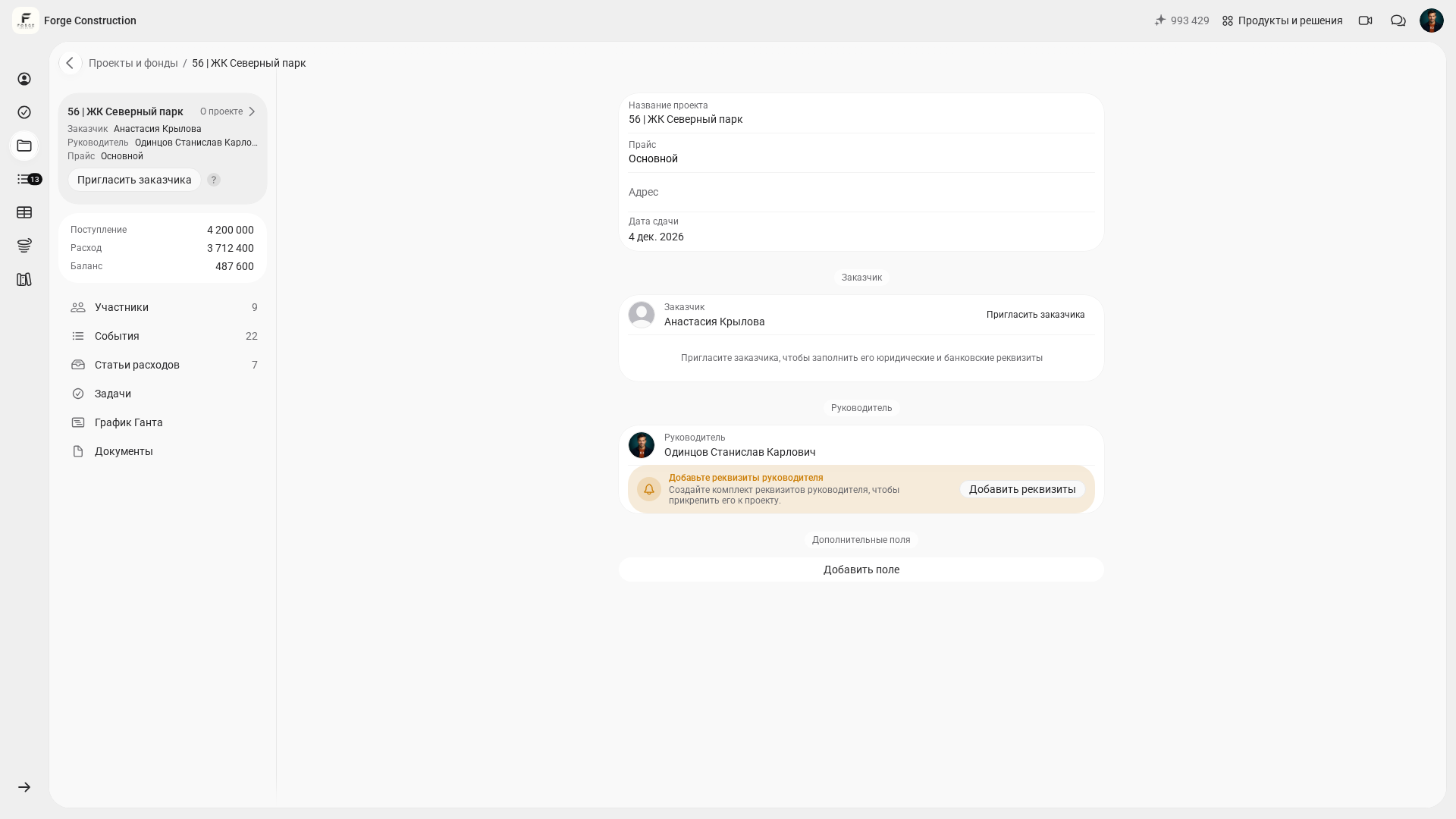
In construction and renovation companies, automation often starts with management accounting for individual projects, allowing costs and payments to be managed without manual spreadsheets. The 101 app provides this layer within a single service: accounting for project expenses and income, budget control, reports and visibility of financial flows.
The project card shows a summary of receipts, expenses and the balance. The displayed balance equals the difference between the stated receipts and expenses; it does not replace a calculation of the project’s net profit. This is a project overview, not a history of individual transactions.
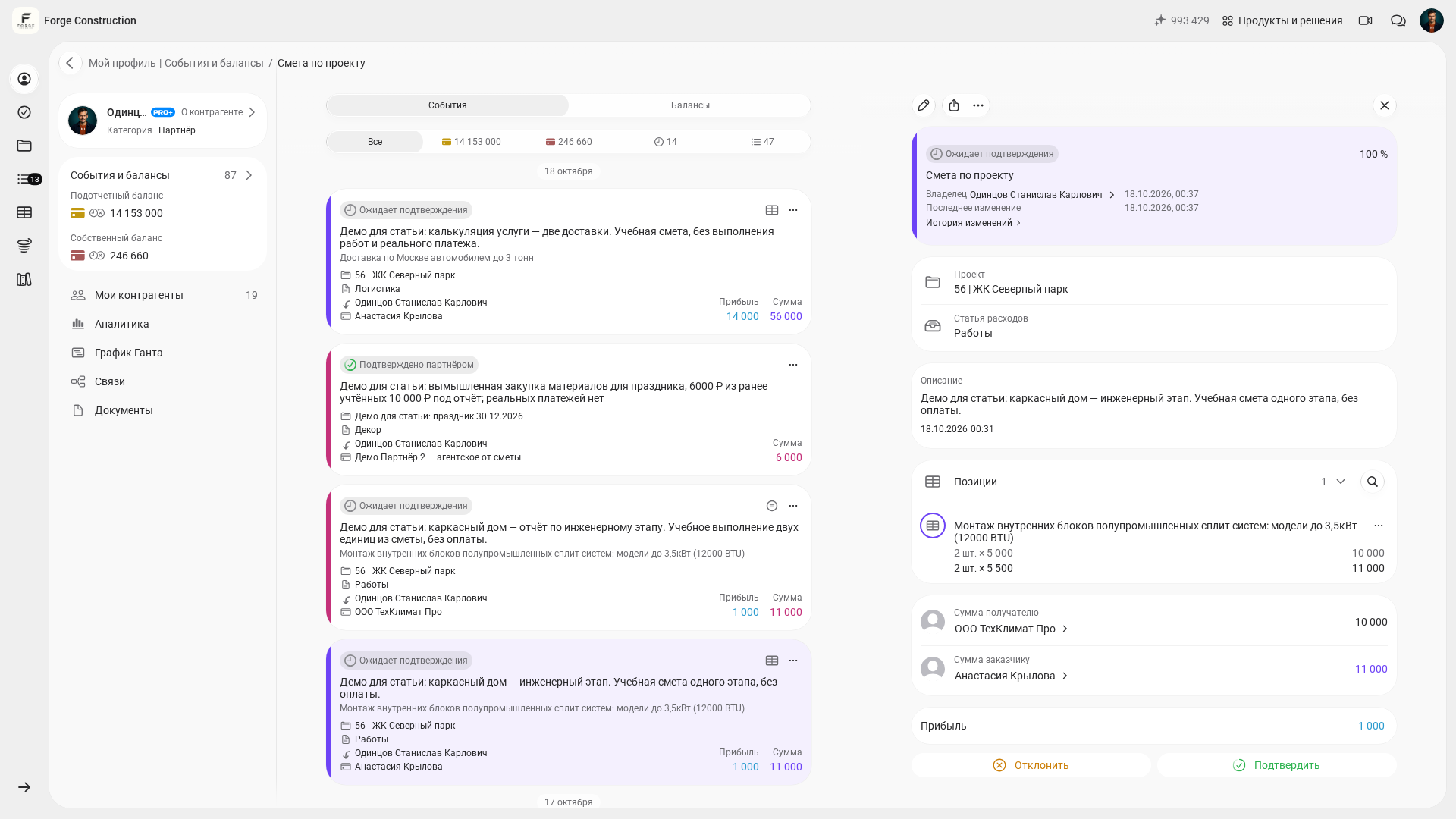
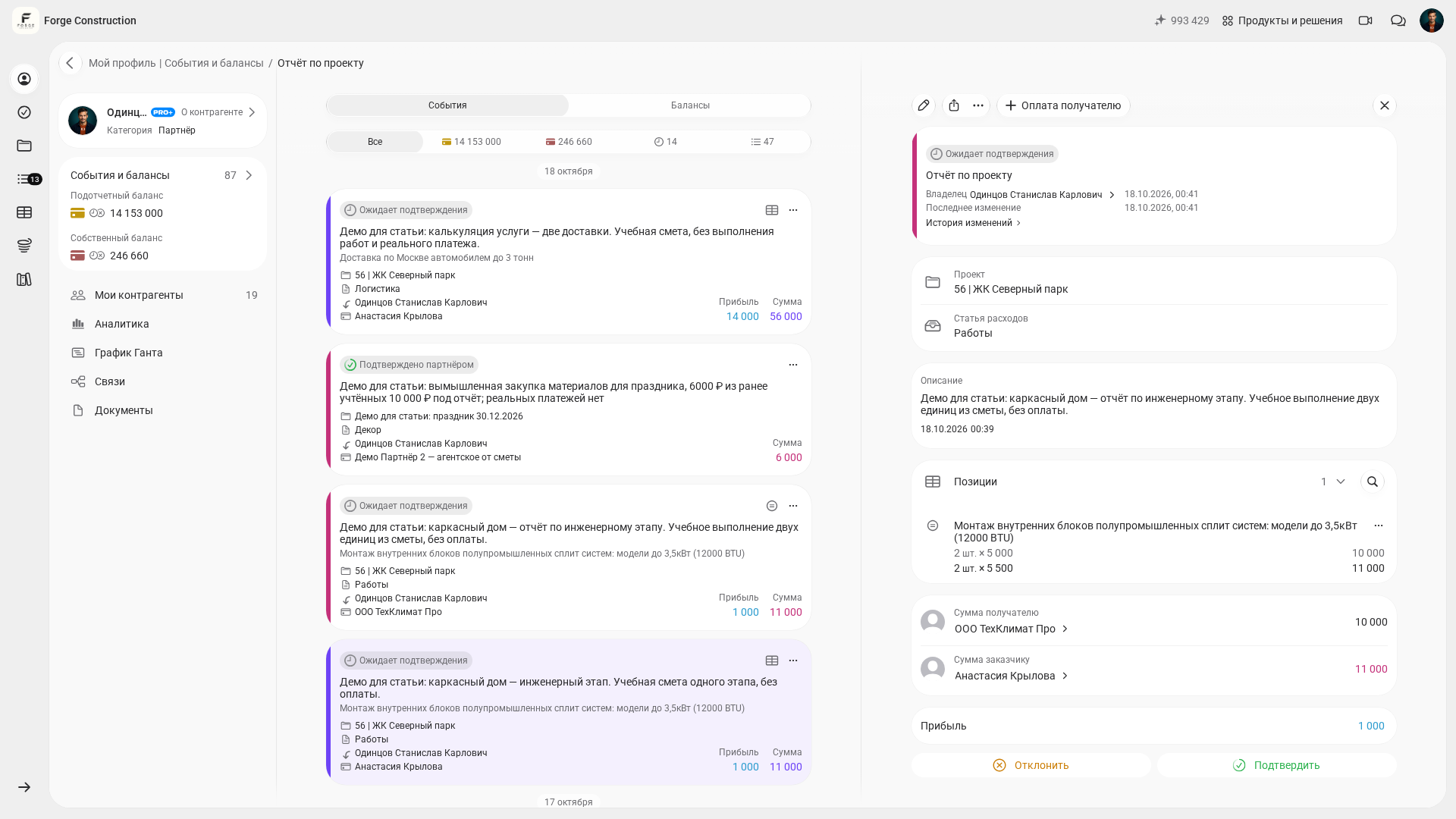
For budget control, you can compare the items in an Estimate with the work reported in a Report for the same project: quantities, amounts and document status. In the demo example shown, both documents are awaiting confirmation. This Report does not yet confirm payment or acceptance of the work.
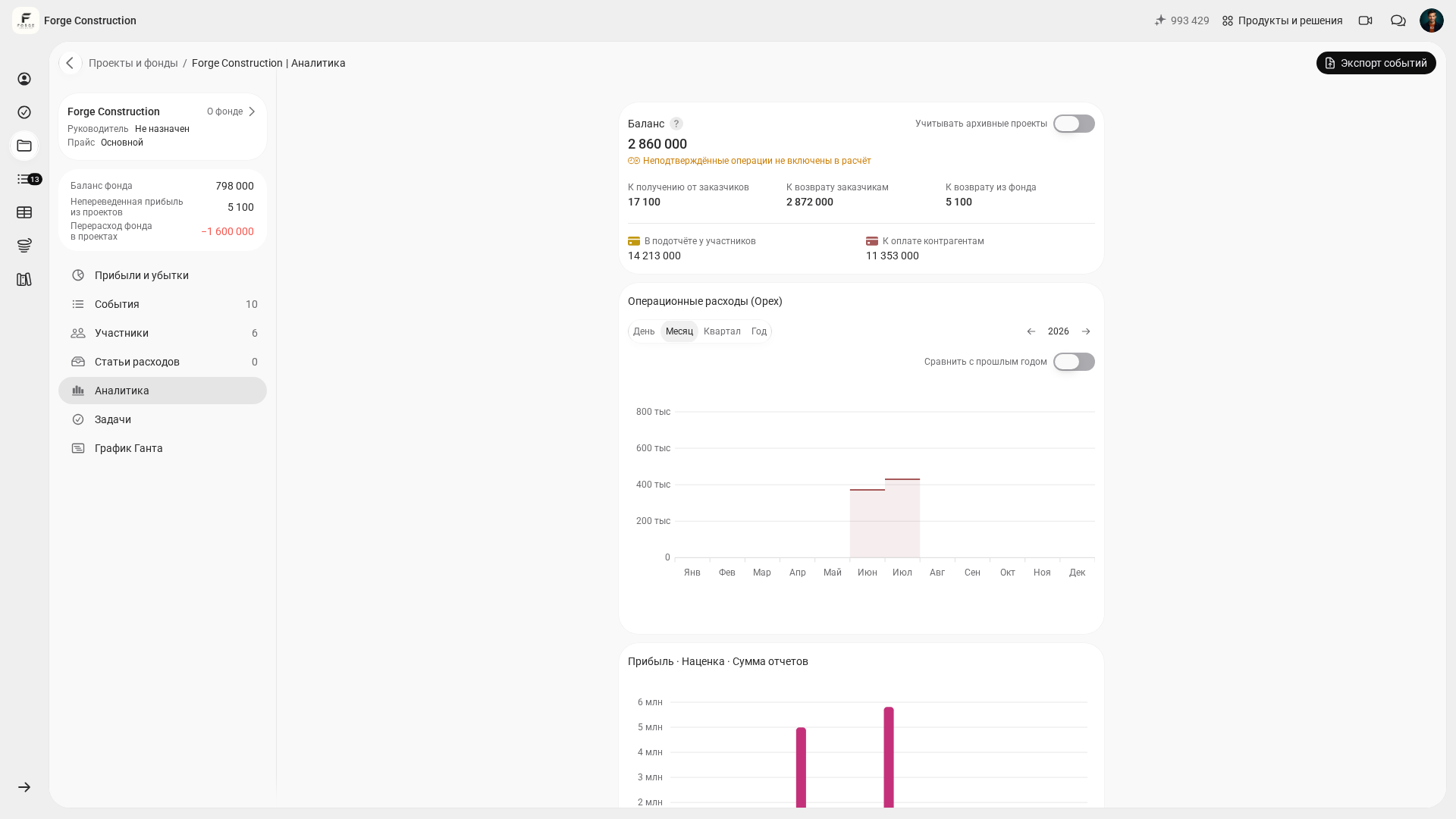
The separate “Analytics” screen shows the Company Fund’s operating expenses. Balance figures should not be treated as the profit of an individual project.
Resources for business process management in the context of change management
Organizational problems often hinder implementation. Even a modern information system for business process management will not deliver results if roles are not assigned, employee training is skipped, controls are not built in, and goals are not linked to the company’s strategy.
To make business process management a lasting practice in your organization, it helps to use a short plan:
- Step 1. Choose 1–2 processes where the cost of error is clear (time, money or quality), and set the goals.
- Step 2. Appoint a process owner and describe how the work should be done: inputs, outputs, roles and controls.
- Step 3. Select tools: where a BPMS is needed, where task management is enough, and where accounting and documents are needed.
- Step 4. Prepare resources for managing the business process: time for training, document templates, procedures and access rights.
- Step 5. Start managing the change as a project: deadlines, people responsible, metrics and feedback collection.
- Step 6. Review the results after 2–4 weeks: what has become faster, where quality has declined and what needs to be adjusted.
At this stage, it is useful to consult project management and communication practices so that processes do not become scattered across chats and verbal agreements. The 101 blog has articles on project management tools and managing project communications: https://101-app.com/blog/instrumenty-upravleniya-proektami (material in Russian) and https://101-app.com/blog/upravlenie-kommunikatsiyami-proekta (material in Russian).
If you would like to review processes for your role, projects and documents in the 101 app, request a demonstration: it is a quicker way to connect processes, data and control in a single scenario.