Business digitization can begin with a familiar scene: in the evening, someone is trying to reconcile project figures, find a conversation with a client, remember who was promised an advance, and keep up with messages from tradespeople saying, ‘Bought it today, lost the receipt.’ In this situation, it is worth checking how information is passed on: scattered records may be one cause of the problems.
Business digitization turns key agreements and actions into clear records: inquiries, tasks, documents, payments, work statuses, photos and reports. This provides a factual basis for management: who did what, when, at what cost and on what basis.
Construction and renovation involve many contractors, materials, stages, rework, advances and acceptance inspections. This is why the 101 blog regularly discusses digitalization alongside project and financial management.
Contents:
What is business digitization?
Business digitization, also referred to as digitalization or digital transformation, means defining company processes and establishing them in tools so they can be repeated and monitored. The essential part is having shared rules, rather than the software itself: what data is recorded, who is responsible, what a completed result looks like and where it is stored.
Put simply, business digitization makes work ‘visible.’ An inquiry has a source and a status. A deal has a stage and a responsible person. A payment has a category and a project. Work has a schedule and confirmation of acceptance. This structure helps you manage processes when data is entered and checked promptly, including when several projects are running at once and part of the team is working on site.
Where should you start?
Trying to digitize everything at once can turn the work into an endless configuration exercise. It is more useful to choose the key areas that support management.
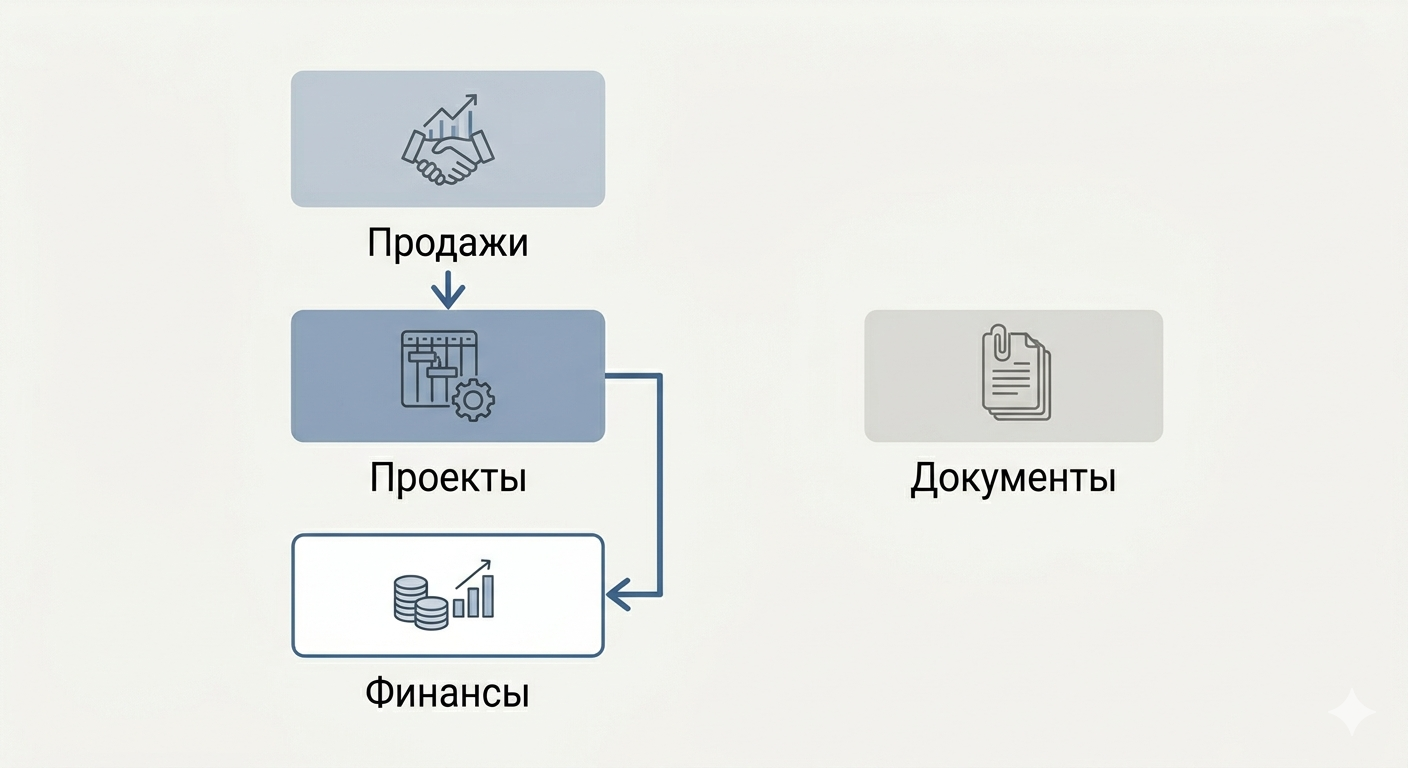
Three areas can serve as a starting point: sales, delivery of work and finance. Sales data helps estimate the expected volume of work for the coming week and month, while information about work delivery helps you check workloads and schedule risks. To assess profit, you need income and all costs attributable to the period; cash receipts and the current cash balance do not establish profit by themselves. A potential cash shortfall is assessed using the opening balance, expected receipts and payments, and outstanding obligations.
Construction adds a fourth area: project documents. Agreements, stages, completion documents, photographic records and acceptance certificates all help you hand over work and support your position in disputes. It is also useful to maintain a work schedule so the team can see the sequence of work and the dependencies between stages. The 101 blog explains scheduling principles using Notion as an example: how to create a construction work schedule.
How do you digitize a business?
A practical business digitization plan follows a simple principle: first agree on the rules, then establish them in a service, then teach the team to follow them. A service without rules becomes another place that nobody visits.
The following approach can be adapted for an office-based company or a contractor working on site:
- Step 1. List 5–7 key processes: leads, calculations, contracts, purchasing, work delivery, acceptance and payments.
- Step 2. Define the end point of each process: what counts as a completed result, such as a paid invoice, an agreed stage or a finalized acceptance certificate.
- Step 3. Assign process owners: one person responsible for keeping the data in order for each process.
- Step 4. Define the minimum set of data that must always be recorded; without it, a report may be incomplete.
- Step 5. Choose a core of 1–2 services and bring the team into them.
- Step 6. Configure the templates available in your chosen services: deal stages, task statuses, expense categories, document types and standard reports.
- Step 7. Set a review rhythm: a brief check of figures and statuses once a week, and a review of deviations once a month.
For a construction company, project finances and confirmation of completed work can be a starting point. This helps you check whether records are complete and whether there is a basis for calculating the result; the effect on profit depends on the data and subsequent actions. The 101 blog provides examples of how project events, estimates and reports relate to each other: see the ‘About the app’ section (in Russian). To discuss your own accounting scenario, you can book a demonstration of the 101 App.
Top 10 services for business digitization (selection compiled on 28 May 2026)
The following selection was compiled on 28 May 2026 and covers services for sales, projects, finance, documents and analytics. The availability of the official links and the descriptions of core capabilities were checked again on 26 October 2026. Before implementation, check the connection terms and the availability of specific features with each service:
- 101 App — management accounting and project work for construction and renovation teams: project finances, estimates and reports (in Russian), and project photo reports (in Russian). Video monitoring uses the separate 101 Vision app (in Russian); camera compatibility and connection terms need to be checked. It can be considered when the team works on site.
- Bitrix24 (in Russian) — CRM (a customer relationship management system) and tasks in one system. It can be considered when you need a single place for deals and their associated tasks.
- amoCRM (in Russian) — a sales CRM (customer relationship management system): deals, inquiries from connected chats and messaging apps, and calls through connected telephony. It can be considered when you need to organize how sales representatives handle inquiries.
- 1C:UNF (in Russian) — accounting for small businesses: sales, inventory, purchasing, production and finance. It is useful when you need to organize your product catalog, stock balances and costing.
- Kontur.Diadoc (in Russian) — electronic document exchange with counterparties. It can be considered when you need to send, receive and sign documents electronically.
- SBIS (Saby) — an ecosystem with services for reporting (in Russian), electronic document management (in Russian) and a messenger (in Russian). It can be considered when you need these areas within one ecosystem.
- MoySklad (in Russian) — cloud-based inventory and sales. It can be considered for a trading business, a small manufacturer or a company that needs to track purchasing and stock balances.
- Yandex Tracker — tasks and workflows. It is suitable for inquiries and internal requests, while resource management (in Russian) helps plan the team’s workload using recorded tasks, deadlines and effort estimates.
- Yandex DataLens (in Russian) — dashboards (screens displaying metrics) and data visualization. It is useful when data already exists in accounting systems and a manager needs analytics; the data source connection must be configured.
- YooKassa (in Russian) — accepting payments on a website and through payment links, including sales conducted through chats and messaging apps. To send fiscal receipts under Russian requirements, you need to connect ‘Receipts from YooKassa’ or an external online cash register (in Russian).
Common digitization mistakes
Common mistakes concern how work is organized: data is entered irregularly, rules are not established, and the basis of reports is difficult to verify. When choosing a process to digitize, check the following risks:
- Buying a service without defining processes and roles: you risk ending up with a collection of tabs without a clear way of working.
- Too many mandatory fields: employees may work around the rules and enter ‘1,’ ‘OK’ or ‘I’ll fill it in later.’
- No data owner: nobody is responsible for keeping deals, tasks and expense categories in order.
- A gap between the estimate and actual results: the plan is separate from real purchases and payments, and profit is calculated ‘by eye.’
- Digitization without regular reconciliation: omissions and errors may go unnoticed. Agree on how often to hold a brief review of statuses and figures.
In construction projects, a separate task is to compare the estimate with actual transactions and documents. When changes arise during the work, check that the plan is up to date and that the new terms have been agreed. This is discussed in ‘Is an estimate all the paperwork a builder needs?’ (in Russian).
What else can you read on the 101 blog?
If your goal is business digitization in a project-based company, it is useful to build an overall picture of project management, scheduling and finances.
- Construction automation: which systems are available and when to introduce them (in Russian)
- How to choose a project management system
- 10 project management systems (in Russian)
Business digitization can be useful when a company uses shared statuses, consistent expense categories and a common procedure for closing stages and recording agreements. The result depends on complete records, regular reconciliation and the team’s actions. Separately, check how the chosen services exchange data with each other.