Business digitalization means moving from verbal arrangements to management based on data: agreements are recorded, figures are calculated, documents are stored, and the status of work can be checked without phone calls or site visits, provided the data is updated promptly.
In construction and renovation, the need for digitalization becomes apparent sooner: there are many projects and people, and even more tasks and money to keep track of. When information is scattered across chats, notes and spreadsheets, managers spend time searching and reconciling records while the team waits for decisions.
Below is a practical explanation of how digitalization works in a real company, who needs it now, and a seven-step implementation plan.
Contents:
- What is business digitalization?
- How is digitalization different from automation and “keeping records in Excel”?
- Who needs business digitalization?
- What do companies usually digitalize?
- 7 steps towards digitalization
- Mistakes that undermine digitalization
- Where does the 101 app help, and when is PRO+ useful?
What is business digitalization?
Digitalization means bringing a company's internal and external workflows into digital form: who does what, by when, under which rules, for how much money, and with which documents and results. The terminology may sound fashionable, but the idea is straightforward: processes move into a system that keeps a record of what happens and makes them easier to manage.
At an everyday level, digitalization answers two questions. The first is “Where is the reliable information?”: which estimate version is current, which payment has been approved, who accepted the materials, and who is responsible for a delay. The second is “What happens next?”: will there be enough money until the end of the month, is the project on schedule, and where is the bottleneck in the team?
A familiar scene on a construction site: the customer asks where the report is, the site supervisor searches chats for photos, the procurement officer tries to remember where the receipts went, and the manager works out how much money has already been spent and how much more will be needed. Keeping events, money and documents in one place helps reduce this search if records are complete and timely and the team follows shared rules.
How is digitalization different from automation and “keeping records in Excel”?
Automation means handing repetitive actions over to a system that performs them according to defined rules: for example, creating tasks, routing approvals, making calculations or generating reports. Its effect is assessed through time, errors and other measures for the particular process.
Digitalization is broader: it creates a digital picture of the business. Automation often becomes part of digitalization once a company understands what data it needs and which decisions it wants to make using that data.
Excel is a digital tool too: you can set up shared lists of values and, when collaborating through supported cloud services, manage access and versions. However, if a team sends separate files around without shared rules, reference lists diverge, copies multiply, and forwarding files becomes a process of its own. This creates a risk of keeping records for their own sake: the figures exist, but the workflow and responsibilities remain unclear.
A useful check: if a process stops when a particular person is absent, review how responsibilities are assigned, how cover is arranged, and whether the data is accessible. Regular execution according to agreed rules and records that can be checked help you assess implementation alongside your chosen measures.
Who needs business digitalization?
Digitalization is useful beyond large companies. It becomes necessary when managing everything manually carries too much risk: too many projects, people, contractors, payments, purchases and changes during the work.
In a construction company, this becomes clear as the business grows. With several site supervisors and dozens of tradespeople, managers cannot keep every task, agreement and figure in their heads when the information is spread across chats and spreadsheets.
Customer service is another signal. Customers want predictability: what has been done, what will happen next, and what they are paying for. If reporting is assembled manually, preparing a report may be delayed even when work on site is going well:
- The team is growing and processes are becoming more complex; the manager spends more time firefighting than managing.
- Project finances are calculated after the fact, and cash shortfalls appear unexpectedly.
- Estimates and agreements change, and the latest version gets lost.
- Purchasing and staff expense accounting operate separately, and reconciliation takes hours.
- Customers ask for transparency, reports and documentary evidence.
What do companies usually digitalize?
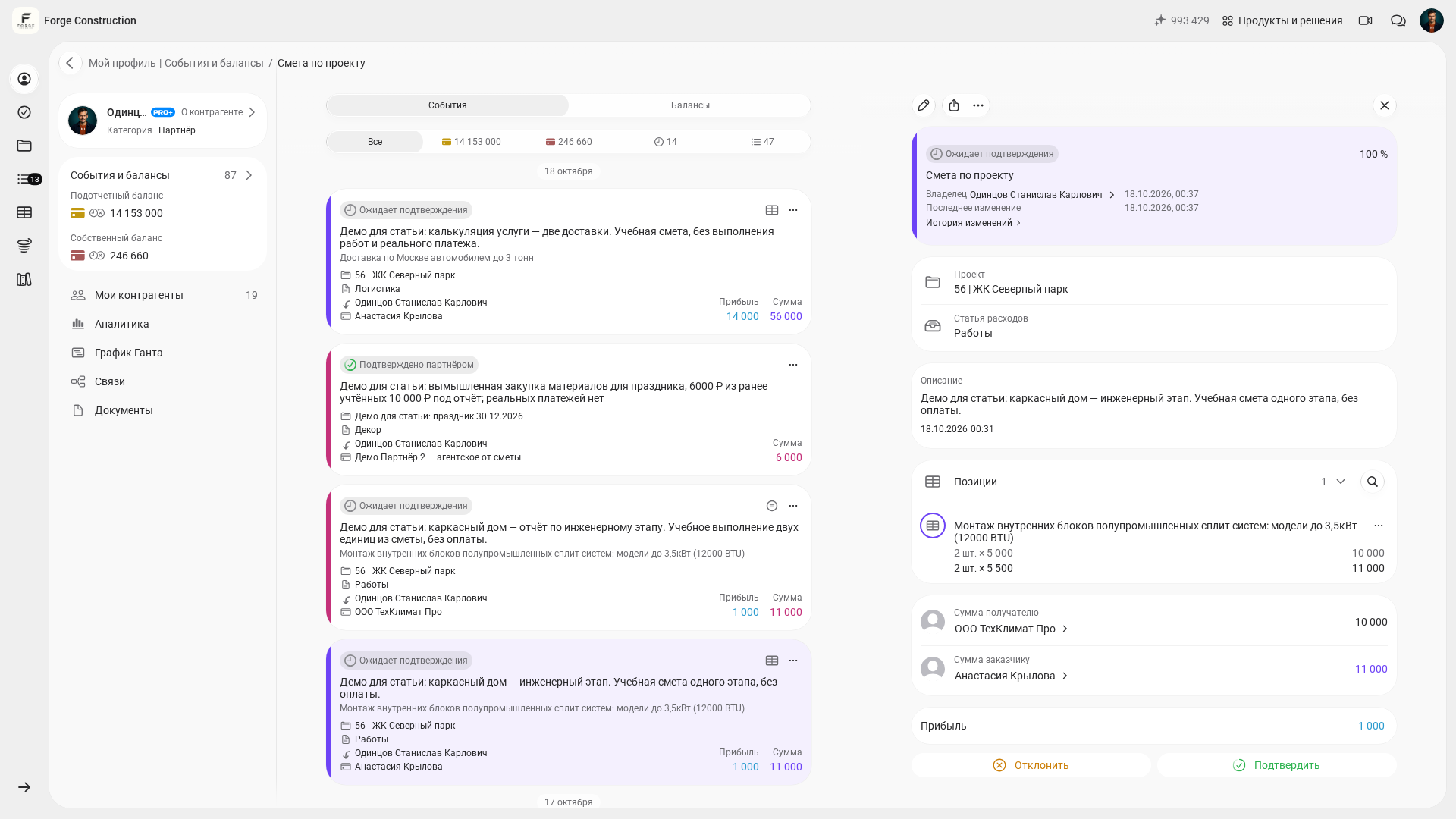
Start with areas where mistakes are most costly. In construction, these are almost always money, agreements and deadlines. In the 101 blog, we have discussed areas that make sense to digitalize first: financial and management accounting, data collection and analytics, sales, contracts (electronic signatures and electronic document exchange), and customer reports.
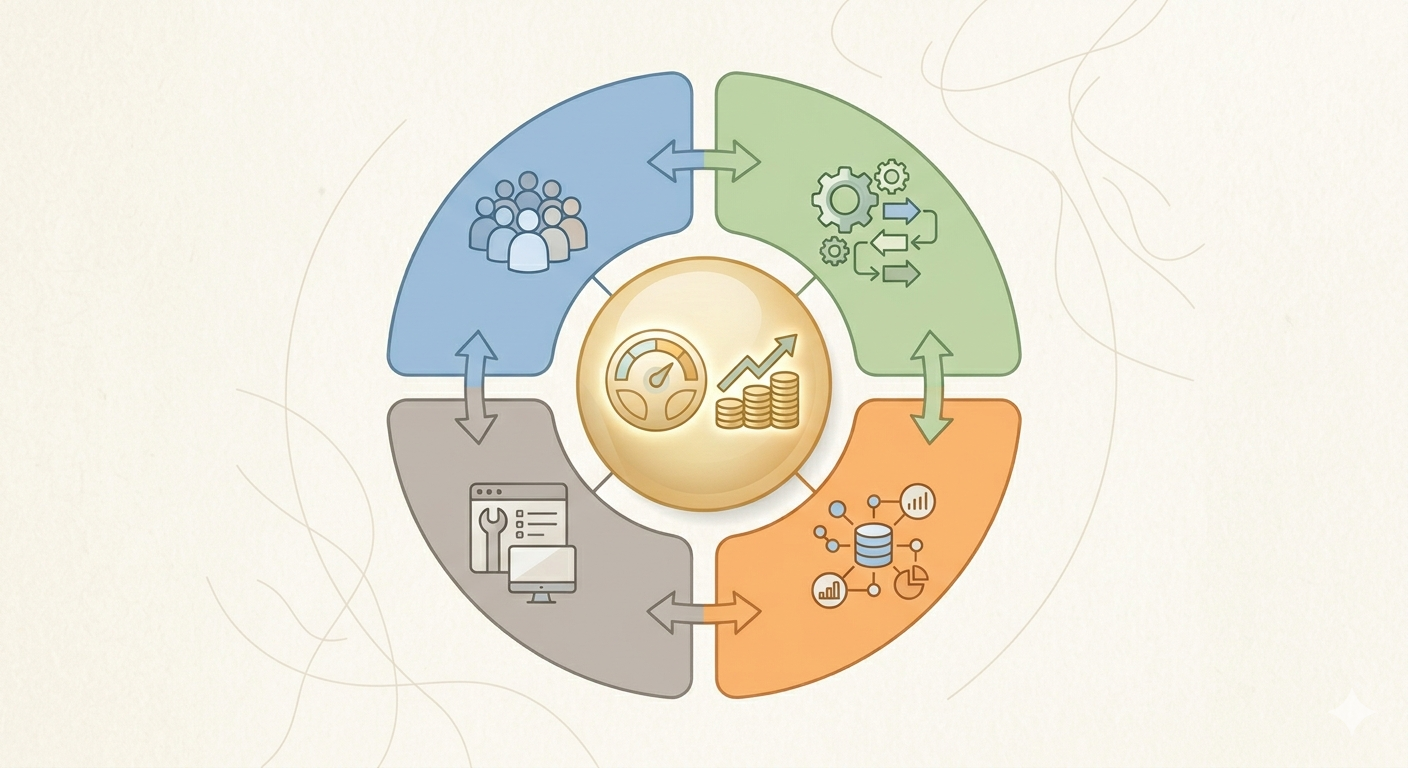
In terms of everyday tasks, digitalization usually affects four flows:
- Money: planned versus actual figures by project, staff expense accounting, advances, payments and profit margins.
- Work: schedules, stage statuses, responsibilities and records of completed work.
- Documents: estimates, contracts, acceptance certificates, invoices, close-out documents and correspondence about changes.
- Communication: who promised what to whom, which decisions have been made, and where the supporting record is.
Estimates are a common starting point. When an estimate is quicker to prepare and follows a consistent structure, it is easier to agree changes and explain the price to the customer. Useful resources include our guide on creating an estimate online (in Russian) and our article on quickly importing an estimate from Excel (in Russian).
The schedule is another starting point. Even if your project management methods have not yet been formalized, a basic schedule helps the team and the customer work more consistently. See our article on creating a construction schedule.
7 steps towards digitalization
Digitalization is easier to implement when you treat it as a project with a clear outcome. Agree in advance on what will change in the team’s work, which data you will record, how you will check its quality, and when implementation will count as successful. The approach is similar to project management; our article on the basics of project management (in Russian) provides useful foundations.
Here are seven steps designed for the realities of construction: phones, site visits, urgent problems and parallel projects.
- Set a measurable goal. Turn “I want digitalization” into a specific target: “I want to see the profit margin for each project once a week” or “I want to reduce the time needed to prepare a customer report to 15 minutes”.
- Describe your key processes in simple terms. How does a lead arrive? How is an estimate created? How are changes approved, funds issued to staff to account for later, and work signed off? Assign an owner to each process: someone responsible for the rule and the outcome.
- Choose 1–2 priority areas. These are often project finances and reporting on work. Once these areas are in order, it is easier to add the others: sales, stock management, documents and planning.
- Gather your data and reference lists. Compile projects, stages, expense categories and contractors, together with estimate templates and approval rules. This step reveals inconsistencies: each site supervisor has their own names for things, while the buyer follows a different logic.
- Choose tools to fit your processes, then configure them. The approach is simple: one reliable source for money, one for work statuses, and a clear connection to documents. Before configuring the system, check roles, access rights and the report formats that managers and customers need.
- Introduce the rules to your team. Provide short training sessions, checklists, supervision during the first few weeks and reviews of mistakes. If recording events on a phone is inconvenient for the site supervisor, they may return to chats and a notebook.
- Check the results and establish a routine. Compare measures before and after implementation: reporting speed, the accuracy of planned-versus-actual comparisons, the share of purchases approved, and the number of disputes. Then make the approach part of your procedures and extend digitalization to the next area.
Mistakes that undermine digitalization
Digitalizing a muddle. If a process has not been described, the system may become another layer of confusion: inconsistent statuses, duplicate expense categories and reports that do not reconcile.
Making digitalization one person’s job. Without process owners, the manager ends up with someone responsible for the software who cannot influence the team’s working discipline.
Chasing more features. Consistency matters more: recording staff expense funds and spending every day is better than producing perfect analytics occasionally at the end of the month.
Keeping duplicate data entry. When a purchase is recorded first in a chat, then in a spreadsheet and then in a service, people may choose the quickest route and stop maintaining the system. Decide at the outset where data will first be recorded.
Forgetting the customer. In construction, one objective of digitalization can be transparent customer reporting that helps you discuss changes using documents. Check the results through report preparation time and the number of disputes before and after implementation. To assess the return on investment, compare the measured effect with the cost of introducing and running the system.
Where does the 101 app help, and when is PRO+ useful?
In construction, a project’s centre of gravity often lies in its finances: staff expense funds, advances, overspending, unapproved purchases and late payments. This is why project management systems are often supplemented with a tool that keeps project finances in order. The 101 blog explores this approach in articles on managing a project-based business (in Russian) and financial accounting for income and expenses.
The 101 app helps connect projects with their finances: recording income and expenses by project, monitoring planned versus actual figures, compiling reports, and keeping calculations and documents in order. The same principle is described in an article on project management technologies in construction, which includes a section on financial control.
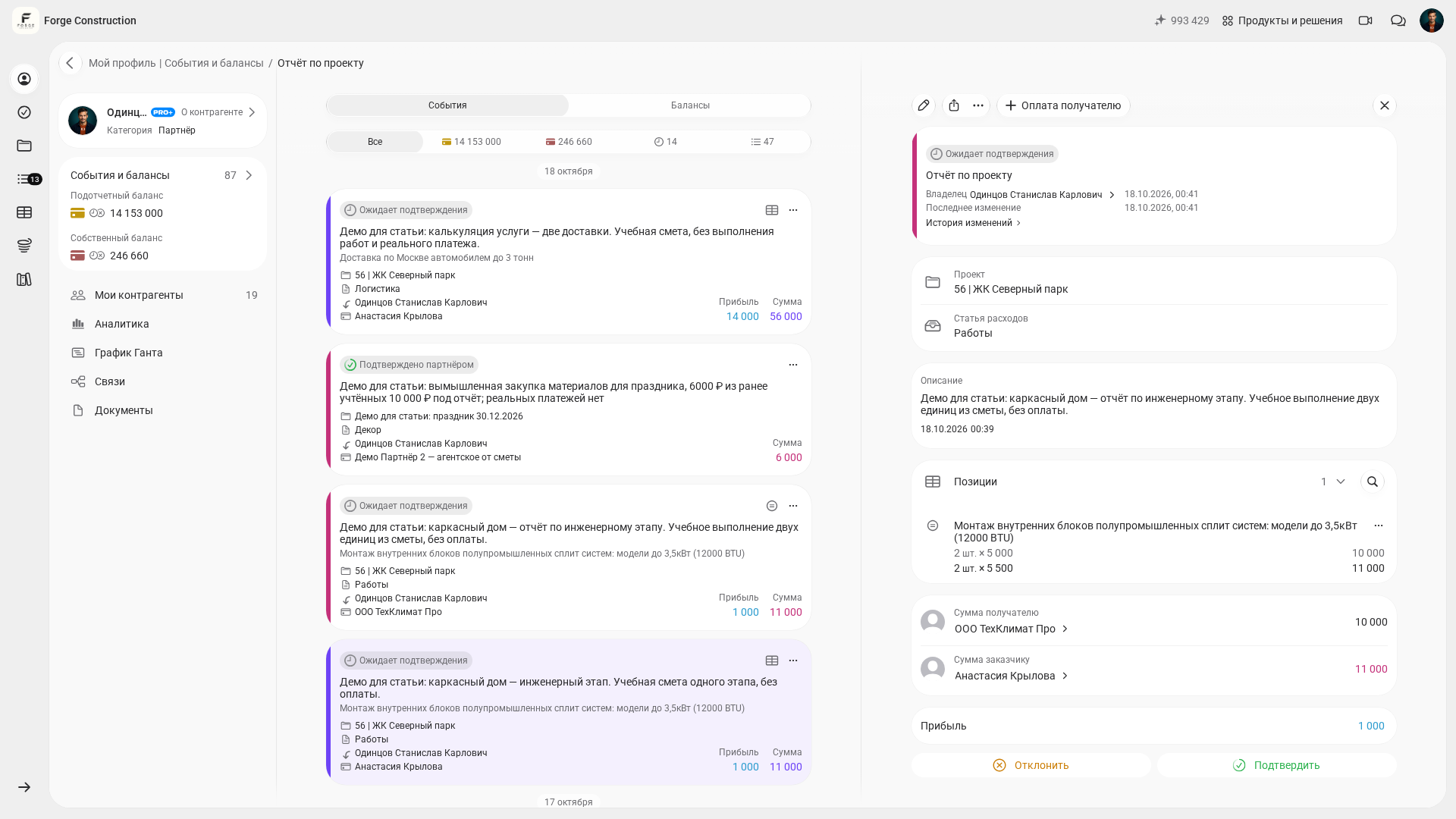
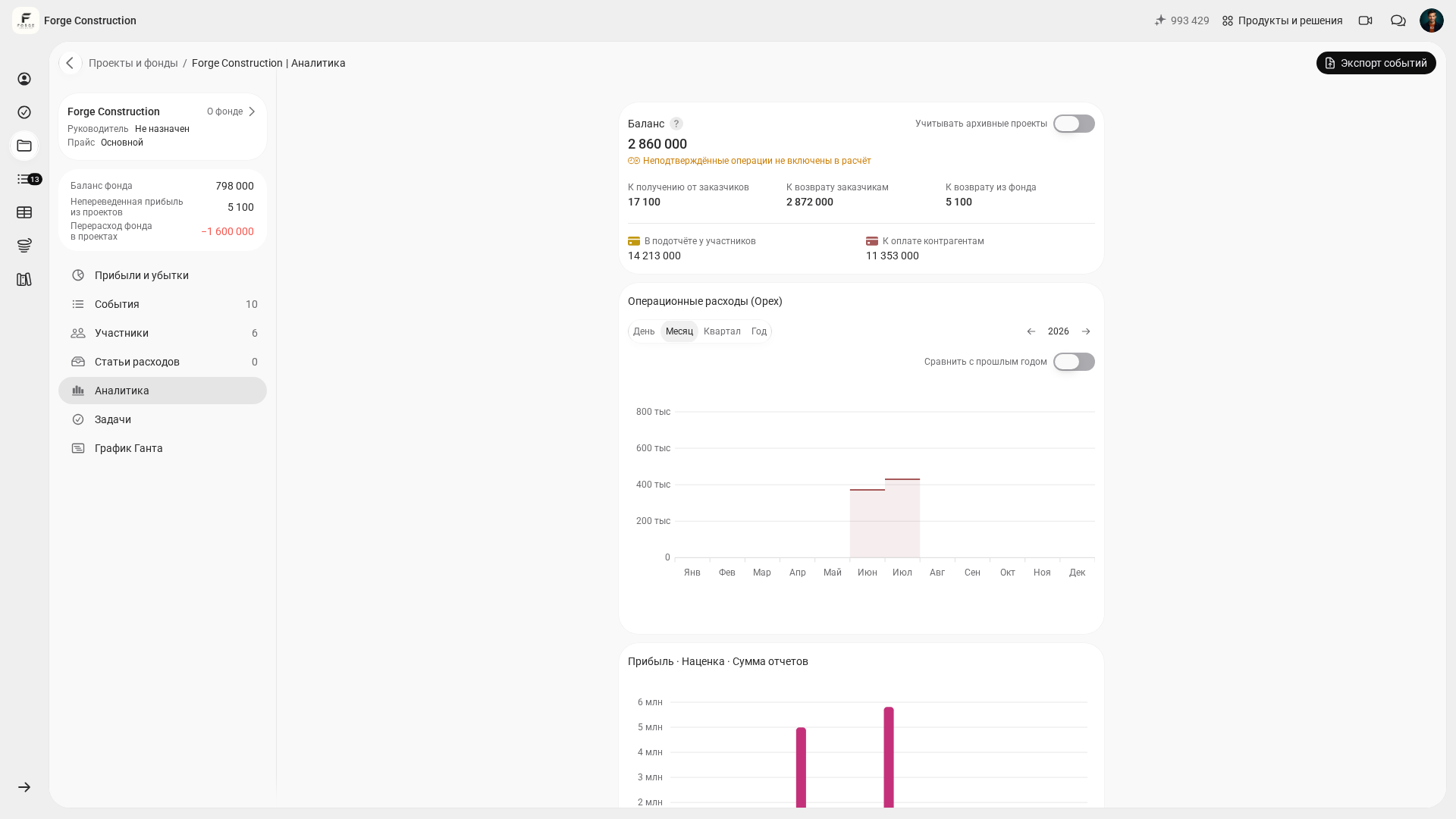
If you are considering PRO+ for closer control of your figures, check the features you need against the current pricing-plan table and your access rights. When a company has several projects, it needs a view across its project portfolio, roles, types of work and expense categories. These are requirements to check when choosing a tool, rather than a promise that every breakdown is available in one ready-made report. The Company Fund provides operating-expense analytics for a selected period; the screen shown presents monthly trends. Profit from projects is viewed separately. Roles determine access to data, while detailed analysis by type of work and other custom breakdowns depends on how detailed your records are, your rights and the tools available.
To see how digitalization through financial control and reporting works in practice, start with a demonstration and assess how the approach fits your own processes.
To make an informed choice of tool, compare your requirements with the criteria in our article on choosing a project management system: the roles in your team, the reports you need, where a single reliable version of the data is kept, and how deadlines and money are controlled.