

Contents:
What is margin?
In monetary terms, margin is the difference between revenue and the costs included in your cost figure. For the simple project example in this article, we include direct costs of labour and materials, while accounting for shared company expenses separately. The resulting amount is therefore not net profit.
Our formula is: margin = revenue − direct costs. Suppose you recognize ₽1,000,000 in revenue from completed and accepted work, with ₽700,000 in direct materials and labour costs. The margin is ₽300,000. Shared expenses, interest and taxes attributable to the period still have to be covered from that amount.
How is margin different from revenue?
Revenue is the value of work or services recognized under your company's accounting policy. An advance payment alone does not establish that the work has been completed and the revenue earned. Check the contract terms, evidence of completion and your recognition rules separately. For more context, see our article on revenue versus cash turnover.
Margin is what remains after the relevant costs are deducted from revenue. It helps you see what is available to cover shared expenses and contribute to final profit. Cash receipts, revenue and margin describe different stages of the calculation; keep them separate in your reports.
How is margin different from markup?
Markup and percentage margin use the same difference between selling price and cost, divided by different amounts. Markup is based on cost; percentage margin is based on selling price or revenue. Decide which expenses are included in cost before comparing percentages.
Suppose the direct cost of painting walls is ₽100,000 and the customer price is ₽150,000. The difference is ₽50,000. Markup = (150,000 − 100,000) / 100,000 × 100% = 50%. Percentage margin = (150,000 − 100,000) / 150,000 × 100% = 33.33%.
The two diagrams below show the same ₽100,000 cost and ₽150,000 selling price. In both, “margin” refers to percentage margin rather than the ₽50,000 monetary amount. The first diagram rounds 33.33% to 33%.
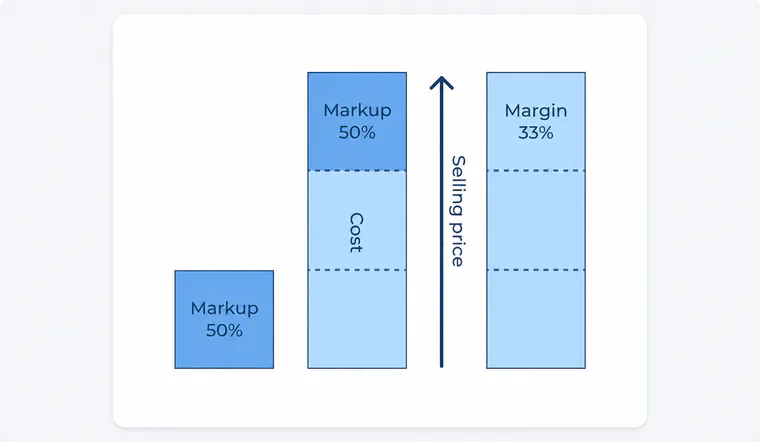
In the first diagram, a 50% markup is measured against cost, while an approximately 33% margin is measured against selling price.
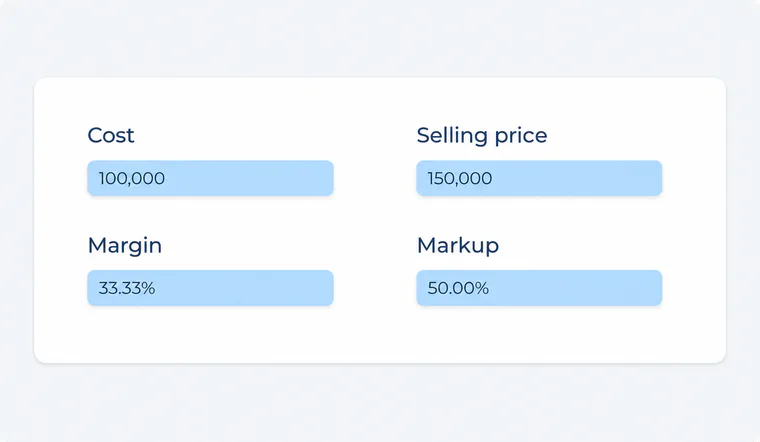
The second diagram shows cost 100,000; selling price 150,000; margin 33.33%; markup 50.00%. The same ₽50,000 difference produces different percentages because the denominators differ.
With a positive selling price and non-negative cost, markup can exceed 100%, while percentage margin cannot exceed 100%. Monetary margin in this example remains ₽50,000 regardless of which percentage you calculate.
Why does a construction business track margin?
A percentage helps you compare jobs and projects of different sizes. Two projects may generate the same monetary margin while charging different prices and using different amounts of your team's capacity. Compare margin with the estimate, the plan and actual direct costs, then account for shared expenses separately.
A high margin also does not guarantee cash in the bank: a client may pay after you must settle with workers or suppliers. Check expected receipts and upcoming payments alongside project results. Profit, markup and cash flow answer different management questions.
How do you set a target margin?
There is no universal percentage for every construction or renovation business. A useful target depends on the mix of work, rework risk, fixed expenses, team capacity and local market conditions. Select comparable projects, calculate their margins using the same cost rules and compare the results with your company's plan.
If material prices or labour hours change during a project, update the expected cost and projected result before work is complete. This is more useful than relying on an unsupported industry “standard” margin.
How can you check the figures in 101?
In 101, a price-list or estimate item can have separate cost and customer-price values; what a participant can see depends on their permissions. When building an estimate, check each item's quantity, unit, cost and price. Markup can also be added separately through expense-category settings, so it should not automatically be treated as the difference between the item price and its cost. The workflow is described in the guide to estimate items (in Russian) and the guide to profit, price and markup (in Russian).
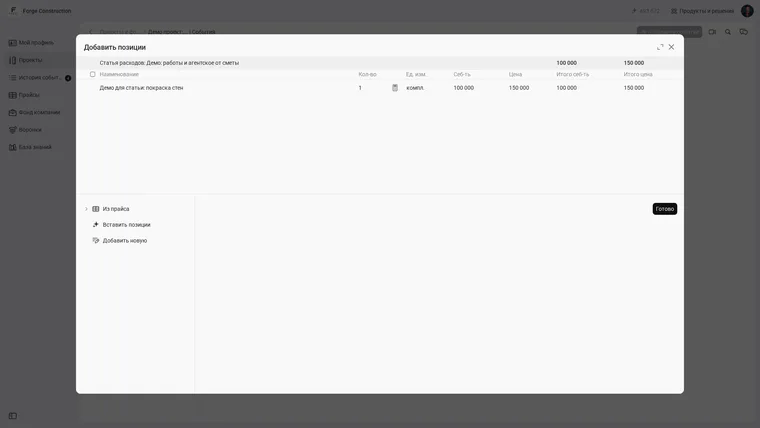
The “Add items” form in an estimate, using a demo example: one set of work, ₽100,000 in cost and a ₽150,000 customer price. The interface shown is in Russian.
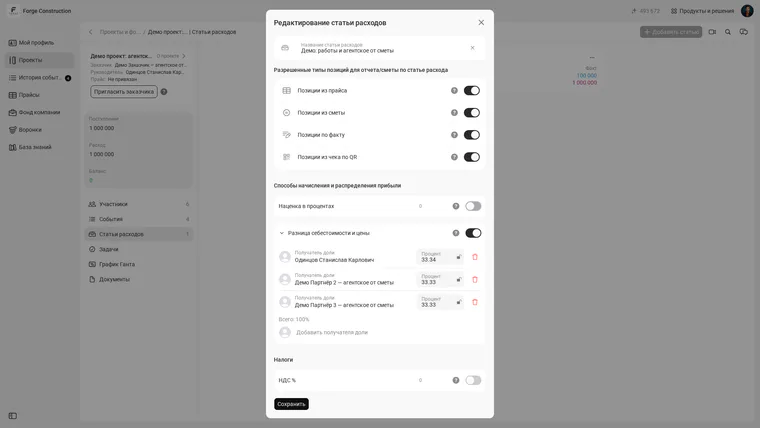
Expense-category settings in 101: markup and the difference between cost and price are separate calculation methods. In this demo example, markup is disabled; 33.34%, 33.33% and 33.33% are recipients' shares of the cost-price difference, not percentage margin. The interface shown is in Russian.
To calculate project margin, you need recognized revenue and costs assigned to the same project and period. Check which expenses are included and whether the recorded events are complete before drawing a conclusion. An incomplete dataset yields only a provisional percentage. To assess the company as a whole, examine its shared expenses and company fund separately.
Want to see which project figures your team can access in 101 and how to reconcile them? Book a demonstration.