Adesk and the 101 App address the same need: keeping management accounting under control. They approach it from different directions. Adesk focuses on company reporting, integrations and financial planning. 101 captures actual data where it originates: on site, during purchasing, and through site managers, supervisors and contractors. It now goes beyond mobile recordkeeping: 101 has a full web version, built-in AI workflows and a plugin for working with data through ChatGPT and other compatible assistants.
To choose between them, compare your data sources, the reports you need, teamwork and the available AI workflows. Check the web version and subscription terms separately: the features included and the final price depend on your chosen plan and billing period.
Contents:
What are we really comparing?
Management accounting helps you see the current state of your company, examine income, expenses and profit, and understand how these figures affect decisions. This typically involves a cash flow statement, expense breakdowns by category and other management reports. The difference starts with how data enters the system. One approach centres on reporting and consolidation: data is collected from available sources, organised into a common structure and used to produce reports. The other centres on projects and events: each team member records their part of the actual data, and the system builds a history and balance for each site.
A fair comparison therefore starts with asking where the facts about your business first become available. In your bank accounts and 1C? On site and in expense advance records? In messages from a site manager? In work acceptance documents and completed project stages?
Adesk: what are its strengths, and who is it for?
Adesk presents itself as a business financial accounting service with an AI agent. Its aim is to reduce routine work, keep key indicators close at hand and support decisions based on figures, without having to recalculate everything manually each time.
Adesk includes management reports and financial planning, with features varying by plan. “Эконом” (Economy) includes cash flow reporting, projects and currencies. “Бизнес” (Business) adds a profit and loss statement (P&L), liabilities, a payment calendar and budgets. “Первый” (First) adds a balance sheet, expense analysis and payment approvals. Details are available in the official plan comparison (in Russian).
The Adesk knowledge base (in Russian) describes a one-way transfer of supported documents from 1C to Adesk. Compatibility must be checked for the specific configuration and version: the extension documentation (in Russian) lists the Russian configurations “Бухгалтерия 8.3” (Accounting 8.3), “УНФ” and “Фреш”. Only Russian configurations are supported. Connection may be impossible in the Basic edition if extensions cannot be installed. An available integration does not mean that every type of 1C data can be transferred.
When evaluating Adesk, check how categories and reports are configured, the analysis available by project and business area, and the available integrations with banks and accounting systems. Ease of use, setup speed and the appropriate depth of analysis depend on your data and workflow, so test them with an example from your own business.
Adesk has three main plans: “Эконом”, “Бизнес” and “Первый”. The choice depends on the reports you need and the number of users and legal entities. The official pricing page (in Russian) advertises 14 days of access to all features after registration. Check the AI assistant’s terms separately.
What should you know about the 101 App and its web version?
The 101 App was created for management accounting by construction site or project. Each project has its own financial balance: the accounting data can be used to examine incoming funds, expenses, profit and debts.
A strength of 101 is capturing actual data as a transaction happens. In construction and renovation, money passes through people: an advance to a site manager, a delivery payment, a supplier purchase or a purchase of consumables. In 101, you can track expense advances: see the amounts issued, substantiated expenses and the remaining funds that still need to be accounted for or returned.
101 places an emphasis on smartphone use. Its blog materials specifically note that on-site accounting breaks down when the figures stay on a computer while people do their work from phones. The app therefore includes workflows for recording what happens quickly, including smartphone entry and scanning a receipt’s QR code.
The 101 web version is a browser-based workspace. On a large screen, you can review projects, financial events, price lists, estimates, tasks, documents and analytics. The mobile app helps capture actual data on site, while the web version continues that work for managers and the office team.
You can sign in to the web version at 101-app.com (in Russian). After signing in, users see only the companies, projects and actions they have permission to access.
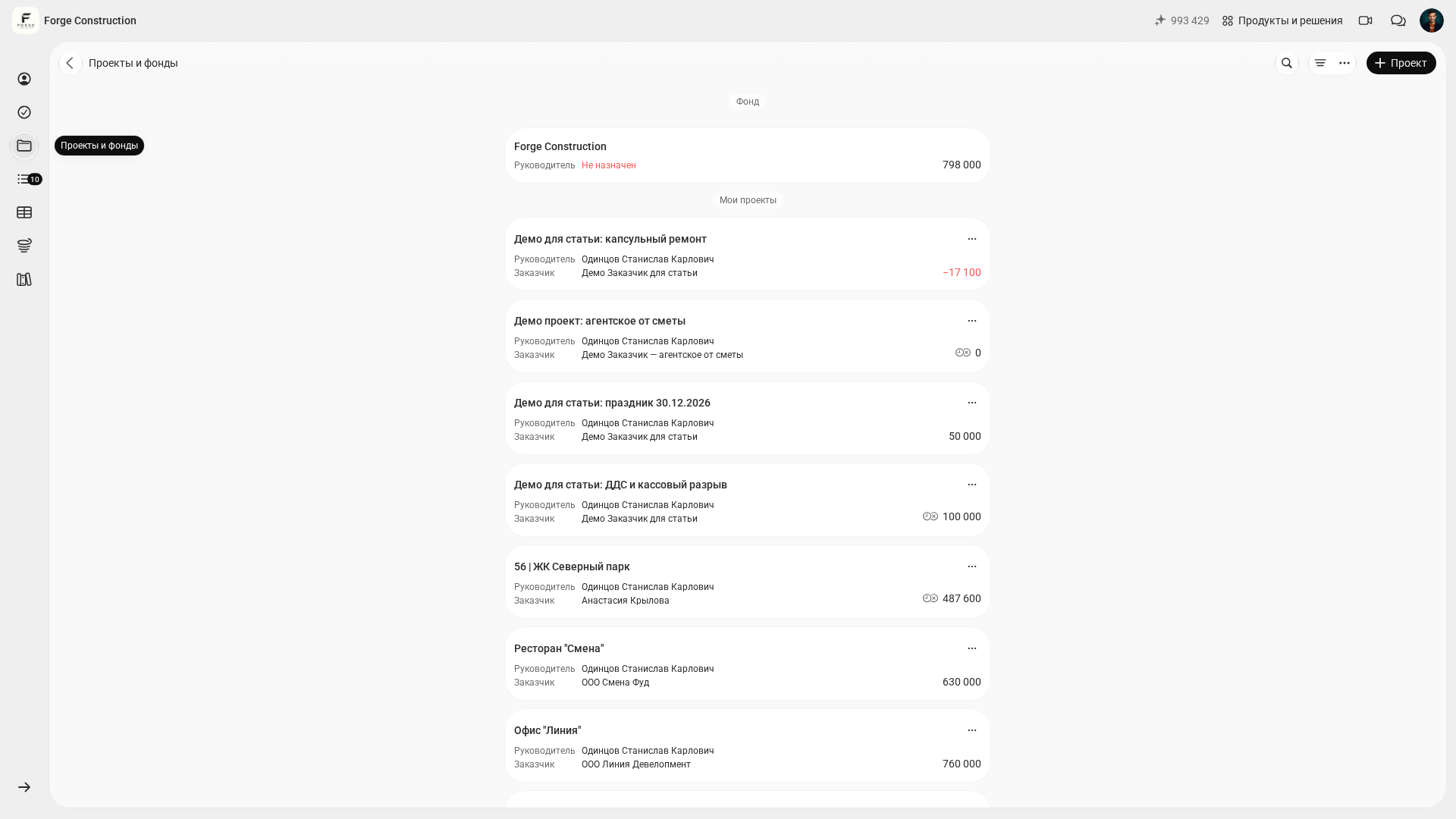
101 includes tools for working with AI. The built-in assistant helps you find information and perform supported actions using everyday language. MCP (a connection that gives an assistant access to 101 data and actions) lets you work with your account from ChatGPT, Codex, Claude and other compatible clients: ask about projects, tasks, events, finances or the knowledge base, open the relevant record and perform available actions. User permissions and the limitations of individual tools still apply. For example, the assistant cannot delete an event or change its status by confirming, accepting, rejecting or resetting it. Users perform these actions in the 101 browser interface. The built-in web chat requires an available balance of 101 AI tokens. ChatGPT limits and 101 AI tokens are accounted for separately; access through an external connection depends on the client, plan and workspace settings. Read more about the built-in assistant (in Russian) and connecting through MCP (in Russian).
For a closer look at management accounting fundamentals and terminology, the blog has a separate article on what management accounting is and a guide to getting started in a project-based business: how to set up management accounting.
To test 101 against your company’s needs, book a demonstration and discuss the accounting and project management workflows you need with an expert.
How do they compare on practical tasks?
The following comparison focuses on practical tasks: which tool fits your workflow, where reliable data becomes available sooner and how your team maintains financial discipline. Use the table to check your expectations, then test your final choice against real scenarios from your own company.
| Criterion | Adesk | 101 App |
|---|---|---|
| Main focus | Company management reporting: cash flow, P&L, balance sheet, budgets, payment calendar and liabilities. | Managing a project-based business: money, work, people, documents, tasks and a history of actual events by site. |
| Where actual data originates | Available bank and 1C integrations, manual entry and mobile transactions; data sources and compatibility are checked during setup. | On site and within the project: site managers, supervisors, purchasing staff and managers record events where they happen. |
| Teamwork | Team members work with financial data within their configured permissions; user numbers and access management depend on the plan. | The team works on the project in a shared system: events, expense advances, estimates, price lists, tasks, documents and participant access. |
| Web and mobile app | A web interface and apps for Android and iPhone. Smartphones provide access to accounts, transactions and cash flow reporting, as well as adding and editing incoming funds, expenses and transfers. | The mobile app quickly captures actual data in the field, while the 101 web version (in Russian) provides a workspace for managing projects and reviewing data on a large screen. |
| AI and working through an assistant | Adesk AI analyses data, processes files and can change accounting records. According to the documentation, the chat is available to owners and administrators; requests are paid for from a separate balance that can be topped up. | The 101 AI assistant and the 101 plugin for ChatGPT via MCP let you access available data and supported actions using everyday language in ChatGPT, Codex, Claude and other compatible clients. User permissions and the limitations of individual tools still apply. The web assistant requires 101 AI tokens; limits imposed by an external client are accounted for separately. |
| Who it is especially suited to | Companies with established financial discipline that need comprehensive reporting, budgeting and planning. | Construction, renovation, design and other project teams that need to capture actual data quickly, manage work and get a clear picture of each project. |
As of 18 October 2026, the Adesk pricing page (in Russian) lists the following rates with annual payment: “Эконом” — RUB 2,490 per month, “Бизнес” — RUB 5,590 per month and “Первый” — RUB 7,490 per month. These are monthly equivalents of annual payment, rather than the prices of monthly subscriptions. The final amount depends on the selected terms and any additional users or legal entities.
101 offers free tools and paid PRO and PRO+ plans. To compare costs, select the plan, currency and billing period you need, then check the final amount in your account. Publicly listed guide prices may differ from the cost of a particular subscription; before paying, use the guide to checking your plan and available features (in Russian). Do not apply prices from one billing period to another.
How do you choose software for your business?
To avoid spending a month on trial and error, start with a simple question: who in your company has first-hand knowledge of what is happening? The finance professional and accountant who see the bank records and documents, or the team on site who spend money and complete work every day?
Scenario 1. You have many small expenses, money is spread across team members, receipts go missing and the client asks about every payment. The 101 App is a good fit here: expense advance tracking, event history, quick phone entry, a balance for each site and clear reports.
Scenario 2. You have several legal entities and many accounts, and need a payment calendar, budgets, payment approvals and company management reports. Adesk is a natural fit here: its plans explicitly list a payment calendar, budgets, a balance sheet and approvals.
Scenario 3. You run a project-based business, with the team handling day-to-day operations on site. Managers need regular analysis to see profitability and stop taking on unprofitable types of projects. 101 provides a shared system: the team records work and money by project, managers review it in the web version, and the AI assistant or 101 plugin helps them find the information they need sooner and prepare a supported action. Adesk remains a natural choice when actual data already flows reliably into the financial system through integrations and a person responsible for it.
The choice rarely comes down to a feature list. It comes down to where accurate figures will appear sooner and how many people will actually enter data.
A short process can help you make the decision in a single team call:
Step 1. List your three main problems: expense advances, cash flow gaps, profit by project, tracking liabilities or payment approvals.
Step 2. Identify who supplies the actual data: a site manager, purchasing specialist or supervisor, or an accountant or finance professional.
Step 3. Decide what matters most in the first 2 weeks: getting the team to record actual data or putting management reports and planning in place.
Step 4. Run a test using one project and one expense category, without trying to digitise the entire business in one evening.
Can you use them together?
Yes, this is an option worth considering. In 101, the team records events, expenses, expense advances and project documents. Managers use this data to make decisions about the site and check its balance. Whether the two services can work together depends on how data exchange between them is organised.
In this arrangement, Adesk could provide a second layer that brings together the company’s management accounting picture: cash flow and P&L reports, planning, liabilities, budgets and a payment calendar.
Data transfer is the key issue. You need to check separately whether a ready-made integration between 101 and Adesk exists and whether it suits your workflow. On the 101 public website (in Russian), the “Максимум возможностей” (Maximum features) card lists advanced analytics and event history export. Before using the services together, check data transfer formats, plan terms and how to avoid recording the same transactions twice.
What should you check during a 14-day test?
Adesk’s pricing page advertises 14 days of access to all features after registration. 101 has a free plan with tools for estimates, tasks and teamwork; check the current plan comparison for available features and restrictions.
To get a useful answer from a test, you need a short checklist. The following points usually reveal differences within the first week:
- Does the team actually record transactions themselves, or does everything end up with one person at the end of the week?
- Is there a clear link from transaction to category to project to supporting evidence (receipt, file or work acceptance document), without having to fill in the gaps by guesswork?
- Is it clear who holds expense advances, how much they hold and how quickly outstanding amounts are settled?
- Can managers review reports regularly, for example once a week, and make decisions about projects?
- Does the web version cover your workflow: projects, events, expense advances and oversight in 101; reports, planning and access permissions in Adesk? Check Adesk’s terms on the official plans page (in Russian).
To explore the topic further, see the selection of management accounting apps (in Russian) and the comparisons of different approaches on the 101 blog to check your expectations about implementation: 101 and Finansist (in Russian), and Gectaro and the 101 App.