When discussing money, “report” and “reporting” sound very similar. This can turn messages into a muddle: “submit the reporting for the project,” “prepare a report for the tax office,” or “we have reporting for the client.” Everyone seems to understand, until it becomes clear that people meant different things.
A report is a separate document or set of data describing results for a period or an event. Reporting is a system for preparing and presenting related reports. It can serve management or external recipients; mandatory regulated reporting is one particular type.
Below, I’ll explain the differences so that the terminology becomes clear both to you and in your team’s procedures.
Contents:
What is a report?
A report is one document or one set of data describing results for a period or an event. It can be financial, operational, managerial or client-facing. Its format depends on its purpose and the requirements of the recipient: the owner, client, project manager, bank or investor. For a regulated report, the applicable rules also need to be taken into account.
In construction, a report often consists of a summary, a table, supporting evidence and a payment total. This is useful because it can be checked quickly, without guessing from photos in chat threads.
A report can be a one-off document for a stage of work or a regular document, such as a weekly project report. It is still an individual report. When you mean a regular set of related reports and the procedures for preparing them, you can use the term reporting.
What is reporting?
Reporting brings together related reports and the process of preparing and presenting them regularly. It can serve management or external recipients. Examples include management, accounting, tax, statistical and personnel reporting.
For management reporting, the company determines the content, format and calendar based on what recipients need. Mandatory regulated reporting is subject to the applicable external requirements. Expressions such as “closing the quarter,” “submitting reports” and “preparing the reporting package” describe different parts of the work: the process and a set of related reports.
Even if preparation is assigned to an outsourced accountant, decide who checks that the reporting is ready and maintains the calendar. Agree on the required documents, preparation deadlines and review procedure so that errors and omissions do not emerge at the last minute.
Comparison: report vs. reporting
| Criterion | Report | Reporting |
|---|---|---|
| What it is | One document or summary | A system of related reports and the process of preparing them regularly |
| Who determines the format | The report’s purpose, its recipient and the applicable rules | The company and recipients; for mandatory regulated reporting, the applicable external requirements |
| Purpose | To understand the result and agree on the next action | To provide a comparable picture of the figures; for mandatory reporting, also to meet the applicable requirements |
| Timing | As agreed or as required by the applicable rules | According to an internal calendar or the applicable external requirements |
| Example from a project business | A weekly project report for the client | Management reporting across projects; mandatory tax reporting according to the applicable calendar |
For a quick check, ask whether you mean an individual document or a set of related reports and the process of preparing them. The recipient’s name alone does not determine the answer.
Where the terms are often confused
Confusion arises where external requirements meet internal management needs. A typical situation is an owner asking someone to “prepare the reporting” when they mean management figures for projects. In a Russian example, an accountant might hear “reporting” and think of forms for Russia’s Federal Tax Service. Management reporting is the correct term for a regular set of management reports. To help everyone understand the request in the same way, specify the content, period and recipient.
A second area of confusion is the owner’s management reports. On the 101 blog, we often refer to three core reports: the cash flow statement, the profit and loss statement (P&L), and the balance sheet. These are internal management reports that help you see cash, profit and liabilities. Do not equate internal formats with mandatory accounting and tax forms; check the applicable set of documents and submission procedure separately.
A third area is the client report: what has been done, which materials have been purchased, what has been paid, what is still owed, and which completion and acceptance documents are needed. One such document is a report; a regular set of documents for the client can be called project reporting. A clear report helps you agree on work and receive payment sooner.
How to organize reports and reporting in a project business
The aim is simple: identify mandatory regulated reporting, management reporting and individual client reports, then assign a schedule and a process owner. This stops the team from demanding things from accounting “yesterday,” helps the owner stop guessing from the bank account balance, and gives the client clear documents.
Here is a practical approach.
- Step 1. List mandatory regulated reporting separately: which forms apply to the company, and who is responsible for preparation and the calendar.
- Step 2. List management reporting separately: what the owner reviews each week and each month. Companies often start with a cash flow statement, then add a profit and loss statement and a balance sheet.
- Step 3. Define the format of the client’s project report: a summary, a table by day or stage, supporting evidence such as photos, receipts and acceptance documents, the payment total and the plan for the next payment.
- Step 4. Introduce a “record payments on the day they happen” rule for the team. Management reports will no longer require archaeological digs through chats and bank statements.
- Step 5. Once a week, run a brief reconciliation of amounts owed by clients, outstanding contractor advances, funds to be accounted for and upcoming payments. This reduces the risk of a cash shortfall and disputes over what actually happened.
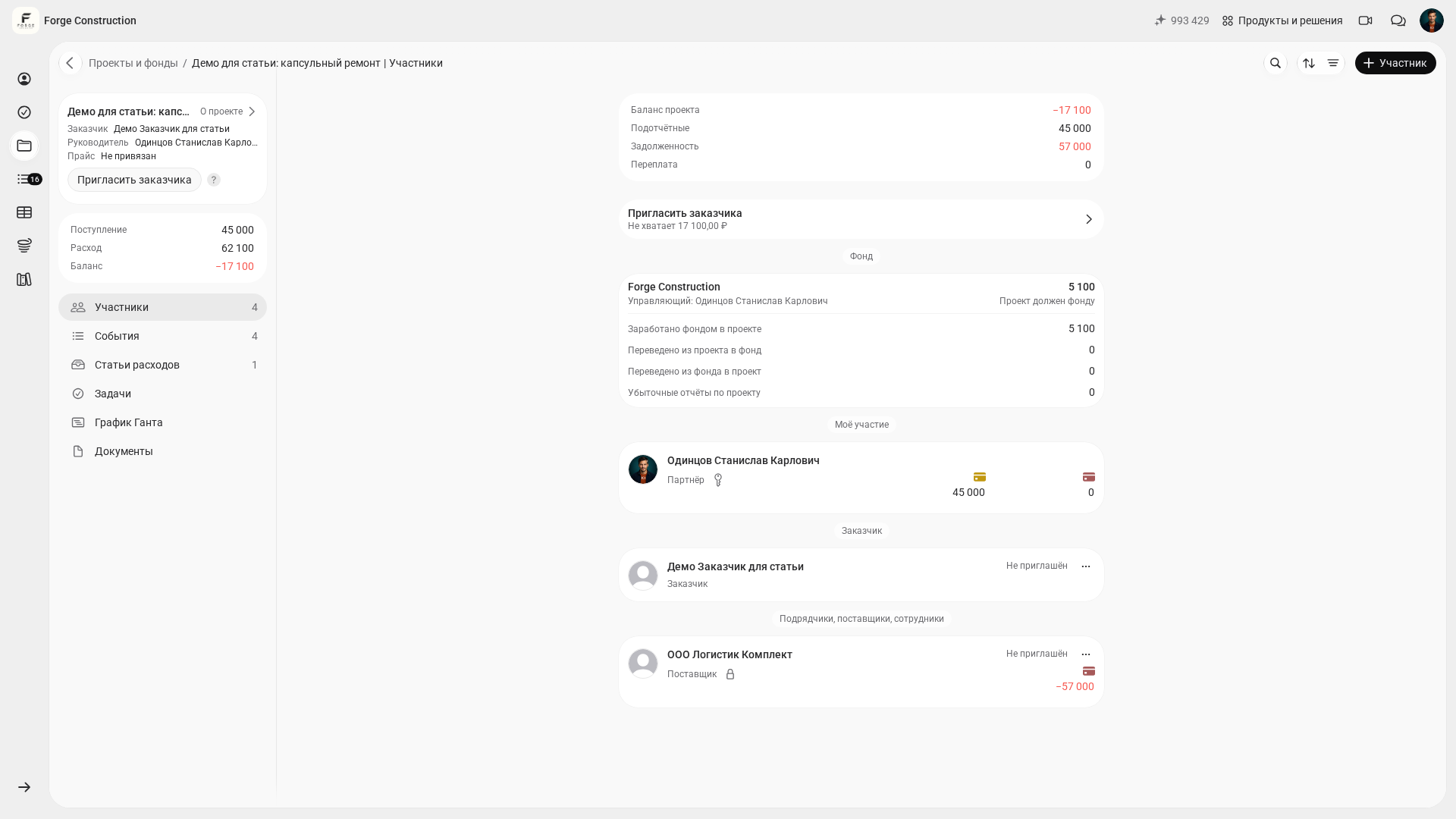
Funds to be accounted for are another area that needs reconciliation. If money has been issued but only some expenses have been supported, or some receipts have been lost, check the transactions themselves and the supporting documents. “Project balance,” “Accountable funds,” “Debt” and “Overpayment” on the project screen are different figures; a mismatch alone does not prove missing receipts or an accounting error. A participant’s accountable balance cannot automatically be equated with the overall project balance either. Examine the underlying records and the meaning of each figure; an example in Participants is shown below.
How the 101 app helps with project reports
In the 101 app, you can view a selected project’s financial records and filter them by period and type. The example below shows the “Demo for article: capsule renovation” project in Forge Construction, viewed from the company owner’s account.
All four screenshots show the Russian interface and fictional demo data. They were viewed from the company owner’s account; the existing records were not changed.
Participants and different figures
Open an existing project and go to Participants. The top of the screen shows Project balance, Accountable funds, Debt and Overpayment separately; below are the fund panel and participant cards. Your own participant card shows your accountable balance. To reconcile the figures, check the records relevant to each one: different amounts alone do not prove an error.
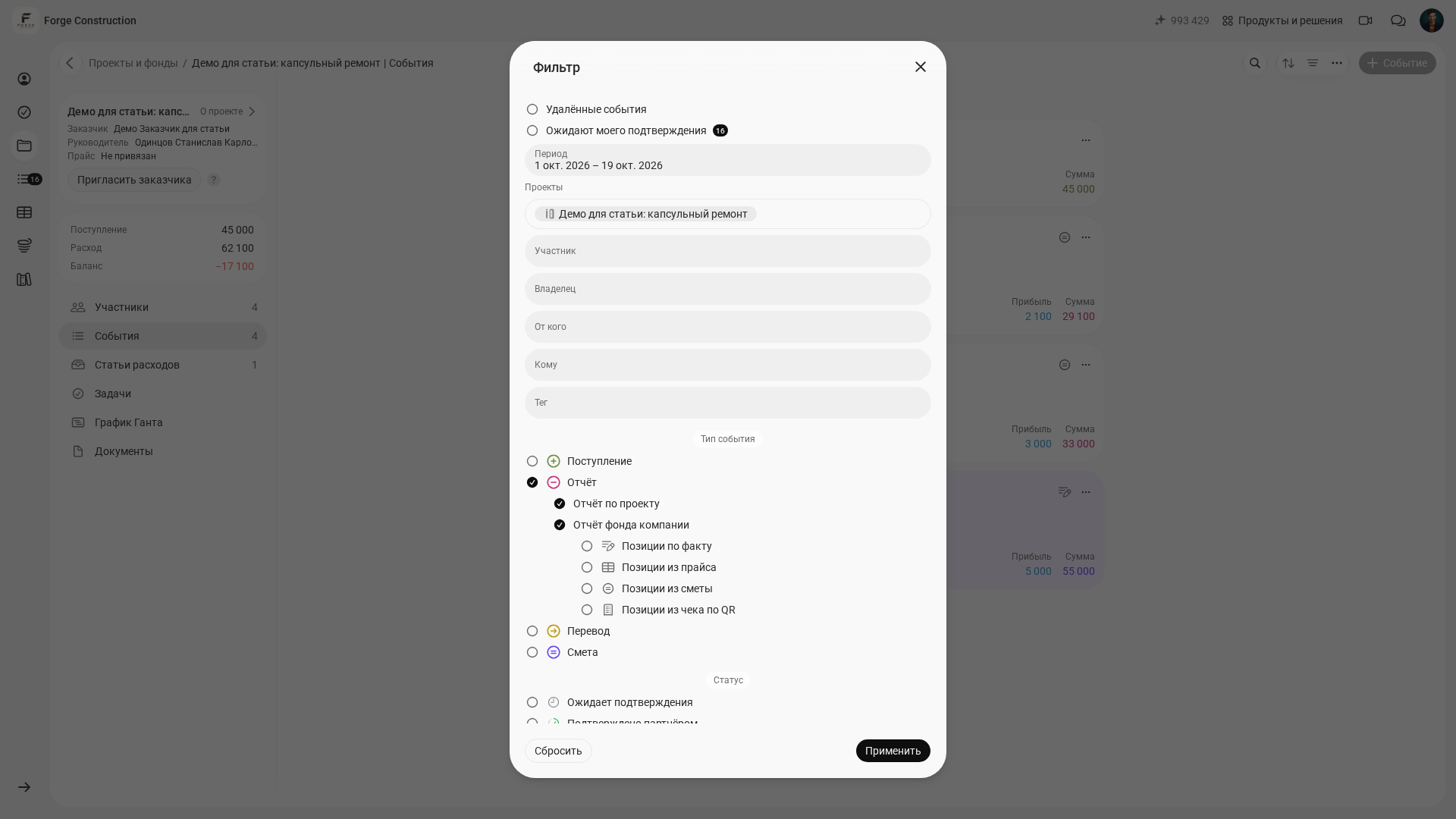
Filtering events by period and type
Go to Events and open Filter. In this example, the project is already selected. The Period field is set to 1–19 October 2026; Report and both its subtypes, Project report and Company fund report, are checked in the event types. In the next screenshot, the conditions have been selected, but Apply has not yet been clicked.
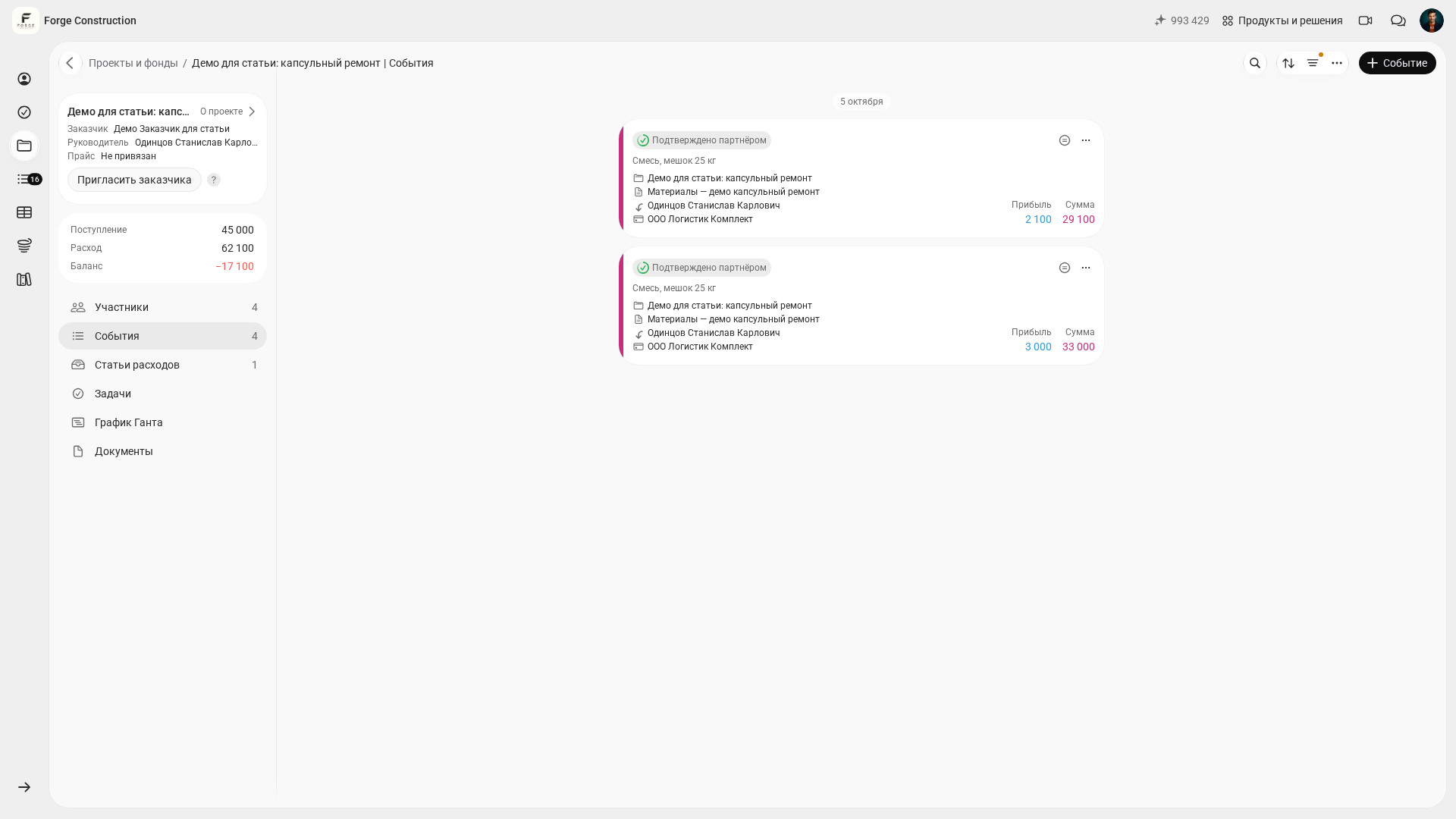
Click Apply and check the list itself. In this demo, applying the filter shows two existing Project report records dated 5 October and marked Confirmed by partner. The dot beside the filter icon indicates that the conditions are applied. “Events 4” in the sidebar counts all events in the project; the two cards in the selected list are the filtered result. Selecting both subtypes does not mean that the results must include records of each subtype.
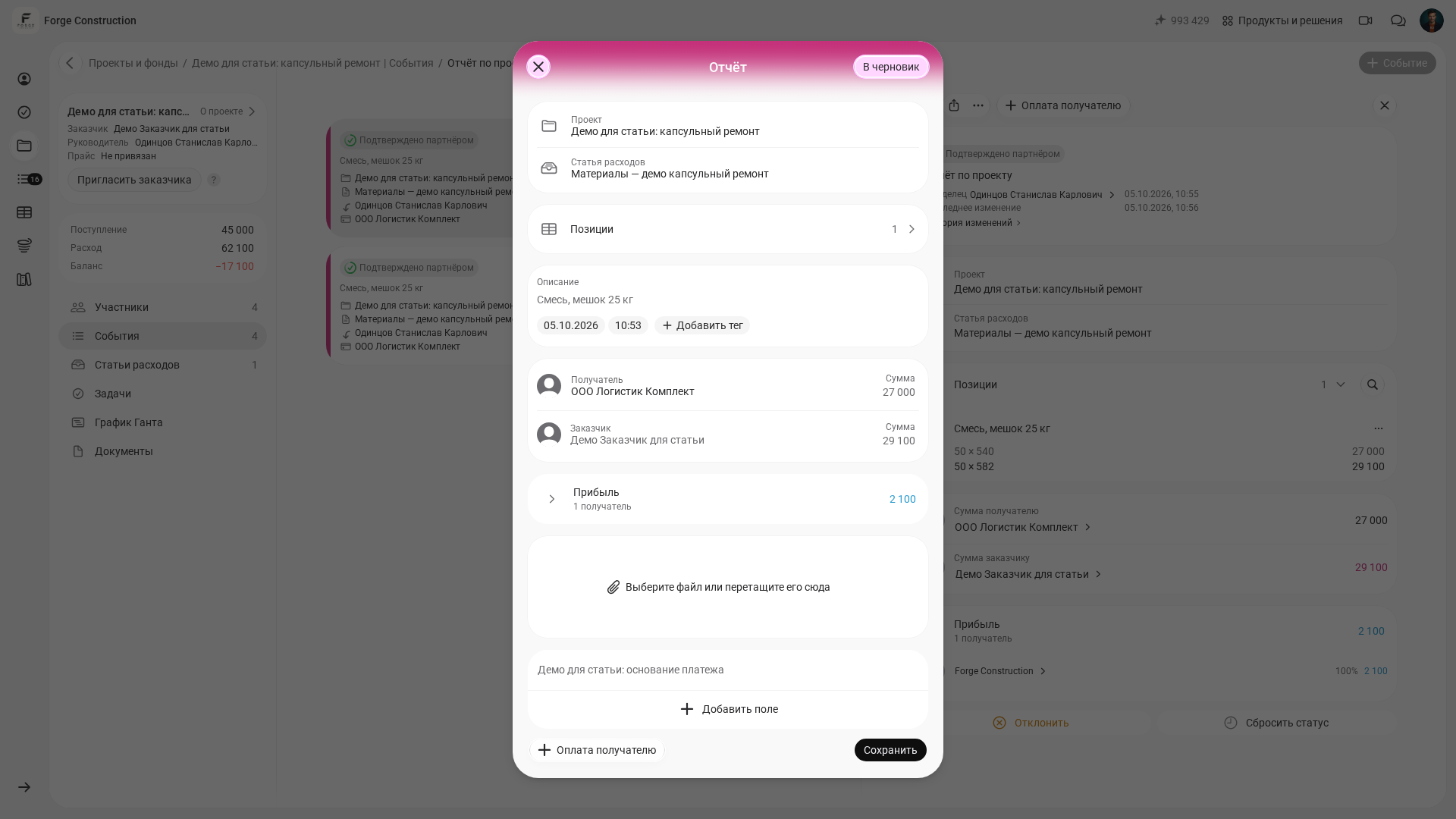
The form for an existing report
Open an existing Project report and click Edit event. In the form, you can check the project, expense category, description, date and time, recipient and client, and their amounts. The Line items section and the “Select a file or drag it here” area are also visible. In the screenshot, the line items are collapsed and the file area is empty; the form was only opened, without any changes or saving.
Prepare the client summary using the procedure agreed by the team: reconcile the selected records against supporting evidence, collect details of completed work, materials, payments and amounts owed, and add copies of supporting documents. Agree on the format, period, responsible person and delivery method with the client separately. Determine how legally significant original documents should be stored according to the applicable requirements.
For a deeper understanding of the owner’s management reports, start with the blog’s introductory articles: 3 essential reports for business owners: P&L, cash flow and the balance sheet and the cash flow statement: format, sections and how to prepare it.
If your team argues about why “the bank statement shows enough money” while “it feels like there is none,” the problem often lies in how transactions are recorded. For more on this, see cash basis vs. accrual accounting: what is the difference?.