

Contents:
- What are unrecorded expenses, and how do they affect profit?
- 6 common reasons expenses go unrecorded
- Categories of unrecorded expenses: where should you look first?
- How can you find errors in the records?
- How can you introduce expense tracking without team resistance?
- A tool that helps uncover unrecorded expenses
- What to do after the first discovery: make the improvement last
What are unrecorded expenses, and how do they affect profit?
Unrecorded expenses are expenses that have been incurred but do not appear in the spreadsheets, records or services used to track money. In construction and renovation, this gap often arises where many people make many small payments: a tradesperson buys consumables, a site supervisor pays for delivery, the office pays for advertising, or a bank fee is debited. The account holds less money, but the project balance has not been updated.
Unrecorded expenses distort the picture used to manage the business. If an expense is missing from the records, the budget-versus-actual comparison is incomplete. If an entry exists but is not correctly linked to a site and a category, analysing that particular project becomes difficult. Decisions end up being based on intuition.

Fictional illustration: a man at a table talks on the phone and passes Russian ruble banknotes to another person. The image does not establish an actual payment or a missing report.
There is an everyday version of this problem: receipts get lost. The 101 App Telegram channel described receipts totalling RUB 50,000 being found in a car after a project had been handed over (in Russian). The money had been spent, but the expenses were missing from the report.
6 common reasons expenses go unrecorded
Reason 1: company expenses get mixed with project expenses. Office costs, advertising, services, communications, equipment and administrative salaries are not attributable to a particular site. Unless these costs have a separate place in the records, every project can seem profitable while the company consumes its own resources. In 101, the Company Fund (in Russian) provides separate tracking. Available operations and limits depend on the plan; the Fund should not be considered an exclusive PRO+ feature.
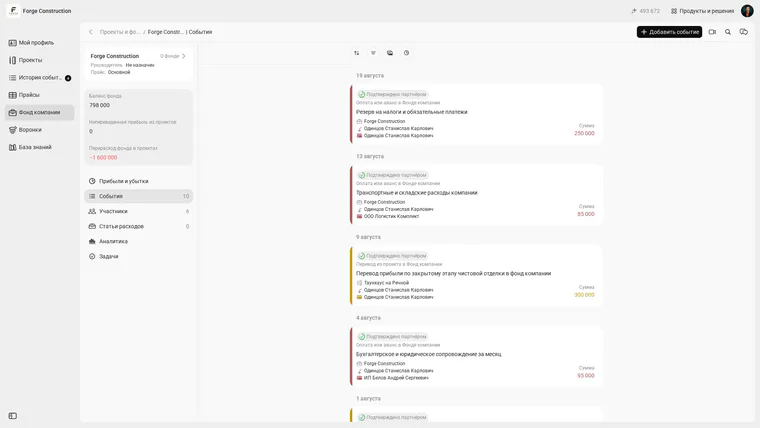
Fictional Company Fund events in the Russian interface: payments or advances are displayed separately from project transfers. A transfer between a project and the Fund does not represent a new expense.
Reason 2: funds advanced to people who must account for their use. Someone receives money, followed by promises to send the details later, claims that the driver has the receipt or that the supplier has the delivery note. Keeping these records together shows who received funds and how much has not yet been accounted for. The 101 App provides a balance of funds held on account for each counterparty to support reconciliation. A positive balance may represent unspent funds or a missing report; it does not, by itself, prove that money has been lost.
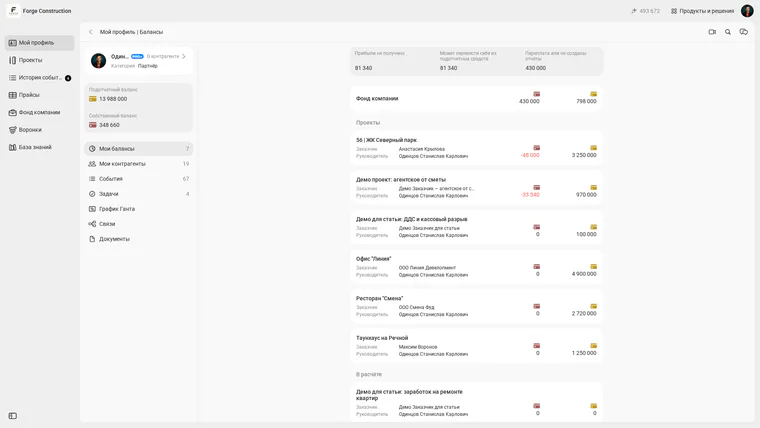
Forge Construction demonstration account, owner role. The Russian interface displays balances of funds held on account and personal balances separately for projects and the Company Fund. A balance alone does not prove a loss.

Fictional illustration beside a car. The Russian speech bubble reads: “Скинь еще, на материалы не хватает” (“Send some more; there is not enough for materials”). It illustrates a request for money and does not establish a purchase or the amount of funds held on account.
Reason 3: a cost arises after the project has finished. A delivery arrives later, a contractor submits a work completion document at the end of the month, or tools are bought for future sites. Without a rule for registering late documents and payments, expenses are easily missed. Distinguish the date a cost arises from the payment date: when tracking obligations, an unpaid invoice also needs an entry, while cash movements are reconciled separately.
Reason 4: expenses are not assigned to categories. Putting everything under “Other” makes analysis ineffective. You cannot tell what is driving costs: materials, logistics, labour or equipment. The 101 Blog explains the principles of assigning expenses to categories in detail.
Reason 5: manual records and duplicates. The same invoice is entered twice, a payment has no purpose specified, or purchases are scattered across personal cards. The article on hidden expenses identifies data disorder and manual operations as a separate source of losses.
Reason 6: costs are classified incorrectly. In a project-based business, direct costs need to be distinguished from indirect costs. Operating versus non-operating expenses is a different distinction and should not be confused with whether costs belong to a project. Office costs and marketing usually relate to operating activities. Otherwise, metrics stop reflecting reality. The blog has separate explanations of direct costs and non-operating expenses.
Categories of unrecorded expenses: where should you look first?
Thinking in categories helps you find unrecorded expenses. The following working map is sufficient for most companies on an initial pass. Refine its structure to suit the way your business works.
- Direct project expenses: materials, labour, subcontractor services, equipment, delivery and site consumables. Treating each site as a separate project makes these costs visible and comparable with the budget.
- Company expenses (overheads): rent, office salaries, marketing, communications, subscriptions, fuel, taxes and training. These are best tracked separately from project expenses.
- Funds advanced to staff and suppliers: check the amounts paid out and the reports accounting for their use. Paying out money or making an advance does not always mean an expense has occurred. During reconciliation, do not count the same purchase twice, once when funds are issued and again when their use is confirmed. More people buying with cards and cash make reconciliation harder.
- Estimating and calculation errors: consumables were not budgeted, delivery was omitted, carrying materials upstairs was overlooked, or waste removal was forgotten. Over time, such small items become a systematic drain on the margin.
How can you find errors in the records?
The table lists signals that warrant checking. Profit and available cash are different; a missing receipt or an entry under “Other” does not, on its own, mean an expense is missing. A duplicate may overstate recorded expenses. Establish the cause of each discrepancy using payments, entries and supporting documents.
| Signal | What to check | Possible causes of a discrepancy |
|---|---|---|
| The project shows a profit, but there is no cash | Payments outside the project | Delivery, small purchases, card debits |
| The site supervisor often asks for more money | Funds held on account and advances | Receipts have not been submitted; expenses lack supporting documents |
| Margins vary from site to site | Assignment to categories | Everything is entered under “Other”; analysis is unavailable |
| Company turnover is growing, but profit is flat | Company expenses | Advertising, services, equipment, office costs |
Next comes an initial reconciliation workflow. For a small volume of data, one evening and the following morning, roughly 1–2 days, can serve as a guide; the actual time depends on the number of transactions and the availability of documents. The process produces a list of discrepancies, each of which needs to be checked.
- Step 1. Export all outgoing payments for the last 30 days: bank payments, cash payments and card transfers.
- Step 2. Split payments into two groups: project-related and company-related. Mark transfers between your own accounts, funds issued on account and advances separately, so that you do not mistake every debit for an actual expense.
- Step 3. Within the project-related group, check links to projects and expense categories. If categories have not been configured, set up a basic structure.
- Step 4. Reconcile funds held on account: who received money, how much lacks a report, and which receipts and delivery notes have not been attached.
- Step 5. Review small payments: delivery, consumables, fuel, fees and services. They may include unrecorded expenses.
- Step 6. Compare the budget with actual costs for two active sites: identify overspending, costs missing from the records, and additional work for which no budget was allocated.
- Step 7. Set rules for the future: who enters expenses, by what deadline, what qualifies as supporting documentation, and who checks the records every week.
How can you introduce expense tracking without team resistance?
A smooth introduction rests on two principles: minimise new tasks for people on site and make information as clear as possible for the manager. Records break down when people have to fill in a huge form at the end of the week and remember who bought what.
A project-based model is simpler: each site is managed as a separate project, expenses are entered directly into it, and the manager can see the balance and overspending. This approach is fundamental to the 101 App.
A practical rollout can follow these steps:
- Step 1. Choose one active site and begin tracking only that site's expenses. Add the others once the team has become used to the process.
- Step 2. Set up 5–8 expense categories that suit your business, such as materials, labour, equipment, logistics and other expenses.
- Step 3. Agree when entries must be made: purchases and payments are recorded immediately, and documents relating to obligations are registered when received. If a tradesperson buys materials, they record the purchase and attach supporting documentation; money issued to them is recorded separately.
- Step 4. Simplify documentation: a receipt, photo or delivery note. Photograph a paper receipt and attach it at the time of purchase; by the end of the week it is easy to lose.
- Step 5. Check funds held on account: amounts issued are reflected in the person's balance, use of the funds is supported by reports, and any unused balance is returned or reconciled separately. This encourages discipline for both the manager and the team.
- Step 6. Carry out a short financial review once a week: allow roughly 30–40 minutes for projects, funds held on account and company expenses. Larger volumes of data or discrepancies will require more time.
A tool that helps uncover unrecorded expenses
A tool for finding unrecorded expenses needs to do three things: assign each expense to the right place, retain supporting documents, and show balances for people and projects. The 101 App is built around project-based tracking: each site has a separate project with expense categories, reports and a clear balance.
Key features that help bring unrecorded expenses to light:
- Recording purchases and supporting documents. 101 can recognise line items and attach files to a report. Its website advertises receipt scanning by QR code; compatibility with a particular receipt must be checked and should not automatically be assumed to be the same in every country. After recognition, check the line items and total, then save the report.
- A balance of funds held on account for each person. You can reconcile money issued with the reports submitted. A remaining balance needs to be checked: it may include money that has not yet been used.
- The Company Fund. A separate place for company events and settlements keeps office costs from getting lost among project data. Check plan conditions and role permissions separately. A transfer between a project and the Fund does not itself create a new expense.
- Reports by project and expense category. Configured categories show what is driving the budget: logistics, materials or labour.
In the report form labelled “Отчёт”, specify a project or the Company Fund and an expense category, then check the line items. The “Сканировать позиции” (“Scan line items”) button starts work with a selected image; nothing has been recognised or saved in the screenshot shown.
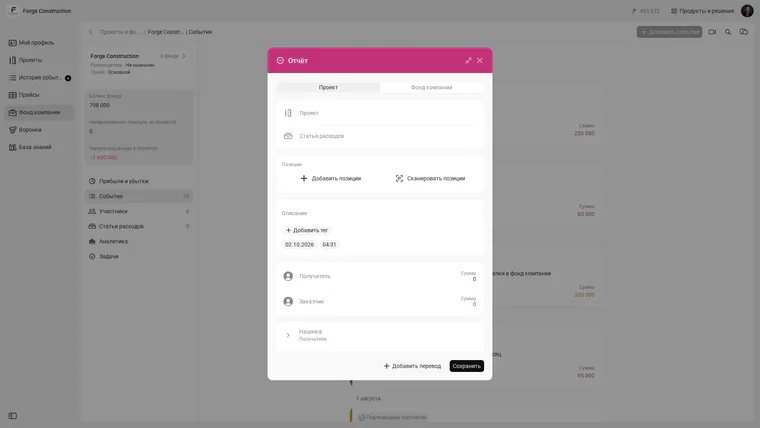
New, unsaved “Отчёт” report form in the Russian interface. Project and expense category fields and the option to add line items are visible. An empty form does not establish a completed purchase.
In the “Файлы” (“Files”) section, attach supporting documentation to the entry. A button or an empty form does not prove that a document has been uploaded; check it and the amount before saving.
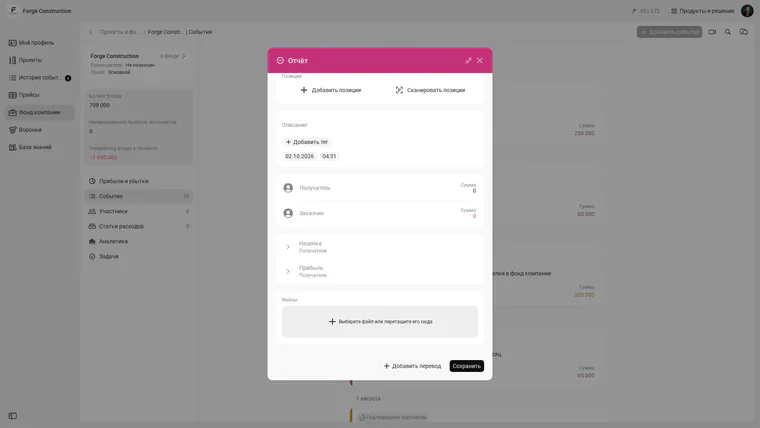
Lower part of the same unsaved “Отчёт” report form: the “Файлы” section for attaching supporting documents. No file has been selected and nothing has been saved.
A hypothetical example in Russian rubles: a week's reconciliation reveals RUB 50,000 of purchases supported by forgotten receipts, RUB 80,000 of unallocated purchases, RUB 40,000 for delivery and RUB 30,000 for office services. Total: RUB 200,000 of previously unrecorded expenses. This is a fictional calculation, with no guarantee of the same result for your company. Recording these costs makes the profit figure more accurate; it does not recover money already spent.
If you would like to discuss tracking using examples from your company, a free 101 presentation gives you an opportunity to ask questions about projects, funds held on account and the Company Fund.
What to do after the first discovery: make the improvement last
Finding unrecorded expenses is half the job. Next, make sure you do not have to find them again a month later. This takes consistency and simple rules that people actually follow.
Three foundations keep the improvement in place:
- One source of truth. Expenses are recorded in one place, rather than scattered across spreadsheets, chats and the site supervisor's memory.
- Consistent categories. Expense categories do not change every day and provide enough detail for analysis and discussions about budget versus actual costs.
- Weekly reconciliation. Projects, funds held on account and company expenses. This short routine keeps the records in working order.
For a deeper understanding and a systematic approach, the 101 Blog has resources on assigning expenses to categories (in Russian), tracking funds held on account (in Russian), hidden business expenses (in Russian) and non-operating expenses (in Russian).