In a project business, money and work move in parallel: an advance payment arrives, materials are purchased, a contractor receives funds to account for, a stage is completed, additional work is agreed and a payment is delayed. When the facts about these events are scattered across chats, statements and the manager's memory, management data starts to lag behind.
When records are entered late, you may be slow to notice overspending, a cash shortage before payments fall due or a loss after rework. Timely entry helps you raise questions about discrepancies sooner; resolving them also requires checking documents, whether all costs are included and payment deadlines.
Below, we explain what management data is, the minimum a manager needs in a project business, how to organise its collection and how the 101 App can help.
Contents:
- What is management data?
- What management data does a manager need in a project business?
- Three basic reports: cash flow, P&L and the balance sheet
- Why does management data fail to reconcile?
- How do you organise the collection of management data?
- How does the 101 App help collect management data?
- The first week: how do you start collecting data in 101?
What is management data?
Management data consists of facts about a project and a company, collected in a way that helps a manager answer practical questions: how much has been earned, where the money is, who owes whom, what is pushing the budget off course, and what should change in pricing and processes. This data sits alongside financial accounting and adds a management view: by project, business area, manager and expense category.
In a project business, it is useful to collect data around each project as a separate accounting unit. The 101 App lets you compare recorded receipts, expenses and the project balance. You need to check which records are included: cash movements and the balance of recorded transactions do not show profit on their own. A company's balance sheet is a separate report on its assets, liabilities and equity at a specified date.
What management data does a manager need in a project business?
The minimum set of management data depends on the scale of the business. A manager needs information on profitability, cash movements over time and obligations. Choose additional metrics to support decisions about pricing, workload, growth and margin control; agree in advance on what each metric includes and how it is calculated.
Once you have collected this minimum using shared rules, you can check each week which projects have rising costs, which work generates a margin, what data is needed to assess project managers and how much money is available after allowing for obligations. For example, you could choose 2–4 weeks of regular entry and reconciliation for a pilot. This is an example of a period for organising the work; whether the data is sufficient and what results you achieve depend on project duration, the completeness of the records and the team's actions.
- Project economics: planned and actual figures by category, project cost, margin and profit, with an agreed definition of income, costs and the reporting period.
- Project cash: actual receipts and payments, opening and closing balances; separately, expected receipts and payments to check for a possible cash shortfall by date.
- Obligations: what has already been ordered, what needs to be paid and when, which advances have been issued and which work has been accepted.
- Debts and expense advances: who owes you, whom you owe, and which amounts and documents still need to be reconciled.
- Company summary: overheads, the contribution of projects towards fixed costs and a reserve; check separately what the reserve includes and whether the funds are available.
Three basic reports: cash flow, P&L and the balance sheet
When a manager asks for figures, they need reports with a clear question and a defined set of metrics. Management accounting commonly uses three reports: the cash flow statement, the profit and loss statement (P&L) and the balance sheet. They describe different aspects of the business. Preparing them requires agreed rules and source data; having a record or metric in an app does not by itself confirm that a report is complete.
The cash flow statement shows actual receipts and payments by date and category over a period. To assess whether there will be enough money for upcoming payments, supplement it with the opening balance and a forecast of receipts and mandatory payments. An advance payment received is a cash movement; on its own, it does not confirm that revenue has been earned.
The P&L statement compares income and expenses attributable to a period and helps assess the performance of business areas and projects. The payment date may differ from the date when income or an expense is recognised. Define in advance which costs to include when calculating margin; for net profit, include all company expenses attributable to the period, including overheads, applicable taxes and adjustments.
The balance sheet shows the company's assets, liabilities and equity at a specified date, including receivables and payables. Its breakdowns help you check where funds are tied up. To assess how urgently debts need to be settled, you also need due dates and a payment schedule. A project balance based on recorded transactions and a bank balance do not replace this report.
Why does management data fail to reconcile?
One cause of discrepancies is late data collection. It is useful to check daily how much money has been received and paid, and which obligations have been incurred for work, materials and advances. If you reconstruct this information from chats and statements after the event, flag missing items and reconcile them before drawing conclusions about the budget or the project's results.
A second cause is the lack of shared lists of projects, expense categories and counterparties. If similar purchases are assigned to different categories, cost comparisons become distorted. Agree on classification rules and correct records on a clear basis; manually changing the final figure without checking the underlying transactions hides the cause of a discrepancy.
A third cause is relying on one person for data entry. If one finance specialist receives, checks and enters all the information, a heavy workload can cause delays. Divide the collection and checking of source facts so that the manager knows the cut-off date, which documents are missing and who is responsible for clarifications.
How do you organise the collection of management data?
Organising the collection of management data starts with brief rules and clear responsibilities: who records a fact, when they do it, who checks the supporting evidence and where to view the result. For each rule, name the person responsible and define what to do if there is a delay or an error.
You can use “one site, one project” as a starting structure. Then divide responsibilities: the project manager monitors timely record entry, the team collects facts on site, and the owner reviews the summary once a week. Check whether this structure fits your contracts and work stages. This approach is discussed in “Project accounting without a bottleneck” (in Russian).
- Step 1. Decide which decisions you want the figures to support: pricing, project selection, hiring, assessment of project managers and the reserve. For each decision, identify the question and the data needed.
- Step 2. Define the structure: the list of projects, income and expense categories, and rules for additional work and refunds. Agree on how to separate project costs from company overheads.
- Step 3. Assign responsibilities: who records receipts and expenses, who reconciles expense advances and returned funds, and who checks documents. Clarify the access permissions each participant needs.
- Step 4. Introduce a rule to record events on the day they occur wherever possible. If a document will arrive later, record the obligation and flag it for a later check under the agreed procedure. Allow for delays when reviewing the data.
- Step 5. Set checkpoints: for example, the project manager checks recorded transactions and the balance daily, while the owner reviews the summary once a week. Take account of stage duration, the payment schedule and data completeness; assign an action and a deadline for each discrepancy found.
How does the 101 App help collect management data?
The 101 App can be used to record events and monetary transactions by project. Recorded receipts, expenses and balances provide a basis for reconciliation with documents and obligations. Calculating project cost, margin and profit also requires an agreed set of metrics, a reporting period and complete source information; the current transaction balance does not automatically establish these results.
The profile shows separate balances for expense advances and personal funds. To check expense advances, reconcile the amounts issued, recorded expenses and returned funds against the documents. The displayed balance does not by itself prove that an advance has been settled with supporting documents, confirm an actual bank balance or show that a payment has been made; it cannot be treated as the company's net profit.
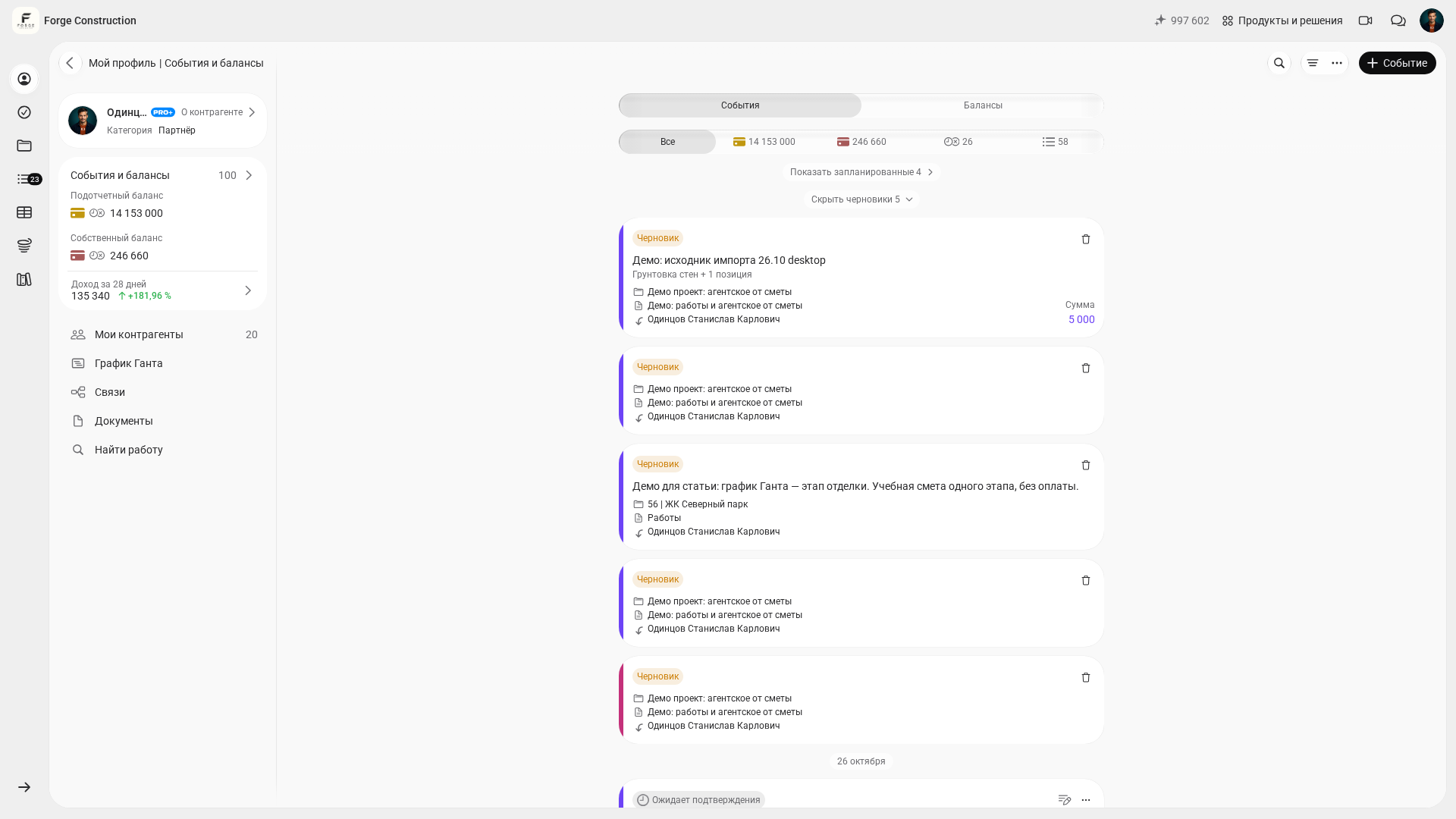
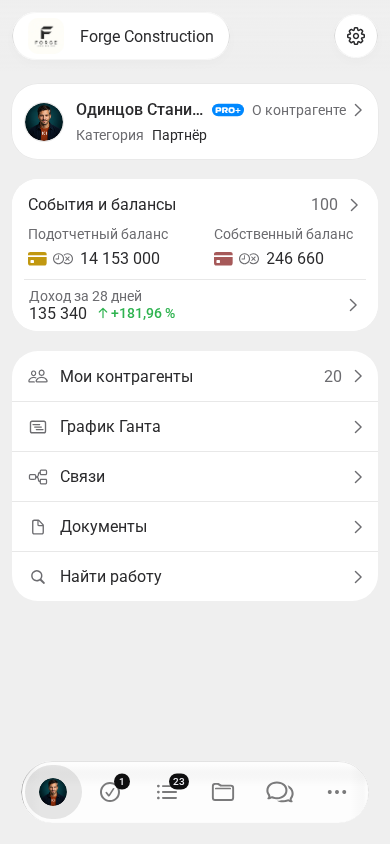
For timely collection, assign responsibility to the people who receive information about a purchase, completed work or a payment. Define which supporting evidence to keep, which project and category a record belongs to, and who will check it. Before starting, check on the devices you use which entry methods and document attachment options are available to your account and role.
If information comes from contractors and project participants, agree on how it will be submitted and checked. Sharing these responsibilities can reduce the queue of work waiting for one employee, provided the team acts promptly. Reconcile the overall picture against source transactions, documents and missing items; an automatic summary does not by itself guarantee complete data or a correct conclusion.
Once entry and reconciliation are organised, assess which additional tools you need to review overheads, working capital and project results. If you are considering PRO+, check what the plan currently includes: whether the reports, metrics and actions involving the Company Fund that you need are available for your specific role and scenario. Test this with your own example; subscribing to a plan does not eliminate missing transactions or prove net profit.
The first week: how do you start collecting data in 101?
In the first week, choose a small scope to check: for example, one active project and an agreed period. Your goal is to organise the recording of facts in one place using consistent rules, assign responsibilities and identify gaps. This is the start of checking the process; how complete the picture is after a week depends on document availability and transaction timing.
For the first review, aim to compare records of receipts, expenses, expense advances and debts with the documents for the selected project. Note separately what has not yet been received and who will check it and when. After reconciliation, you can identify which data and calculations are missing for analysing margin, overheads, the Company Fund and reports for the owner; check the available functions separately. Useful references are the three essential reports for business owners and the article on working capital.
To discuss an accounting structure for your business, you can book a demonstration of the 101 App. Prepare a sample project, a list of data sources and questions about the functions and access permissions you need. During the meeting, clarify how the proposed structure fits your contracts and working practices.