Business performance is often judged by intuition: there is enough money in the account, the team is busy and projects are moving forward. The problem is that this impression lags behind reality. An estimating error, overspending on materials, excessive advances to contractors and a falling margin come to light when it is already too late to put them right.
A practical way to assess performance is to bring the figures together in one place and track how they change over time. This is especially important in construction and renovation: projects run for a long time, payments arrive in instalments, purchases happen daily and some money is advanced to people for expenses.
Below are five features in 101 for regularly checking data on projects, transactions, expense advances, planned and actual figures, and overheads. Reconcile these data before drawing conclusions about profit, cash risks and the team's work.
Contents:
- Where should you start when assessing business performance?
- Feature 1. How do you keep records by project?
- Feature 2. How do you record money movements?
- Feature 3. How do you control expense advances?
- Feature 4. How do you compare planned and actual figures?
- Feature 5. How do you use analytics and PRO+ features?
- How do you assess business performance each month?
- What mistakes get in the way of performance analysis?
Where should you start when assessing business performance?
For regular performance reviews, distinguish between profit, cash movements and liabilities. Collect data on projects, events and balances in 101, then examine the analytics indicators. A single amount on a card cannot replace a complete management report on cash flow, profit and loss, or the company's financial position.
| What should you check? | What indicates a problem? | Where can you see it in the 101 app? |
|---|---|---|
| Project margins and profit | Sites are busy, but profit for the month is low | Project data and analytics; comparison over the same period |
| Cash flow | Payments and purchases constantly turn into emergencies | Records of incoming and outgoing payments by project |
| Planned versus actual estimate figures | Every project costs “just a little” more than estimated | The financial planned-versus-actual chart; a separate reconciliation of expenses |
| Expense advances | Money has been issued, but supporting receipts are missing | The participant's balance and related transactions |
| Company Fund expenses | Overheads are growing, but no one reviews them by category | The Company Fund and overheads; event approval is included in PRO+ |
These five features help you gather data for a review: what is happening on projects, how money is moving and which expenses need checking. Match the records against actual transactions and liabilities, then investigate the reasons for variances and discuss the work of those responsible.
The screenshots show fictional training data for Forge Construction in the Russian-language 101 interface. The company owner's account is open. Elements are arranged differently on a computer and a phone, and the available actions depend on the user's role.
Feature 1. How do you keep records by project?
A lack of separate transaction records for each site is what leaves a project-based business operating “blind”. Today, an advance for Site A arrives in the account; tomorrow, that money pays for a delivery to Site B; the following day, a supervisor receives an advance “for purchases”. Unless you record which project each transaction belongs to, the overall cash balance will not tell you the profit on individual sites.
Open the relevant site in “Projects and funds” («Проекты и фонды» in the Russian interface). On the project card, reconcile incoming payments, expenses, the balance and funds advanced for expenses with that site's transactions. A project's cash balance does not, on its own, equal profit: it is affected by payment timing, advances and outstanding liabilities.
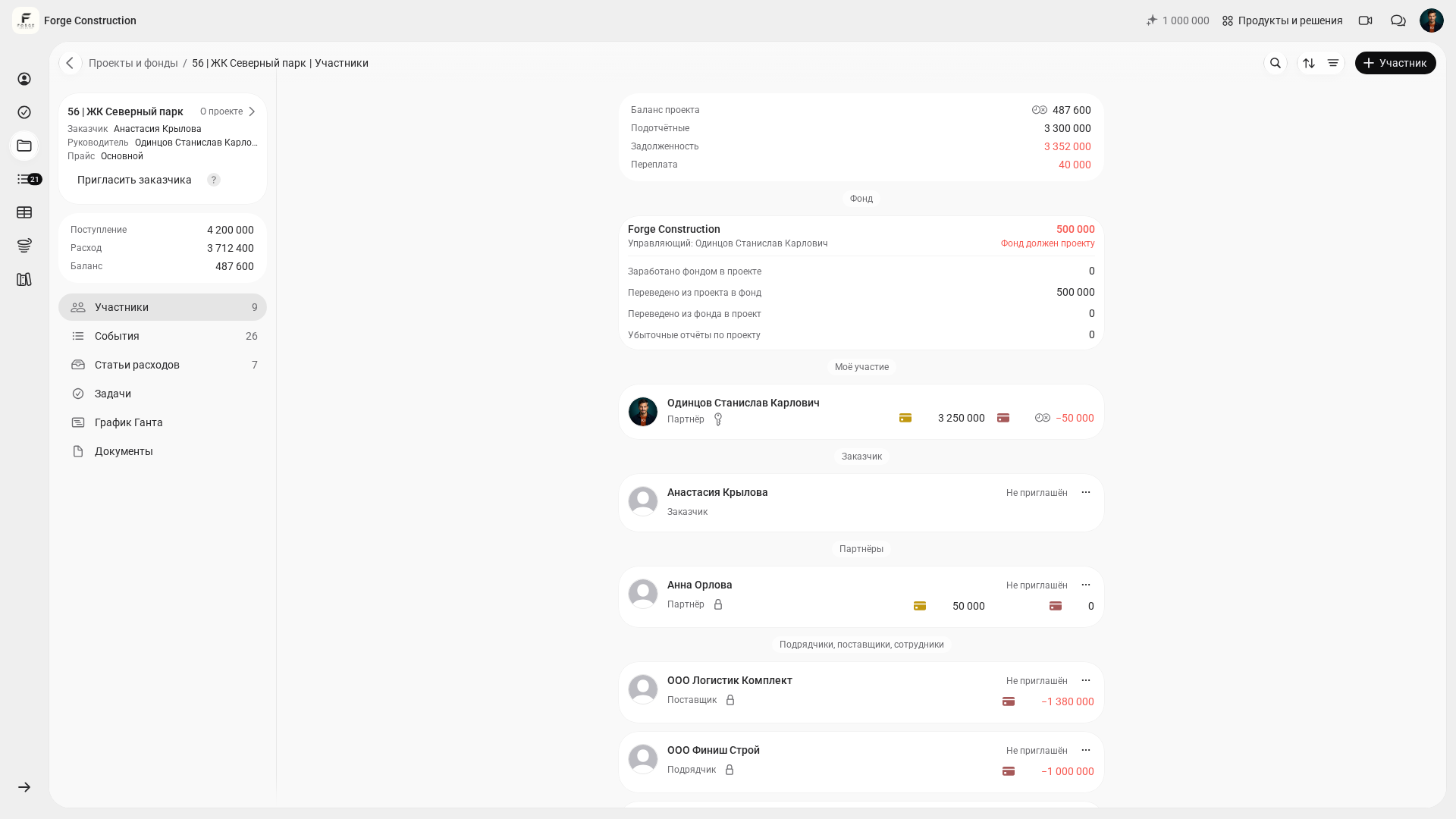
Compare project profit with the company's cash flows over the same period. A profitable project can still be accompanied by a cash shortage because of the timing of receipts and payments, advances and liabilities. Check the allocation of project costs and overheads separately.
Feature 2. How do you record money movements?
Business performance can deteriorate quietly: one purchase has no receipt, another is paid into a personal card account, and a third is left with “I'll enter it later”. A week later, no one remembers exactly what was bought, and a discussion about overspending turns into an argument.
Record income and expenses in 101 while the circumstances of each transaction are still fresh in your memory. To check a record, open the project's “Events” («События») and the relevant report: verify the date, participant, category, description and line items. Match the record against supporting documents. Agree in advance who sends information from the site, who enters it and who checks it.
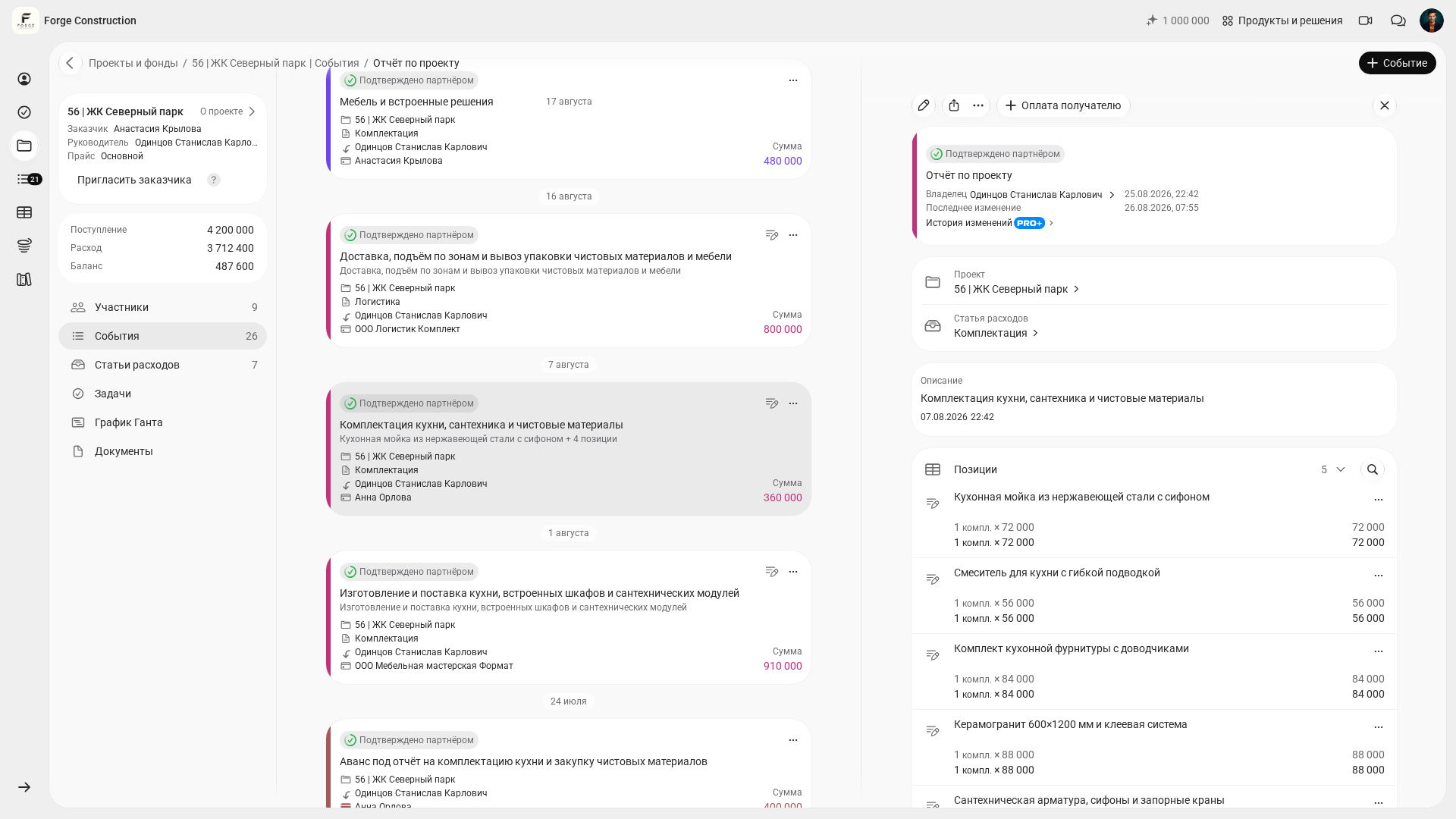
Agree within the team that information about all site spending must be entered in 101 promptly. Then review expenses by category and check the supporting records: deliveries, consumables, downtime, rework and unnecessary extra site visits. Use these data with the people responsible to establish why the margin has changed.
Feature 3. How do you control expense advances?
Expense advances often become a grey area in project work. Money has been issued and purchases made, but some receipts have been lost and some funds have been used for other needs. For analysis, it is important to distinguish money advanced for expenses from recognised expenses: issuing an advance does not itself reduce profit. Until the spending is reported and reconciled, it remains unclear what has been spent and what needs to be returned.
Find the relevant participant in the project's “Participants” («Участники») section and check their outstanding expense advance balance. Reconcile the amounts issued, purchase reports and returns against related transactions and supporting documents. An individual amount helps you see the remaining balance, but a full reconciliation is needed before deciding on the next advance or repayment.
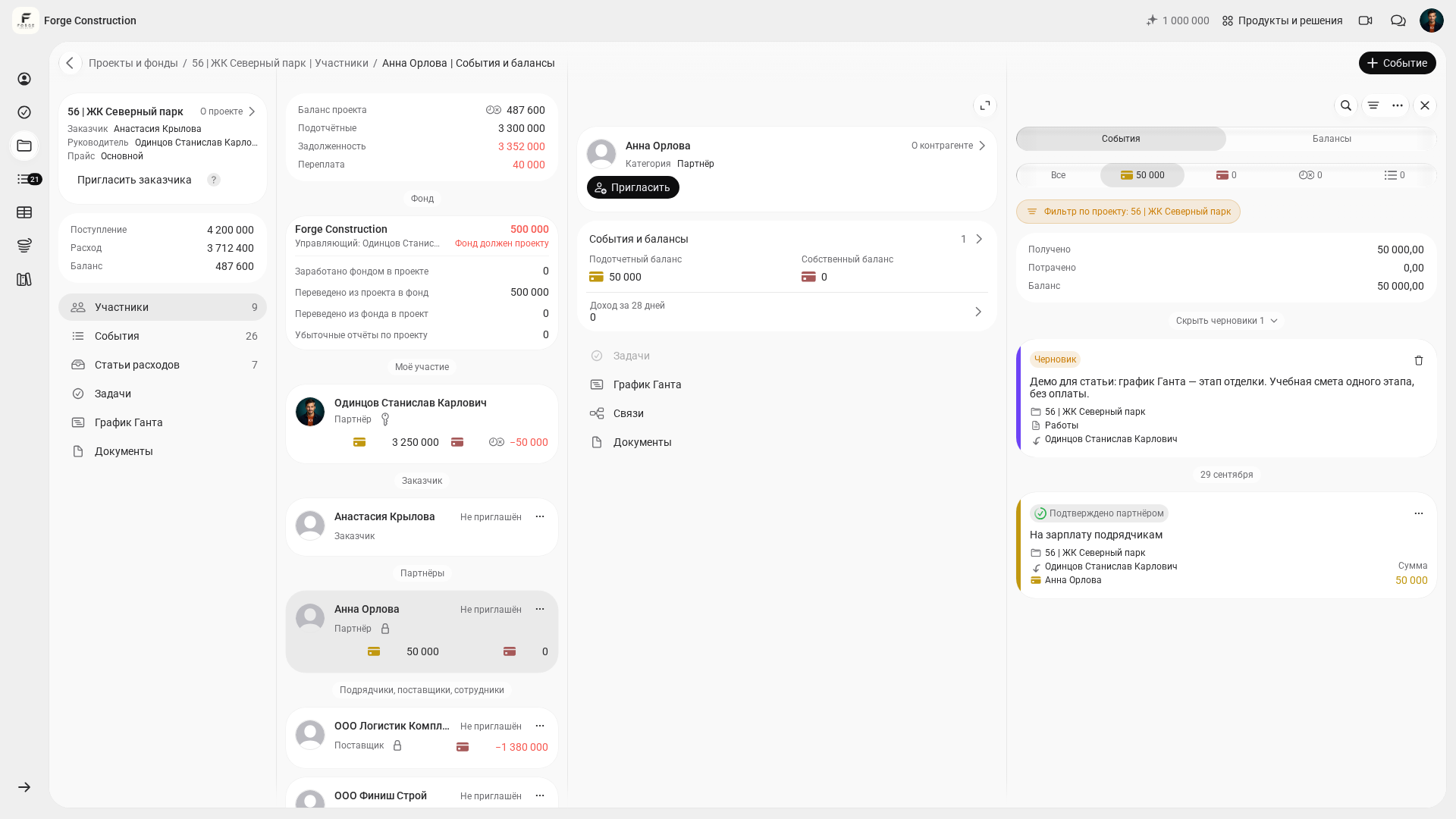
A hypothetical example: on Monday, a site foreman receives 120,000 for materials. On Tuesday, the foreman enters three expense transactions with receipts totalling 101,500 in 101. If there have been no other advances, expenses or returns, and all transactions have been recorded, the unused balance by Thursday will be 18,500. Reconcile this amount against the reports and the cash actually held by the foreman before planning the next purchase.
Feature 4. How do you compare planned and actual figures?
An effective business can forecast. If estimates consistently differ from actual results, the company pays for it in time, stress and money. Comparing planned and actual figures helps you check how accurately the team estimates and how consistently it meets the assumptions built into the calculation.
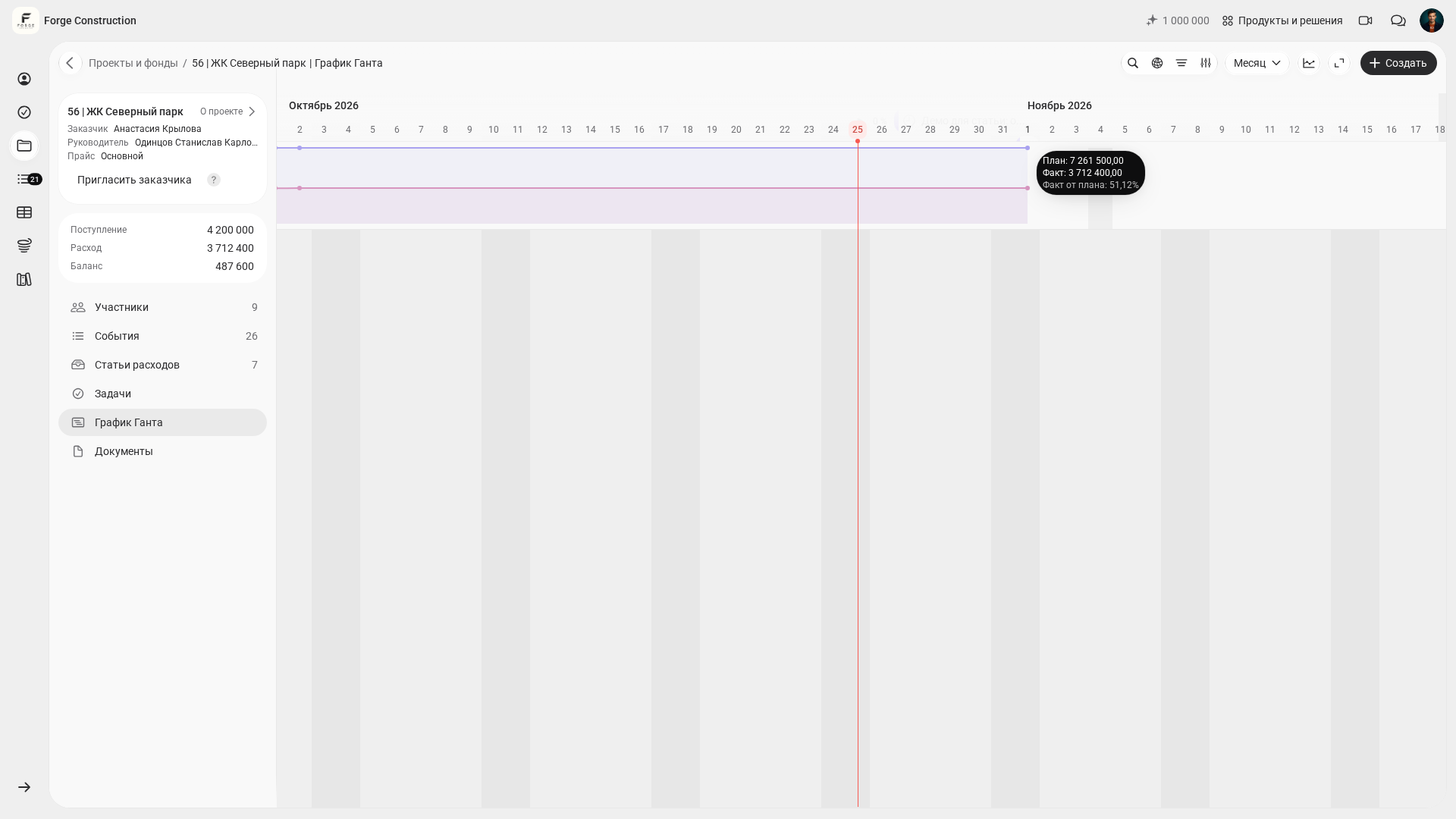
In the Gantt chart, open the additional charts, select “Planned versus actual” («План-факт»), then “Cost” («Стоимость») or “Profit” («Прибыль»). “Cost” compares the planned and actual amounts for the customer. The “Profit” indicator takes profit and markup into account. Review any difference alongside the original calculation and the recorded transactions to establish the reasons for the variance.
If you would like to explore expense category structure in more detail, the article on allocating construction expenses is useful: it shows how the level of detail affects the quality of your conclusions. Expense categories in the 101 app (in Russian).
The earlier you prepare and check the calculation, the earlier you will have a basis for control. Share the work of gathering task data among employees and appoint someone responsible for the overall document. Check the scope, quantities and prices before comparing them with actual results. How to create a cost calculation quickly (in Russian).
Feature 5. How do you use analytics and PRO+ features?
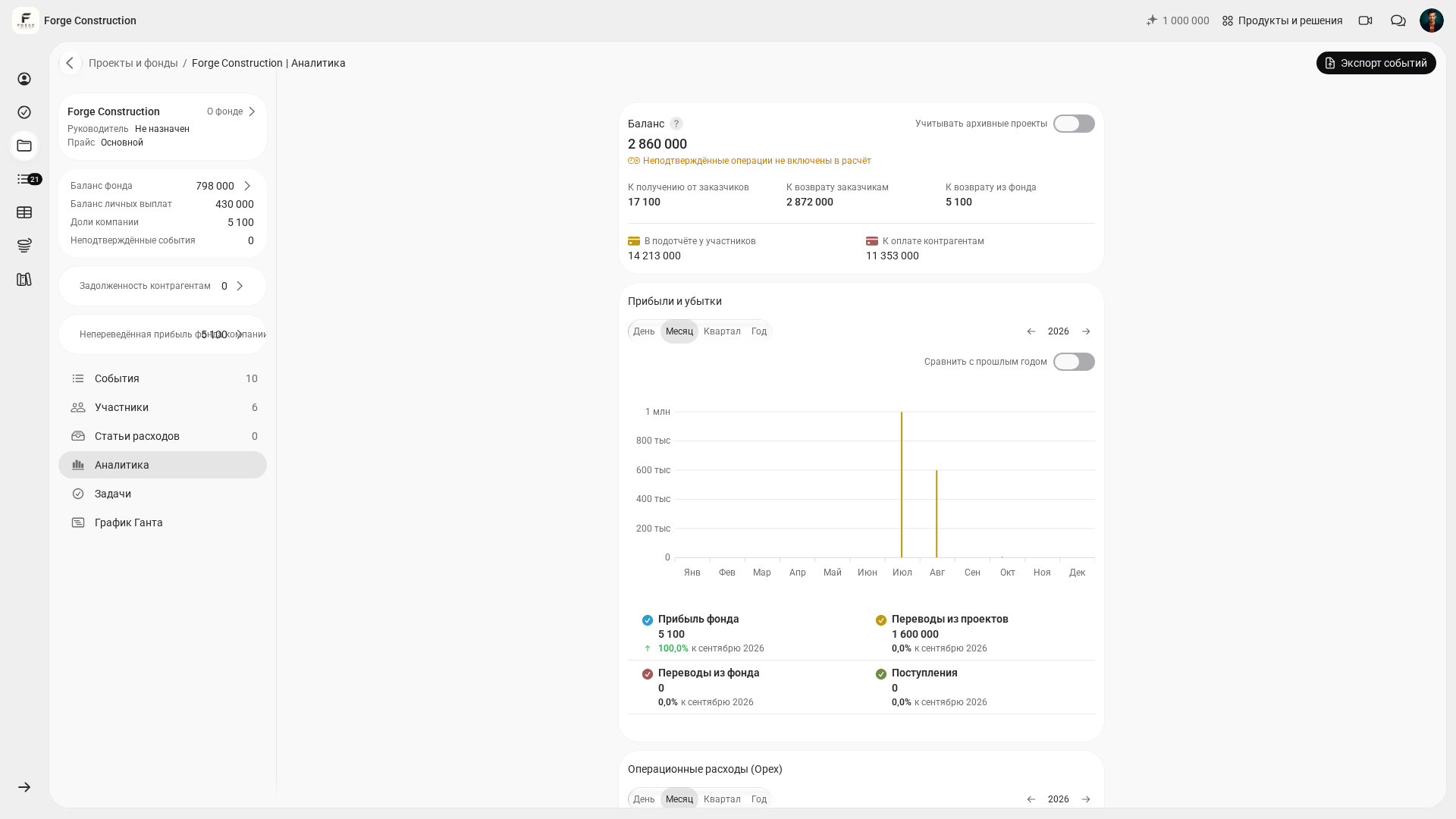
Open “Analytics” («Аналитика») in the Company Fund. In “Profit and loss” («Прибыли и убытки»), compare “Fund profit” («Прибыль фонда»), “Transfers from projects” («Переводы из проектов»), “Transfers from the Fund” («Переводы из фонда») and “Incoming payments” («Поступления») over the same period. Establish what each amount includes: Fund profit and money transfers cannot automatically be equated with the company's accounting net profit.
Use the “Company Fund” section to record overheads that do not relate to an individual site: marketing, office costs, services and bookkeeping. Review them separately from project costs. PRO+ includes expanded analytics and approval of all types of events in the Company Fund.
Another management task is to compare project results with the work of the people responsible. Compare profit and expenses while accounting for the scope of work, deadlines and project complexity. A project indicator is not, by itself, a ready-made assessment of an employee's individual performance: the reasons for variances need a separate review.
If you would like to understand which reports are most useful to a business owner, start with the basic three: cash flow, profit and loss, and the balance sheet. The article explains why you should review these reports regularly.
How do you assess business performance each month?
A one-off analysis is of limited help. A regular rhythm works: the same day at the end of each month, the same questions and the same set of reports. Performance review then becomes a manageable habit.
Here is a process that fits into a working week:
- Check that all active projects have been set up and that site payments and expenses are linked to the relevant projects. Record company overheads separately in the Fund.
- Compare projects over the same period: manually select the five with the highest profit and the five with the most noticeable fall in margin. Check that expenses have been recorded consistently.
- Compare planned and actual figures for key projects. Where there are variances, check the calculations, recorded transactions and expense categories, then discuss the reasons with the people responsible.
- Check expense advances: who still holds a balance, where receipts are missing and where money was issued a long time ago.
- Review overheads in the Fund: which categories are growing month on month, and how these expenses relate to the company's results for the same period. Consider transfers into and out of the Fund separately from expenses. Expanded analytics and approval of all types of Fund events are included in PRO+.
It is helpful to keep the results in one place: two paragraphs of conclusions and three decisions for the next month. As comparable data accumulate, you can assess trends and check which changes have produced results.
What mistakes get in the way of performance analysis?
First. Some expenses remain “off the books”. The money has been spent, but it is missing from the system. Reports show a higher margin, while actual profit is lower.
Second. Expense categories are too broad. When everything goes under “other”, the cause of a variance remains hidden. A reasonable level of detail makes the review quicker.
Third. Expense advances are tracked separately from projects. Unless advances, reports and returns are reconciled against project transactions, the data may differ. Check that records are complete and review the due dates of upcoming payments.
Fourth. Planned and actual figures are reviewed without investigating root causes. A variance does not fix anything on its own. Keep asking “why” until you reach an action: change a supplier, establish an approval rule or update the calculation template.
Fifth. Decisions are made without a time horizon. One month may be unrepresentative because of seasonality and holidays. It is better to look at at least three months if your aim is to assess business performance rather than find someone to blame.
If you would like to bring management accounting together into a complete system, the article on management accounting automation will help. It explains how to organise implementation without unnecessary disruption: data sources, roles, rules and regular analysis.