A sales funnel is more than a board for its own sake. It lets you see every day which leads are already being handled, which are waiting for an estimate, which have stalled without a next contact, and which are ready for a contract. It also helps you quickly spot where enquiries are being lost.
Below is a six-stage sales funnel system suited to construction and renovation. You can easily reduce it to 4–5 stages if your sales cycle is short.
Contents:
- Why use sales funnel stages when you only have a few leads?
- How can you make funnel stages clear to the whole team?
- 6 sales funnel stages for construction and renovation
- How can you adapt the stages to your sales cycle (4–5–7 stages)?
- How can you put a funnel into practice in the 101 App?
- Where should unsuccessful leads go?
Why use sales funnel stages when you only have a few leads?
When you receive 1–2 enquiries a day, sales funnel stages may seem unnecessary. You can keep everything in your head: whom to reply to, whom to send an estimate to, and whom to call back. Then a “black hole” develops: calls, messages, site measurements, rescheduled meetings, and late-evening enquiries. Some leads end up without a next action.
Hypothetical example: a lead enquires about renovating an apartment and asks in a message for an “average” price. You reply, and then hear nothing. A week later, you discover that the client was expecting a brief price range and some follow-up questions. By then, they have chosen another company. If the team checks leads daily against a separately maintained plan of next contacts, that check can reveal the missed step.
How can you make funnel stages clear to the whole team?
A funnel breaks down in two situations. First, stages are named according to someone’s impression, such as “thinking it over” or “almost agreed.” Second, there are so many stages that nobody remembers the transition rules.
Imagine a conversation in a sales team. The manager says, “This lead is in negotiations.” The team leader asks, “Does ‘negotiations’ mean the site measurement is booked, or that the estimate has been sent?” If there is no clear answer, the sales funnel stages are no longer helping you manage the process.
For a funnel in the 101 App to support your team’s work, define three things for each stage: what the stage means, its exit criterion, and the next action required by your team’s rules. You can keep these in a one-page internal procedure.
- Stage meaning: what is happening with the lead now.
- Exit criterion: the fact that allows the lead to move forward.
- Next action: a specific contact or document, with a deadline.
One more useful principle: your stages should reflect how you actually work. If a site measurement is always required, it deserves its own stage. If 70% of deals close after the first estimate without lengthy discussions, a separate “bargaining” stage will only cause confusion.
6 sales funnel stages for construction and renovation
The following is a suggested six-stage method for organizing work with leads. Use it as the framework for your team’s procedure and adapt it to the type of work you do. The stage names in the table describe a working model; you need to map them to the actual stages of your funnel in 101.
| Stage | Meaning | Transition criterion | Next action |
|---|---|---|---|
| 1. New enquiry | A lead has arrived and contact details are available | Initial contact has taken place | Get in touch and arrange a brief call |
| 2. Qualification | You have established whether the project is a good fit | You have the basic information: type of work, address, timing, and budget range | Arrange a site measurement or collect the project requirements |
| 3. Assessment and site measurement | You have gathered the information needed for the estimate | The site has been measured, or drawings/photos have been received | Agree on the estimate format and the deadline for preparing it |
| 4. Estimate sent | The client has received the proposal | The client has confirmed that they have reviewed the estimate | Discuss the estimate by phone and record the changes |
| 5. Terms being agreed | The agreement is being finalized | The price, schedule, payment stages, and scope of work have been agreed | Send the contract and an invoice or link for the advance payment |
| 6. Contract and advance payment | The deal is won | The advance payment has been received and the site start date has been confirmed | Hand over to the delivery team and create a project |
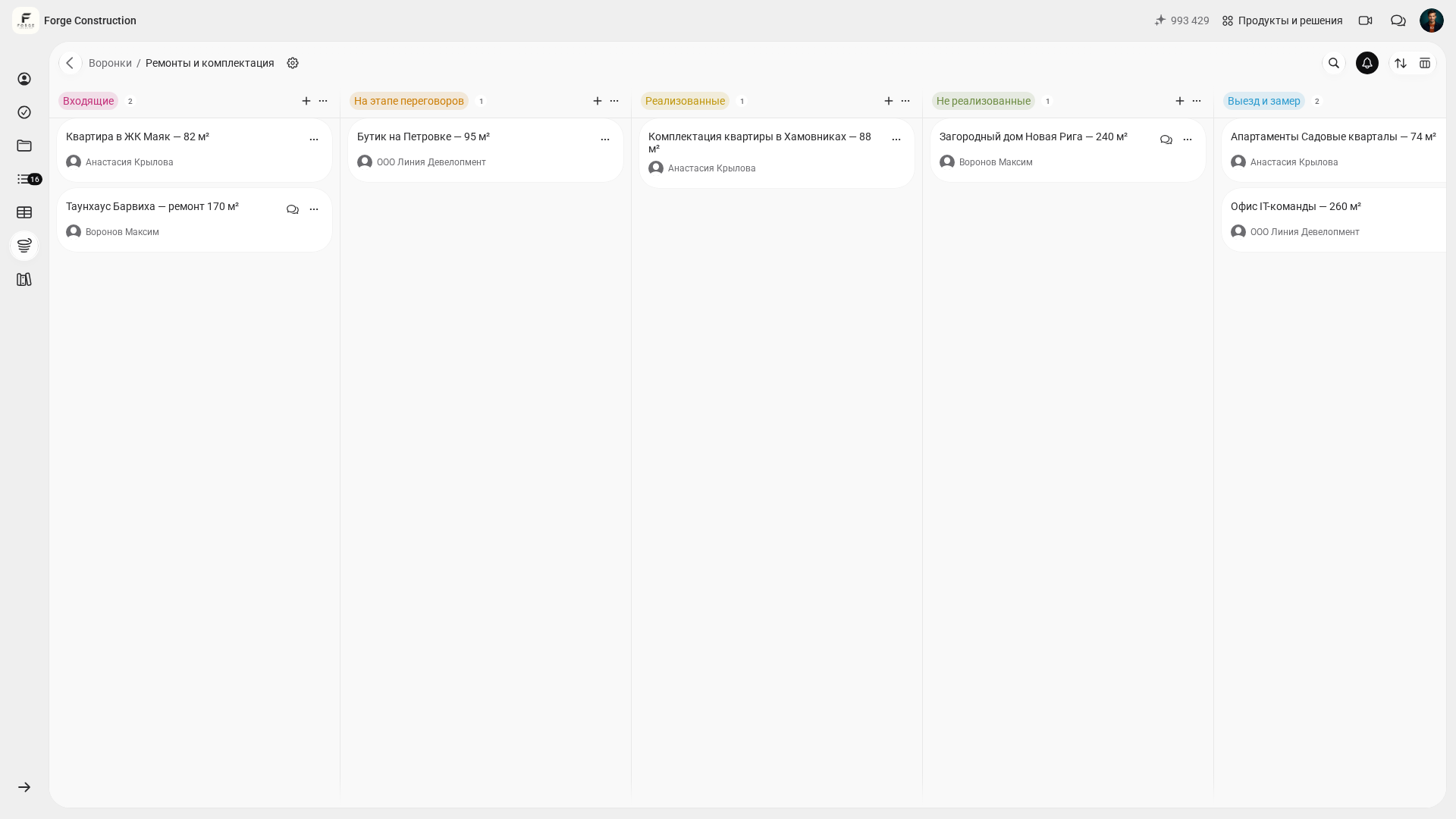
The screenshot of the existing demo funnel “Ремонты и комплектация” (“Renovation and Fit-out”) shows four complete columns: “Входящие” (“Incoming”), “На этапе переговоров” (“In negotiations”), “Реализованные” (“Completed”), and “Не реализованные” (“Not completed”). Part of the “Выезд и замер” (“Site visit and measurement”) column is visible on the right; the full list of seven stages does not fit in this frame. The six stages suggested in the table, along with the labels “Won,” “Lost,” and “Paused,” belong to the team’s method. Agree on how to map that method to the actual funnel.
The new screenshots show the Russian interface and fictional demonstration data.
Hypothetical example: a lead writes, “I need a renovation in a new-build apartment, 42 m².” At the “New enquiry” stage, first get in touch and qualify the lead: establish the timing, address, type of renovation, readiness for a site measurement, and who makes the decision. You can leave the detailed estimate calculation in the chat until later. The lead then moves to “Qualification” according to the rule agreed by the team.
In this hypothetical example, qualification reveals a crucial fact: the client does not yet have the keys, and a site measurement will be possible in two weeks. Under the suggested method, the lead moves to “Assessment and site measurement,” while the team separately records the next action: “Follow up on the agreed date, confirm that the keys are available, and arrange a time.” This creates a manageable queue with a clear work plan.
For a closer look at why leads are lost and how to monitor conversion between stages, this 101 article will help (in Russian).
How can you adapt the stages to your sales cycle (4–5–7 stages)?
Sometimes six stages are too many; sometimes they are not enough. It all depends on where the bottleneck is in your sales process. The funnel should make that bottleneck visible and help you bring discipline to the work.
Short-cycle scenario: you carry out smaller jobs, such as bathrooms, electrical work, or stretch ceilings; estimates are fairly standard, and decisions are made quickly. Your team’s model may only need 4–5 stages: “New enquiry → Qualification → Proposal sent → Contract and advance payment → Closed.”
Long-cycle scenario: a full renovation, design, fit-out, several calls with the family, and a couple of estimate revisions. Here, breaking down the negotiations can help: a separate “Estimate in preparation” stage and a separate “Estimate revisions” stage show where time is being spent within the department.
- Combine stages if the team is confused and leads are stalling.
- Add detail if a queue develops in one area: site measurements, estimates, or contracts.
- Include a separate “Paused” label in your team’s procedure if clients often put decisions on hold for practical reasons. The team decides separately where to record this label.
A useful check: try to name the next action for every stage. If you cannot identify one, the stage is unnecessary or its name is too vague.
How can you put a funnel into practice in the 101 App?
A funnel in the app should support the team’s everyday work. That requires a short set of rules and a consistent update routine.
Hypothetical example: on Monday, you have 18 leads. By Wednesday, it seems that “everyone is in negotiations.” On Friday, you check the funnel against a separately maintained contact plan and discover that half the leads have no next step assigned. This check helps you draw up a list of people to contact, provided the team has agreed on the stages and action deadlines.
Below is a suggested implementation process. Work through the steps with the size of your lead database and your team’s agreements in mind.
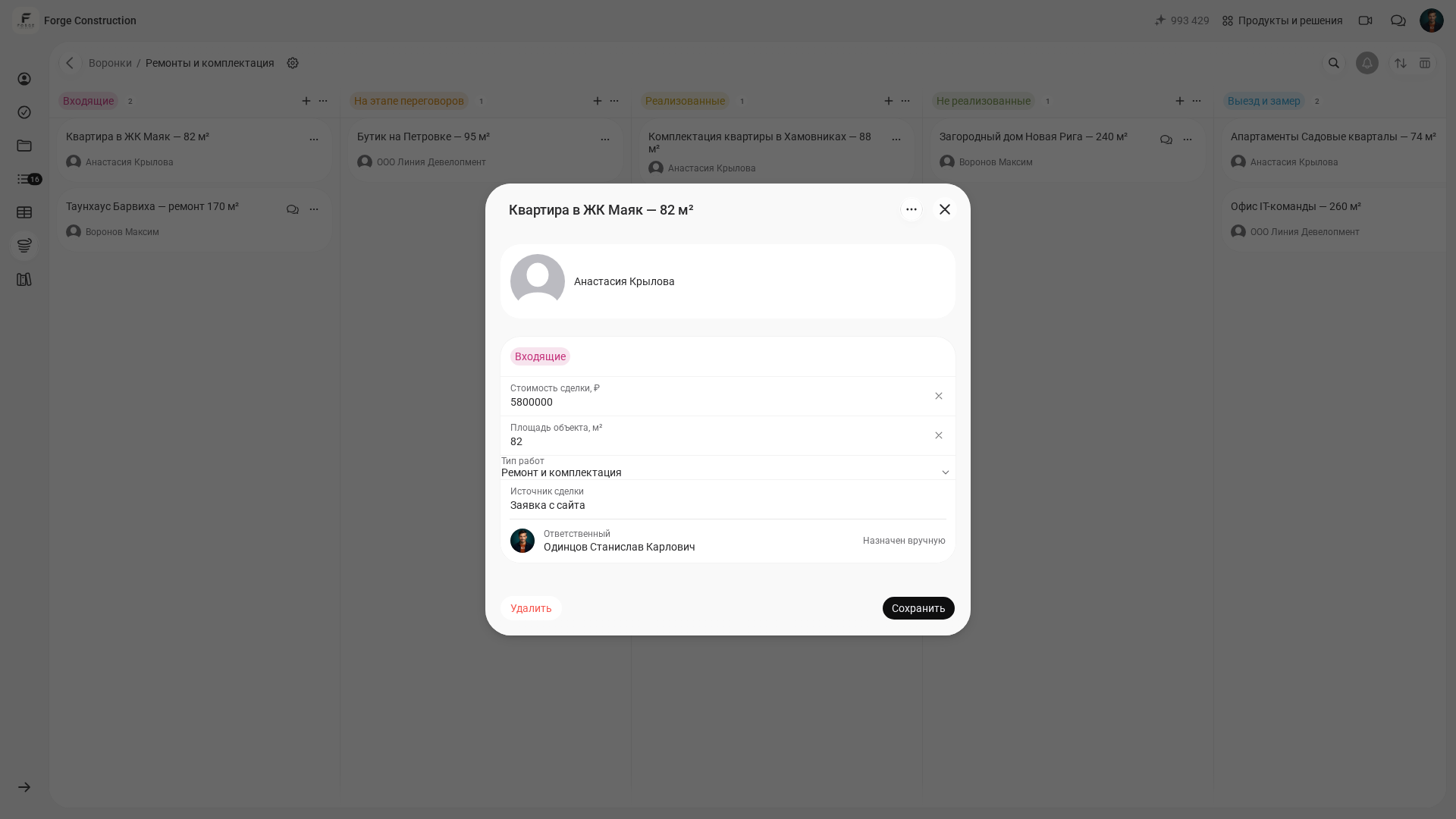
To view an existing deal, open “Воронки” (“Funnels”), select “Ремонты и комплектация” (“Renovation and Fit-out”), and open an existing card. The screenshot of its form shows the contact, stage, deal value, property area, type of work, deal source, and the person responsible with the label “Назначен вручную” (“Assigned manually”). No changes were made or saved during capture. The address, timing, budget, and next contact mentioned in the implementation process below are information the team has chosen to collect using its own template. Keep additional information and contact dates in a separate team register linked to the lead.
- Step 1. Agree on the six stages in this article as a working model and map them to the stages of your funnel. Include two outcomes in your procedure: “Won” and “Lost.” These are suggested names within the method.
- Step 2. Write down the transition criterion for each stage in one sentence in your internal procedure.
- Step 3. Agree on the information your team requires: source, address, type of work, timing, budget range, and the date and method of the next contact. Complete the available card fields in 101; keep the other information and the contact plan in a separate team register linked to the lead.
- Step 4. Agree that every lead must always have a recorded “next action” and a date. Treat a missing date as a reason to check the lead under your team’s internal rule.
- Step 5. Once a day, manually compare leads with the contact plan and find those without a recorded next step. Once a week, calculate and review conversion by stage separately in your team report.
If you need to connect sales with management figures and understand where CRM processes end and accounting begins, read this explanation of how CRM and management accounting connect in 101 (in Russian).
To check the setup and see how a team handles leads in the actual interface, request a demo.
Where should unsuccessful leads go?
For unsuccessful leads, it is useful to record the reason for the outcome separately. Otherwise, very different situations end up in the same list: one client finds the price too high, another goes to a designer, another puts the renovation on hold, and another stops responding. These leads need different approaches. In the funnel shown, the corresponding visible stage is called “Не реализованные” (“Not completed”); “Lost” below is a suggested outcome name in the team’s method.
Hypothetical example: a lead declines after receiving the estimate. Two months later, they return on their own because another contractor missed the deadlines. If the team separately recorded the reason for the rejection and a follow-up date, it still has a plan for working with that lead. This helps organize follow-up without promising a predictable rate of returning clients.
A useful approach for your procedure: agree on one unsuccessful outcome, “Lost,” and record the reasons in a separate team register with a link to the relevant lead. A list of reasons helps you review sales results while keeping the stage system simple.
- The price did not match expectations.
- The schedule was unsuitable.
- There was a lack of trust (contract, guarantees, reviews).
- The renovation was postponed (keys, mortgage, family plans).
- The client chose a competitor.
Set a rule for leads that are put on hold: either schedule the next contact date in the team’s plan, or close the lead as lost under your procedure. Otherwise, “negotiations” becomes a store of hopes that makes your actual workload hard to see.