A management decision in a project-based business can seem straightforward: raise a price, stop offering an unprofitable type of service, give a tradesperson an advance, approve a purchase, or take on another site. The difficulty comes when you have to choose: you need to know which work has been completed, which money has been received, and which obligations still need to be paid.
The 101 App lets you keep project records and collect entries about financial transactions and work. This information helps you check the basis for a decision when the team enters data promptly, attaches supporting evidence, and corrects errors. Missing transactions remain a gap even in a neatly presented report.
We will look at the data you need for management conclusions, how to organize checks, and what review schedule to use. We will also examine four hypothetical situations in a project-based business and the questions to check before subscribing to PRO+.
Contents:
- Why do decisions based on data save money and time?
- What data is available in the 101 App?
- Which management questions can analytics help answer?
- How should you set up the 101 App to make its figures useful for decisions?
- Management review schedule: what to check weekly and monthly
- Typical decisions based on figures: cases from project-based business practice
- Accounting errors that undermine analytics
- When do you need PRO+, and how can you make decisions faster?
Why do decisions based on data save money and time?
Almost every management decision relates to one of three questions: what is the financial result, where is the money, and what is limiting the progress of work? When information is scattered across messages and spreadsheets, you first have to reconcile the facts: which amounts belong to a site, which period they cover, and whether documents support them.
Project accounting helps you examine each site separately. A temporary shortage of money caused by payment timing and a loss on completed work require different checks. In the first case, you need a schedule of expected receipts and payments; in the second, you need to compare revenue with the related costs. A single negative balance cannot establish the causes.
Keep cash receipts, project balance, margin, and net profit separate. An advance received shows a movement of money but does not yet confirm earned revenue. A balance based on recorded transactions depends on which entries it includes. Before comparing margins, define the costs included and the period; net profit requires all company income and expenses attributable to the chosen period, including overhead, applicable taxes, and adjustments.
As the team grows, this agreement becomes more important. Tradespeople, contractors, project managers, and partners need common rules: who enters information, who checks it, and which version of the data forms the basis for a decision. You can then discuss specific discrepancies and assign responsibility for resolving them.
What data is available in the 101 App?
The records are based on project events: receipts from the customer, material purchases, settlements with those carrying out the work, and information about the work itself. Context matters for each entry: the project, date, participants, amount, expense category, and supporting materials. The events entered determine what appears in the overall picture.
Keep receipts and other supporting documents, and check that they are linked to the correct transactions. A receipt alone does not prove that an expense has been assigned to the right project, that work has been completed, or that all costs have been recorded.
The profile displays the accountable balance and own balance separately. To monitor funds issued on account, reconcile recorded advances, expenses, and returns with the documents: who received how much, what has been substantiated, and which balance needs to be returned or cleared. A visible balance alone does not prove documentary clearance or an actual bank payment. Issuing funds and substantiating their use are separate parts of the check; avoid counting the same amount twice when consolidating the data. This provides a basis for discussing limits and further advances.
The screenshots show the owner's own profile in the Forge Construction demo company: the accountable balance and own balance are displayed separately. These are training data from an owner account; they do not represent the company's net profit or a bank balance, or confirm documentary clearance of every advance. The desktop view also shows a feed of drafts; the phone shows a profile summary. The interface is in Russian.
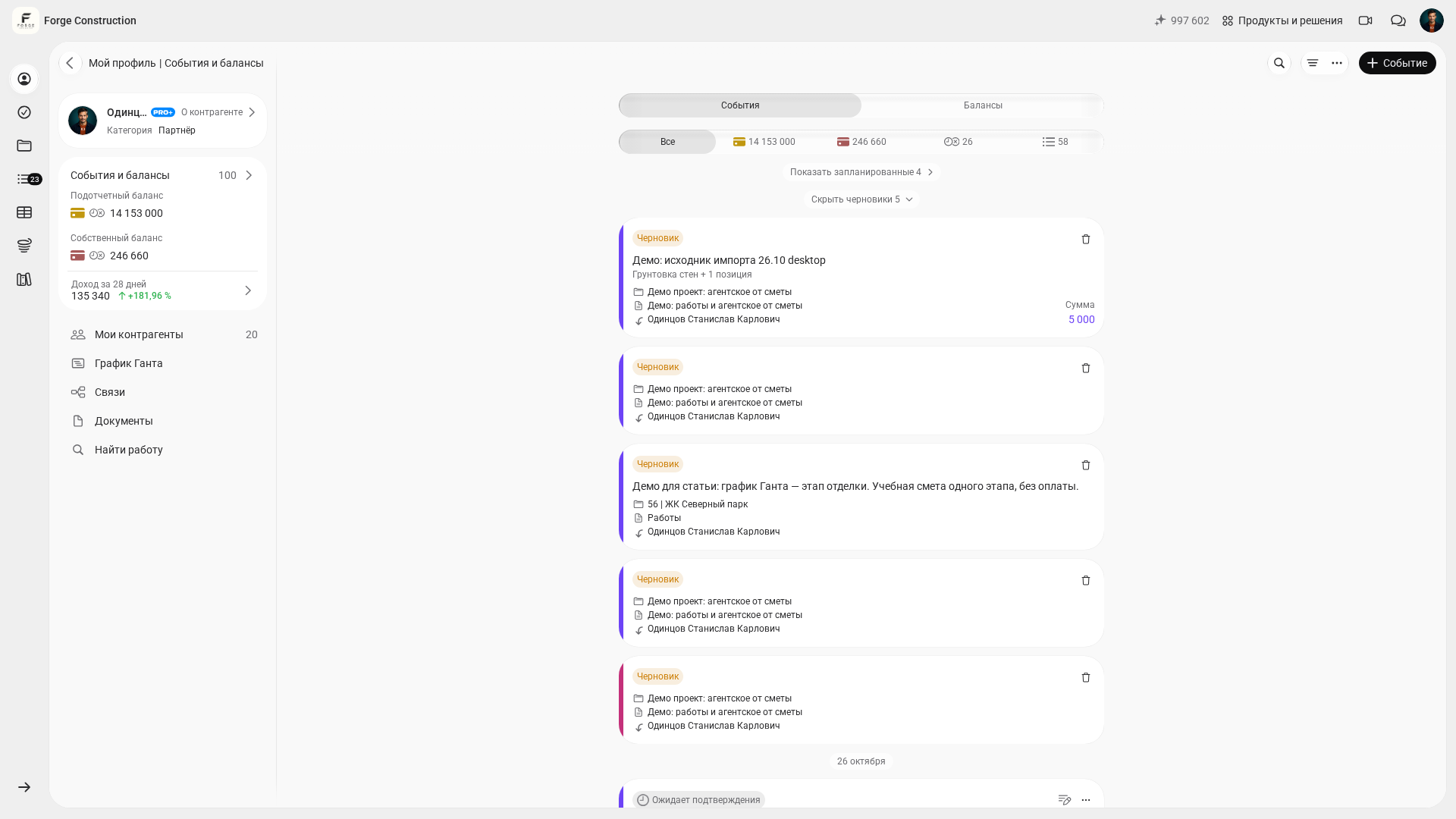
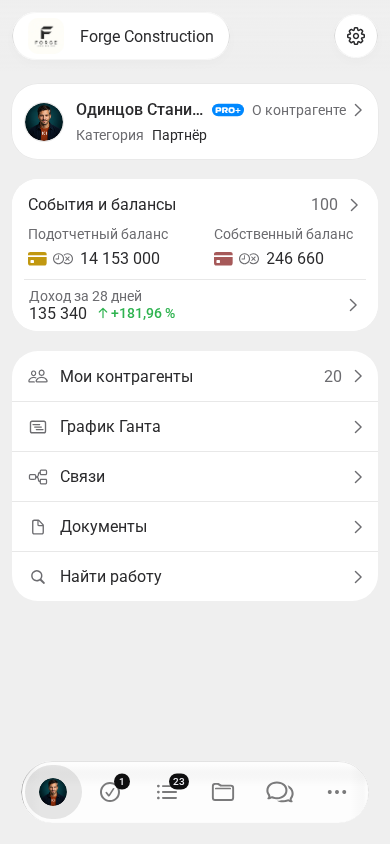
At company level, separate direct project expenses from overhead: the office, advertising, services, and management salaries. When using the Company Fund, check which transactions have been entered and which expenses remain outside the records. The Fund balance does not automatically confirm net profit. A general approach to questions and metrics is explained in Business analytics: how to set up analytics for your business (in Russian).
Which management questions can analytics help answer?
Use the sequence “question → metric → check → action” for your analysis. Start with issues that already require a decision: falling margins, insufficient money for a purchase, unsubstantiated funds issued on account, or a difference between planned and actual costs.
Before comparing figures, make sure you have selected comparable projects and periods and that the metrics have been calculated using the same rules. Then check the underlying events and documents. Aggregate figures help identify an area to investigate; they do not replace establishing the cause of a deviation.
Project accounting data can help you examine the following questions:
- What is the result of each project, and what data is needed for settlements with a partner or for evaluating a manager's work? The article on contribution margin will help clarify what the metric includes.
- For which work and expense categories do actual costs exceed the plan? Reconcile quantities, prices, and agreed changes; the article on tracking expenses (in Russian) can help you organize the entries.
- What money is needed for current obligations, how much has been issued on account, and which advances remain uncleared? Compare this information with the explanation of company working capital.
- On which projects are expected customer payments lagging behind purchases and other payments? Check the payment schedule and opening balance; the article on cash flow gaps in construction provides further guidance.
How should you set up the 101 App to make its figures useful for decisions?
The quality of decisions depends on the quality of the underlying entries. If some expenses have not been entered or projects have been mixed up, an aggregate metric may be calculated without a technical error while still giving an incomplete picture of the business.
Agree on a recordkeeping procedure with your team. You can start with five rules:
- Create projects for active sites and contracts. Assign the corresponding receipts, expenses, and work information to them; when transferring data, reconcile opening balances and outstanding obligations.
- Agree on consistent expense categories for recording and checking costs. Separate the costs of a particular project from company overhead. Define in advance how overhead will be included when evaluating the result, and apply this rule consistently.
- Allocate responsibilities within the team. Decide who collects supporting documents and work information, who reconciles the project, and who checks settlements with partners and Company Fund transactions. Clarify the necessary access permissions for each responsible person separately.
- Establish a rule to record every transaction relevant to the accounts. If a document has not yet been received, retain a record of the obligation and a note that it needs checking, following the agreed procedure. Do not treat the absence of an entry as the absence of an expense.
- Agree on deadlines for entering information: for example, on the transaction date for purchases and funds issued on account, and after signing for work acceptance documents. Assign responsibility for delays and reconcile which data is still missing by the review date.
If you use Excel for your own analysis, retain the snapshot date, the underlying dataset, and the calculation rules. Reconcile information in a separate spreadsheet with transactions and documents; choose a way of transferring it based on the verified capabilities available for your scenario. This approach is discussed in the article on Excel and project accounting (in Russian).
Management review schedule: what to check weekly and monthly
Set a review schedule: a brief weekly check of cash and risks, followed by a more detailed monthly review of results. Align the frequency and data cutoff date with the duration of stages and the payment terms of your projects.
At the weekly meeting, check balances on key projects, expected receipts and payments, overdue reports on funds issued on account, large uncleared advances, and purchases without documents. For each deviation, record the next step, the person responsible, and the deadline. Investigate a negative transaction balance using the payment schedule and obligations.
Compare revenue, margins, and expenses each month using the same methodology. Examine overhead and Company Fund transactions separately, then reconcile their inclusion in the calculation of the company's result. Assess net profit only after considering the completeness of all data attributable to the period.
Once you have comparable information for several periods, you can discuss changing advance payment rules, the price list, and the scope of work. First clarify the reasons for the differences: changes in quantities, prices, the mix of projects, or the timing of income and expense recognition. The article on three reports for business owners: the income statement, cash flow statement, and balance sheet can help structure the review.
Typical decisions based on figures: cases from project-based business practice
The hypothetical situations below illustrate the checking process. They are examples of management analysis and do not describe verified results from specific companies.
Situation 1: a project appears profitable, but there is not enough money for the next stage. Check the data underlying the profit calculation, the amounts the customer still needs to pay, how much has been issued on account, and which payments are already planned. If receipts are found to be lagging behind payments, discuss payment stages, purchasing limits, and advances. Check the contractual terms and the ability to meet obligations; one metric does not establish the cause of a cash shortage.
Situation 2: revenue is growing, but profit is not increasing. Compare project margins and the components of overhead for the same periods. If margins have changed, check prices, estimates, quantities, and the approval of additional work. If overhead has grown, examine its components and its connection to business growth. Several causes may be present at once; verify your conclusion against transactions. The articles on financial accounting for income and expenses and business efficiency analysis (in Russian) can help you prepare.
Situation 3: a dispute has arisen with a partner over the result. Agree on the period, which income and costs to include, the rules for accounting for overhead, and how profit is to be distributed. Then reconcile customer receipts, work documents, expenses, and outstanding obligations. A shared set of verifiable data helps you discuss discrepancies in concrete terms; document agreements on distributing the result separately. Having a report does not rule out disputes or replace agreed terms.
Situation 4: it is unclear which areas of the business to develop. Compare the profitability of comparable projects, working capital needs, resources, and risks. If an area is performing poorly, check the causes and the consequences of changing prices, the scope of work, or order volumes. Take these conditions into account when deciding whether to expand or stop offering that type of service. For construction and renovation projects, the article on construction business profitability can help.
Accounting errors that undermine analytics
Problems in management analysis often start with the underlying entries: transactions have not been entered, expenses have been assigned to another project, or documents have been left in messages. Before making a decision, check the completeness of the data and fill in any gaps you find.
Reasons to postpone a firm conclusion and reconcile the data first include:
- Expenses are entered late, and receipts and other supporting evidence are attached selectively.
- Expense categories are too broad or are used inconsistently, so the components of a cost overrun are unclear.
- Funds issued on account are not reconciled: money has been issued, supporting documents and returns have not been recorded, and individual balances have not been checked.
- Some costs have not been assigned to the correct project or to company overhead, so the result appears higher than it would with complete records.
When do you need PRO+, and how can you make decisions faster?
Consider PRO+ when basic records are maintained regularly and you need to address overhead and company financial performance. Before subscribing, clarify the plan's current features and the access available for your role and scenario. Separately check the Company Fund actions you need, ways of analyzing data, and how the team will work; a feature being available to one account does not establish its availability across all plans and roles.
It is useful to include the Company Fund in your overall reconciliation procedure: which transactions it receives, which expenses have been paid, and which obligations have not yet been recorded. Assessing net profit requires agreed rules and a complete dataset. Subscribing to PRO+ does not, by itself, fix missing entries or confirm that the result is reliable.
A practical selection criterion is the time needed to prepare a review. Measure how long it currently takes to collect and check information, then use your own scenario to assess which actions the app simplifies and which manual work remains. The time saved depends on your processes, the quality of the records, and the features used.
During a demonstration of the 101 App, you can discuss your accounting scenario: the project structure, overhead, the Company Fund, and questions about the data. Prepare a project example and clarify which features and permissions your team will need.