
Searching for a “free CRM” may reflect a practical need: store enquiries and agreements, avoid unnecessary implementation costs and understand future expenses. For a construction company, it is important to check how sales connect with projects, estimates and deadlines, as well as customer records.
A free plan does not necessarily cover every operation you need. Before choosing, check limits on users, deals, analytics and integrations. Terms differ between services and can change; include setup costs in your comparison too.
101 offers free basic tools, including estimates, tasks, a Gantt chart, documents and price lists. Unlimited creation of events in projects and the Company Fund, customer approvals and document sending are included in a paid tier; advanced analytics and event-history exports are in the next tier. Do not automatically assume that the complete CRM feature set is free. Check current terms under “Plans and subscriptions” on the official 101 website and in your profile.
Contents:
What should you check in a free CRM?
A free CRM may limit the number of users and deals, automation, analytics or integrations. These are questions to check for a specific service, rather than a claim that all free systems work the same way.
Your team’s time is another cost. Setting up fields, rules, access permissions and reports may take effort even without a licence fee. Assess who will maintain the data and how much time you can devote to setup.
Use this short checklist to assess a free CRM for your circumstances.
- Can you manage several projects and several enquiry sources without duplication?
- Can you keep the final estimate and documents within the deal so they do not get lost in chats?
- What happens as you grow: how much do additional users, pipeline expansion, reports and integrations cost?
- Can you export your data if you decide to change systems?
- Is there a “deal → project → money” connection that lets you see the profit result, rather than conversion alone?
For another comparison of approaches to estimates and project management, see “Smetter vs 101” (article in Russian). Check its description of plans against current terms: a comparison article does not replace the current pricing terms.
The CRM essentials in the 101 App
Start with three tasks: a contact database, deal stages and document storage. In 101, counterparties participate in projects; a project record can show the customer, manager, participants and financial events. This arrangement may help you recover the working context if the team updates the data regularly.
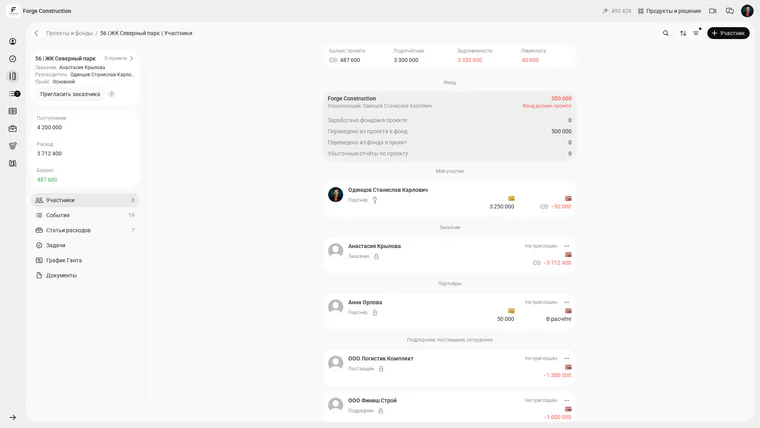
Participants in a demo project: the customer and partner. Balances are examples of recorded accounting data, rather than confirmation of bank transactions. The screenshot shows the Russian interface.
For an overview of the features, see “The 101 Business Platform”. Distinguish between feature availability, plan terms and the quality of data entry: a section’s existence alone does not mean a working process is already in place.
Agree on a consistent format for the name, status, site and enquiry source of phone contacts. Read more in “How to Save Contacts in Your Phone”. The app’s counterparty list distinguishes customers, suppliers and contractors; it does not replace checking whether the contact details themselves are current.
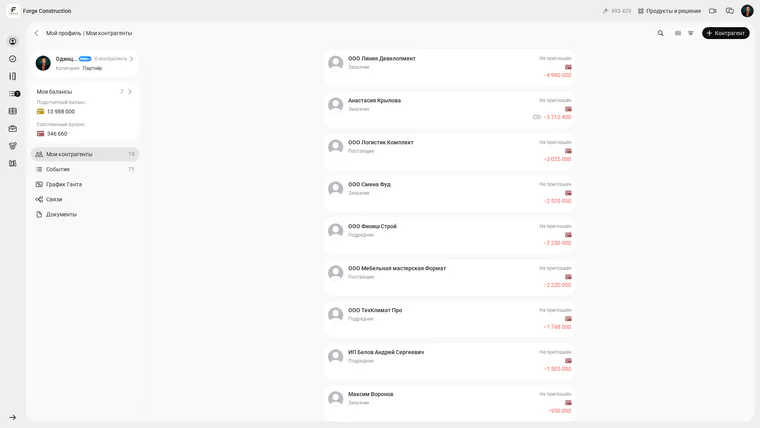
The counterparty list of the fictional company Forge Construction. Categories distinguish customers, contractors and suppliers. The screenshot shows the Russian interface.
The pipeline shows the stage a deal has reached. Agree on the next action and the person responsible within your team. The approach to stages in construction is discussed in “The Sales Funnel”. An existing 101 deal record shows fields for stage, source, contact and responsible person; do not fill them in as a formality without an agreed meaning.
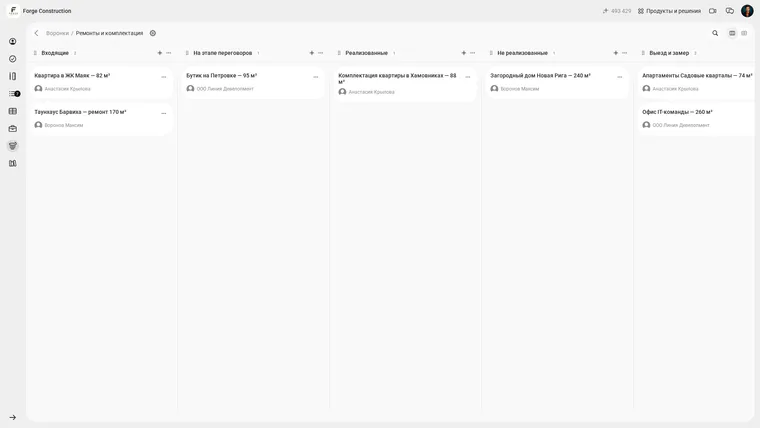
Stages and existing deals in the demo pipeline. The screenshot shows some columns, rather than the complete path of every deal. The screenshot shows the Russian interface.
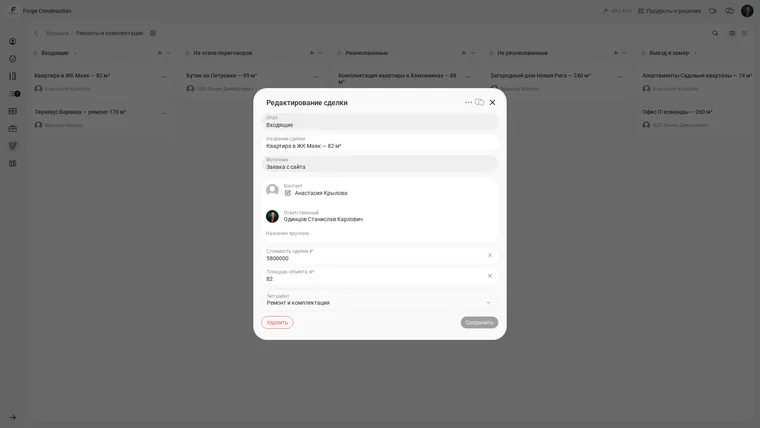
Fields in an existing demo deal: stage, source, contact and responsible person. No changes were made; the screenshot does not show a new deal being saved. The screenshot shows the Russian interface.
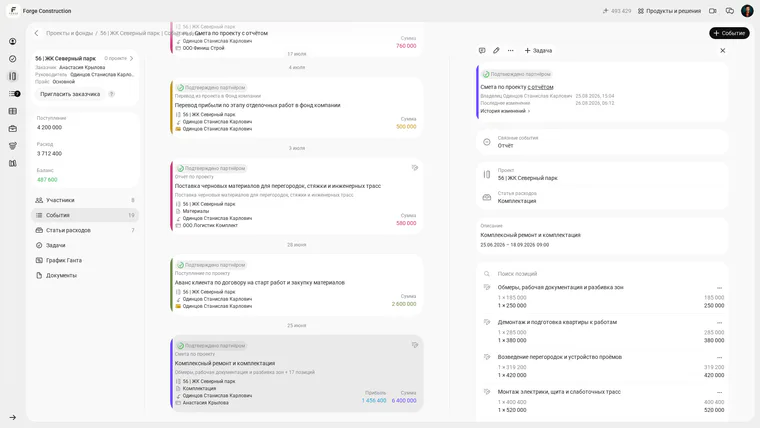
An existing demo-project estimate with line items and a linked report. This is an example of a saved result, rather than proof of a free plan or a PDF being sent. The screenshot shows the Russian interface.
Why use a Gantt chart alongside sales?
A Gantt chart is useful for discussing stages and deadlines with a customer. A clear plan may make it easier to align expectations, but does not itself guarantee a sale or that promises will be kept. Check whether deadlines are realistic with the people doing the work.
In the web version of 101, the chart is linked to project estimates and reports: the estimate sets the plan and the report records actual work. Price-list items help you use consistent work names in calculations and records. Read more in “The Gantt Chart in the 101 App”.
The estimate-based planning workflow is described in “The Automatic Work Schedule in the 101 App” (article in Russian). The timeline excerpt below shows estimates and reports. It is an example of planned versus actual work, rather than a complete schedule of all work.
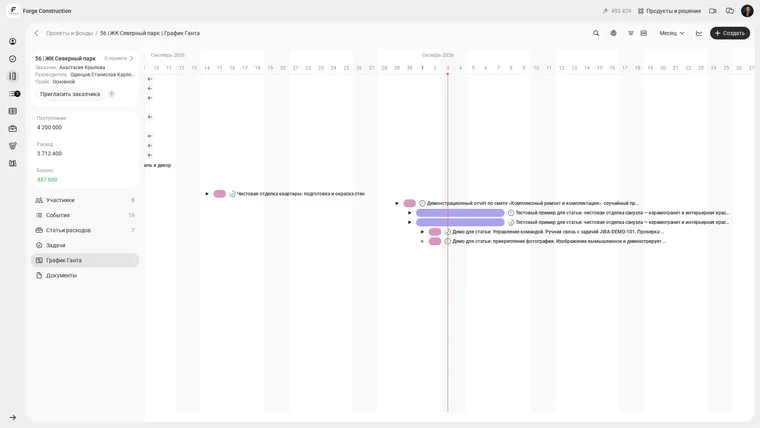
A timeline excerpt for the demo project showing estimates and reports. The screenshot does not show the full plan, assignments to workers or a payment calendar. The screenshot shows the Russian interface.
To monitor cash shortfalls, compare work dates with a separately prepared purchasing and payment plan. A work date is not a payment date: contract terms, advances and deferred payments must be considered separately. Do not treat the Gantt chart as an automatically generated payment calendar.
An example one-week CRM review plan
For initial implementation, it is sensible to limit the scope: agree on the data, then check connections between contacts, deals and the project, and only then move on to deadlines and finances. This sequence is a suggested organisational approach, rather than a guarantee of results.
Below is an example one-week review plan for a renovation crew or a small construction company. Extend it if necessary: the amount of source data and participants’ permissions affect the time required. The screenshots show existing demo records; this article does not demonstrate creating new records, exporting PDFs or assigning workers.
- Step 1. Agree on who is responsible for the data and checks that events are recorded promptly.
- Step 2. Check work names, units and stages in your price list. Record which items need standardising.
- Step 3. Compare scope and cost in one estimate. Free estimating is discussed in “Create an Estimate for Free in the 101 App!” (article in Russian). Check the format for sending the document to the customer and the available operations against your own plan.
- Step 4. Check who is listed as the customer and project manager, and which counterparties are involved. Agree on any missing connections.
- Step 5. Agree on a rule: actual expenses, completed work, transfers and incoming funds are recorded promptly with supporting material. An app entry does not replace bank confirmation of a payment.
- Step 6. Compare the estimate and reports on the timeline. Discuss deadlines and responsibility with your team; the excerpt shown does not confirm assignments to workers.
- Step 7. Schedule a regular review of deal stages and project finances. Examine approval and payment delays separately, without replacing profit with the number of closed deals.
If you need help choosing a process, consider a 101 demonstration. It can help you clarify available operations, plan terms and how deals connect to the project and documents.
The distinction between CRM and management accounting is discussed further in “CRM or Accounting First?” (article in Russian) and “Financial Management Accounting or a CRM System?” (article in Russian).